
Guardrail Configuration
Guardrail Sub-node
Guardrails are implemented within Agent Studio as a pre-execution safety and compliance control mechanism. They function as an evaluation layer that analyzes user inputs against predefined safety policies before the Agent processes the request.
The Guardrail layer ensures that only policy-compliant, safe, and authorized queries proceed to the Agent workflow. Non-compliant inputs are programmatically blocked, and appropriate feedback is returned to the user.
- Prevent the processing of harmful, malicious, or off-policy user queries.
- Enforce organizational safety, compliance, and governance standards.
- Protect system integrity and brand reputation.
- Optimize operational costs by avoiding unnecessary LLM executions.
- Maintain visibility into user intent and policy violations
- To configure the Guardrail settings, access agent studio by opening the
following URL:https://tenant-url/admin#/genai/flow
Figure 1. Guardrail Configuration 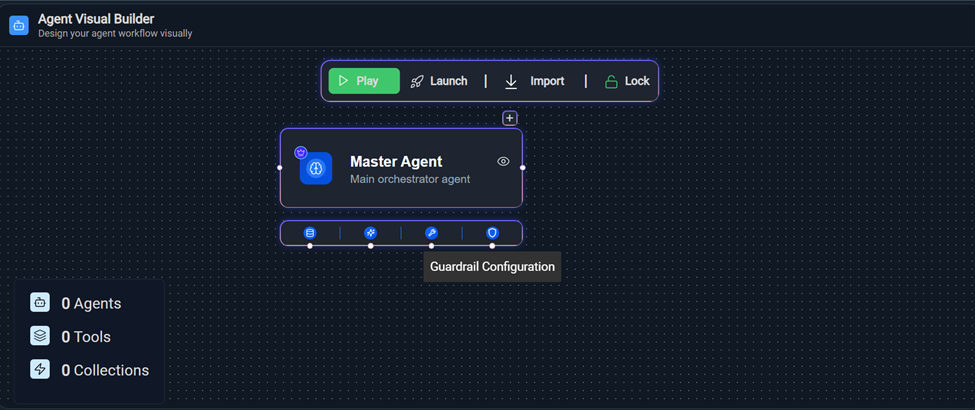
- On the Agent Visual Builder page, select Guardrail Configuration node.
- Enter the fields as per requirement and select Save
Configurations.
Figure 2. Guardrail Configurationl 
- To configure the Guardrail settings, access agent studio by opening the
following URL:https://tenant-url/admin#/genai/flow
Configuration Components
- Model Selection
Field: Model
Specifies the AI model used to evaluate guardrail prompts.
Example: gpt-4o
The selected model acts as a classification engine to determine whether a query should be allowed or blocked.
Purpose:
- Executes guardrail prompt logic
- Performs safety classification
- Generates structured validation output
- Max Tokens
Controls the maximum number of tokens the guardrail model can generate in its response.
Range: 0 – 4000
Purpose:
- Limits response length
- Controls cost
- Prevents unnecessary verbose output
- Context Window
Defines how much conversation history is considered during evaluation.
Range: 5 – 50
Purpose:
- Enables contextual evaluation of user input
- Improves detection accuracy for multi-turn conversations
- Temperature
Controls randomness of the model output.
Range: 0.00 – 1.00
- Lower values → More deterministic
- Higher values → More creative
- Top P
Controls nucleus sampling (probability-based token filtering).
Range: 0.00 – 1.00
Purpose: Restricts output to high-probability tokens for stable classification.
Best Practice: Keep Top P moderate to low for predictable results.- Frequency Penalty
Reduces repetition in generated responses.
Range: 0.00 – 1.00
For guardrails, this typically has minimal impact since responses are short.
- Presence Penalty
Encourages topic diversity in output.
Range: 0.00 – 1.00
For classification use cases, this should remain low to avoid inconsistent decisions.
- Frequency Penalty
- Prompt Configuration
The Prompts section allows administrators to define specific guardrail logic.
Example:
Sensitive Data & Confidential Information Filter
The configured prompt acts as a safety classifier that:
- Detects attempts to access confidential data
- Identifies policy violations
- Flags restricted queries
- Returns structured ALLOW/BLOCK decisions
Multiple prompts can be configured to enforce layered validation, such as:
- Safety and harmful content filter
- Confidential data protection filter
- Compliance validation filter
The System Guardrail Library provides pre-designed prompts to handle common risks such as:
- Prompt injection attacks
- Unauthorized instruction overrides
- Sensitive data handling
For example:
- It ensures the model treats user input strictly as data, not as executable instructions
- Prevents malicious attempts to override system behavior
Figure 3. System Guardrail Library  Clicking on + System Guardrail Library in prompt section open the Guardrail Library drawer on the right.
Figure 4. System Guardrail Library Drawer 
- Each guardrail rule is displayed with a checkbox
- Select one or multiple rules as needed
- Selected rules are highlighted
- ✔ Checked → Rule selected
- ☐ Unchecked → Rule not selected
- Multiple selections are supported
- Search and Filter
- Use the ‘Search by title’ bar
- Enter keywords to filter available rules
- The list updates dynamically based on input
- Apply Selected Rules
- Click Apply Changes
- The system will:
- Collect the fullText of selected rules
- Append them to the System Prompt field
- Click Save Configurations to apply changes.
Figure 5. Save Configurations 
- Operational Flow
- User submits input by clicking on Save Configurations.
- Guardrail model evaluates input using configured prompt.
- If decision = ALLOW → Agent execution continues.
-
If decision = BLOCK →
- Agent execution is cancelled.
- Safety message is returned.