
Agent Versioning
Overview
Agent version management allows users to create, manage, and track different versions of an agent configuration in Agentic Studio. This feature helps maintain version history, compare changes, and roll back to previous configurations when required.
- To access the agent version, log in to the Agent Studio Console using the following URL:
- Select the required Agent and Click Configure to open the Agent
Configuration Page.
Figure 1. Agent Dashboard 
- After selecting Configure, the following page will be displayed. On the
Agent Configuration page, the Version History and Save
Version options are available at the top-right corner.
Figure 2. Agent Configuration Page 
Save Version
-
Select save version and enter the following details:
- Version Name
- Description
- Click Save.
Figure 3. Save Version 
- A new version of the agent configuration has been created and stored in Version History.
- Duplicate Version Name:If the user enters an existing version name, the system will display a validation message indicating that the version name already exists.
Figure 4. 
- Blank Version Name
If the version name field is left blank, the system will display an error message prompting the user to enter a valid name.
Version History

Version History Dashboard

- Version Name
- Description
- Creation Date
- Version Actions
Versions Tab
The Versions Tab lists all the available versions created for the agent.
- View version details
- Preview a version
- Rollback to a previous version
- Compare versions
Version Details

Preview Version


Rollback Version


Upon confirming the action by clicking Rollback again, the agent configuration reverts to the selected version.
Compare Versions
The Compare feature allows users to compare differences between two versions.


Changelog
The Changelog tab records modifications made to the agent configuration.
- Displays configuration updates
- Shows change history
- Provides timestamps for modifications
Figure 14. Changelog 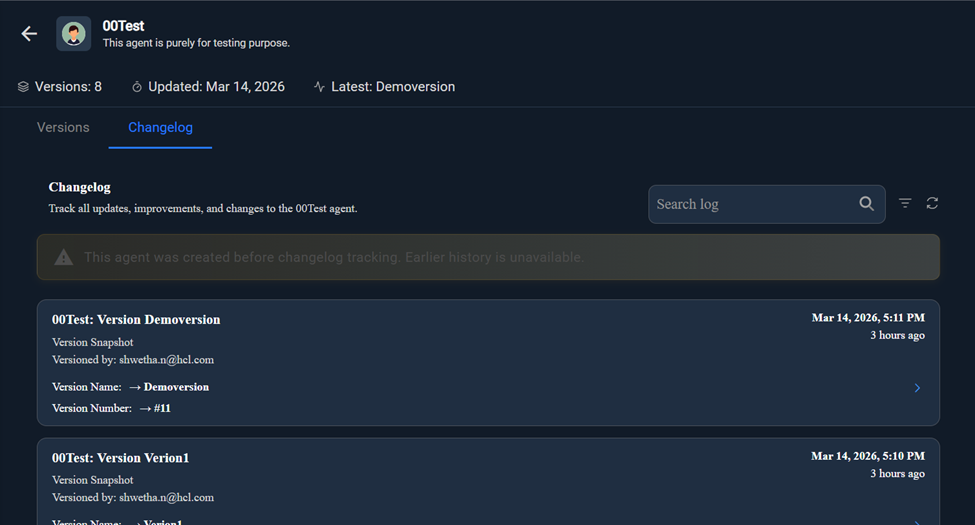
Changelog Tools
| Option | Description |
| Search | Allows users to search for specific changes |
| Filter |
Filters change history based on criteria |
| Refresh | Reloads the changelog data |
Changelog Information Message
For agents created before changelog tracking was implemented, the system displays the following message:
"This agent was created before changelog tracking. Earlier history is unavailable."
This indicates that historical data prior to the implementation of changelog tracking cannot be retrieved.