
Placing future orders
You can place a future order for both out-of-stock and in-stock items from your store.
Procedure
- Open the store landing page.
-
Select the product category from your store. All the products in the selected
category are listed on the landing page.
You can click on the Select a store to view the inventory at different locations.
Once you click on the Select a store the following pickup drawer appears: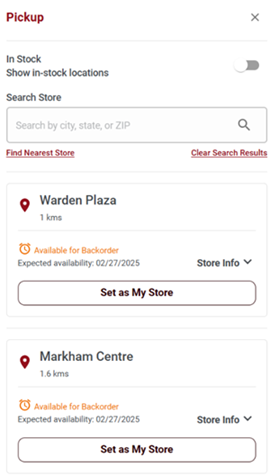
-
Click on the product image to view its product display page.
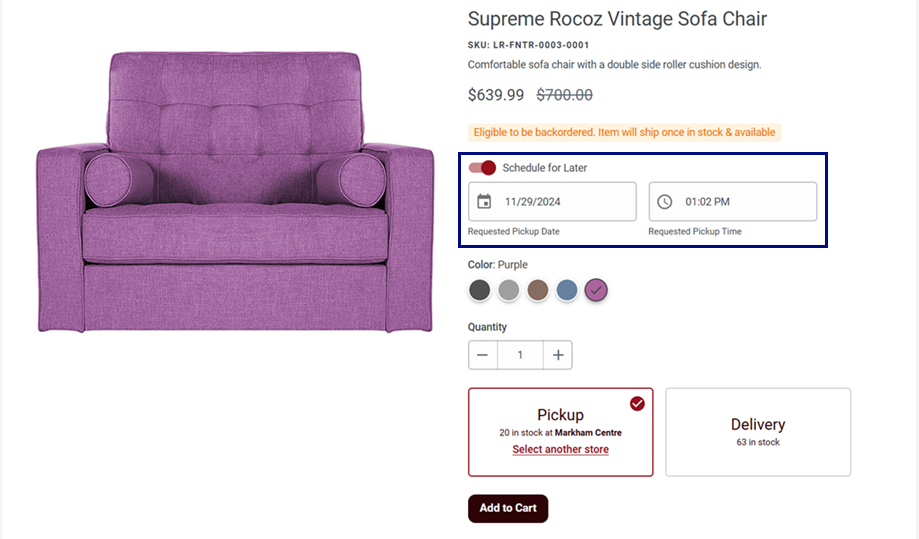
- Specify the quantity of the product.
-
Select the Schedule for Later toggle button to enable
future orders for Pickup and
Delivery.
- Future order for Pickup: Once the Schedule for Later option is selected, you can choose a future date and time.
- Future order for Delivery: Once the Schedule for Later option is selected, you can choose a future date only.
- Enter the future date and time for the Pickup order.
-
Click on the buttons.
The Shopping Cart page opens. You can place future orders for both out-of-stock and in-stock items from the Shopping Cart page as well.
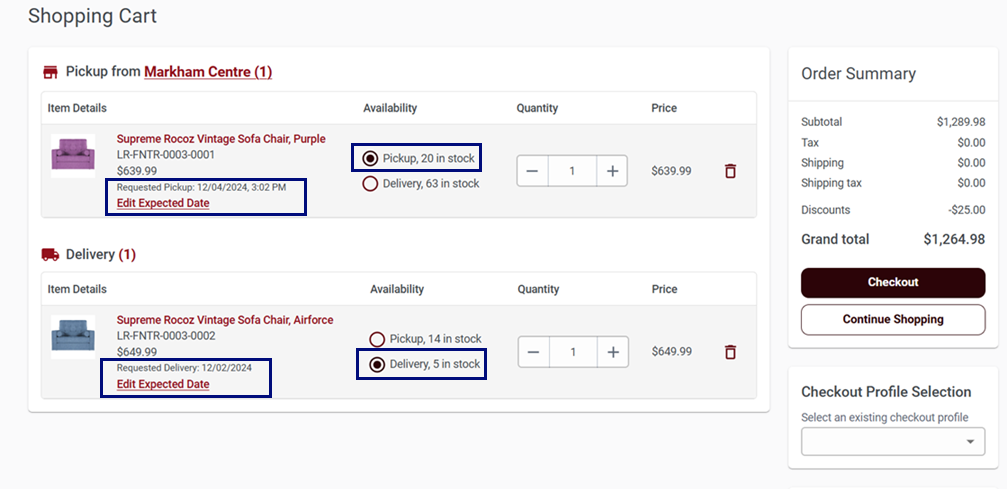
For pickup, you can see Requested Pickup along with the date and time.
For delivery, you can see Requested Delivery along with the date.
- Follow the checkout process and review the details to complete your order.