Workspace Management tool
The Workspace Management tool is a graphical user interface
tool that is used to manage workspaces and workspace-related activities. It provides a
single view across all workspaces and all tasks in the workspaces where managers can see
how work is progressing.
In the Select Workspace popup, the user can choose to work on approved content or work on an active task. User can filter active tasks by workspace.
The following screen capture provides a quick look at the Workspace Management tool. This list view shows all of the tasks that the user is authorized to work with:
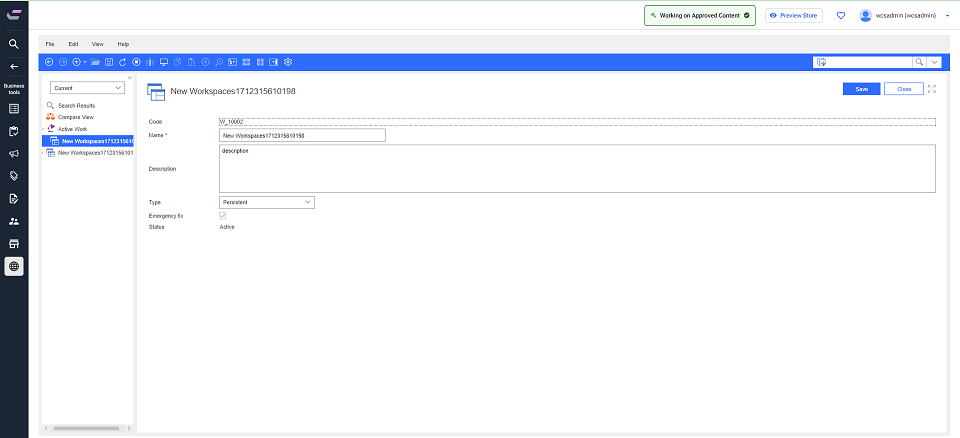
Note: If the user selects a task to work on, the workspace
and task being worked on are reflected in the user interface header.
What you can do with the Workspace Management tool
Here is a summary of tasks you can do with the Workspace Management tool:
| Tasks | Details | For more information |
|---|---|---|
| Work on approved content | You can work on approved content if you have changes or additions that must be made quickly without the need for approvals. | Working on approved content |
| Manage workspaces | You can create workspaces with the specific purpose of serving as templates for new workspaces. In doing so, you can reuse its task groups and tasks for other workspaces. | Managing workspaces |
| Manage task groups | You can create task groups within a workspace so that contributors can do work in Commerce Lab under the task group. | Managing task groups |
| Manage tasks | You can create tasks within a task group so that contributors can do work in Commerce Lab under the task. Try to combine the work that is assigned to a contributor into one task where possible. | Managing tasks |