Use this action in a web activity to display
one or more catalog entries that are recommended in an e-Marketing
Spot by .
This action can display both flat file and dynamic recommendations.
Example 1
Here is an example of a web activity
that uses the Display action
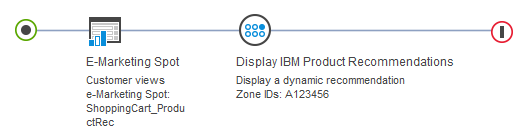
to display a dynamic recommendation. In this example, a site zone
with the ID A123456 is set up using the software.
The purpose of the site zone is to display a list of products that
other customers also viewed when the customer is viewing the current
product:
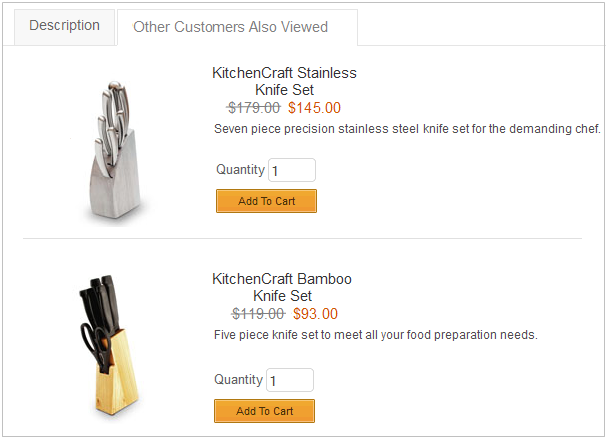
When this web activity is activated, the product details
page displays the catalog entries that are recommended by site zone
ID A123456.
Figure 1. on
the product details page
Example 2
Here is an example of a web activity
that uses the Display action
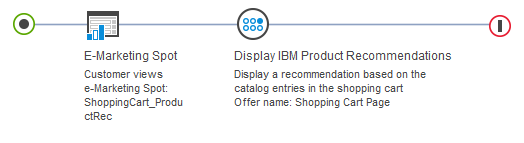
to display a flat file recommendation. For flat file recommendations,
you must specify an offer that is created in the software:
When this
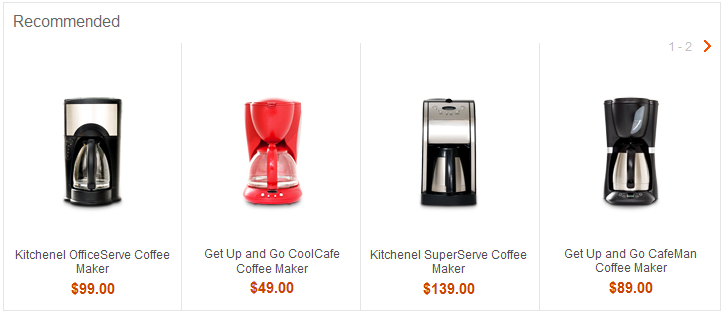
web activity is activated, the shopping cart page displays the catalog
entry recommendations that are provided in the Shopping Cart Page
offer flat file that is imported from :
Figure 2. on
the shopping cart page
Tip: You can use this action to display
different recommendations to different sets of customers by using
a Branch element to split a single path in
the activity into multiple paths. You can also use this action with
the Experiment element to perform A/B or multivariate
testing on the activity.
Requirements for e-Marketing Spots that display recommendations
from
The
e-Marketing Spot requirements for flat file recommendations are different
from the requirements for dynamic recommendations:
For flat file recommendations, you can use any basic e-Marketing
Spot that displays catalog entries on store pages. In Commerce+ Transaction Server starter
stores, basic e-Marketing Spots use snippets that are named ContentAreaESpot.jsp, ESpotNavDisplay.jsp,
and ScrollingProductESpot.jsp.
For dynamic recommendations, you must use a specialized e-Marketing
Spot that has an added function to include a refresh area.
Guidelines for using this action
When you set
up the Display action
in a web activity, you can specify the following options:
Option
Description
Recommendation delivery
For dynamic recommendations, choose Site Zone.
For flat file recommendations, choose Flat File.
Zone IDs
For dynamic recommendations, enter one or more
zone IDs defined in the software. If
you specify multiple zone IDs, the e-Marketing Spot displays a separate
section for the recommendations for each zone. ensures
that the same catalog entry is not recommended in more than one zone
on the page.
Ensure that your store developer has configured
the e-Marketing Spot to match the corresponding zone function:
If the zone displays recommendations for a specific catalog entry,
the e-Marketing Spot must be passed the part number ID of the current
catalog entry.
If the zone has a fallback in the recommendation plan to display
category top sellers, the e-Marketing Spot must be passed the parent
category ID of the catalog entry.
If the zone displays recommendations for the most recently viewed
product, the product display page must contain an analytics tag to
identify viewed products.
If the zone displays recommendations for the most recently purchased
product, the order summary page must contain an analytics tag to identify
purchased products.
If the zone displays recommendations for category top sellers,
the e-Marketing Spot must be passed the current category ID.
If the zone displays recommendations for site top sellers, the
e-Marketing Spot must be passed _TS_ as the category
ID.
Offer name
For flat file recommendations, type the offer
name that is defined in the software.
The maximum length of the offer name is 32 characters. The offer name
must match the name that is defined in exactly,
including case.
Action
For flat file recommendations, specify what
you want to base the display of recommendations from on.
Options are:
Display a recommendation based on the catalog entries of the current
page
The server determines which catalog entry the customer is viewing.
Then, the server finds any merchandising associations corresponding
to the specified flat file offer and displays those catalog entries.
Use
this option only on the product details page.
Display a recommendation based on the catalog entries in the customer's
shopping cart
The server checks the catalog entries the customer has in the
shopping cart. Then, the server finds any merchandising associations
corresponding to the specified flat file offer and displays those
catalog entries.
Display a recommendation based on the catalog entries in the customer's
purchase history
The server checks the customer's purchase history for previously
purchased catalog entries. Then, the server finds any merchandising
associations corresponding to the specified flat file offer and displays
those catalog entries. You can also specify a time frame for the purchase
history, for example, within the last 7 days.
Display a recommendation based on specific catalog entries
The server checks that catalog entries are specified in the Display action.
Then, the server finds any merchandising associations corresponding
to the specified flat file offer and displays those catalog entries.
Tip: For flat file recommendations, consider specifying
default catalog entries to display in the e-Marketing Spot. If does
not return any recommendations to the e-Marketing Spot, customers
see the default catalog entries instead of an empty e-Marketing Spot.
Specifying default catalog entries is useful for flat file recommendations
when there are no fallback recommendations that are provided for catalog
entries that do not pass the view floor threshold in .
To specify default catalog entries, open the properties view for the
e-Marketing Spot and add the catalog entries to the Default
content table.
Limitations for dynamic recommendations
If a Display action
that displays dynamic recommendations is used in an experiment:
If a customer views a recommended catalog entry, statistics are
not gathered for the revenue that is associated with purchasing that
catalog entry.
If a customer clicks a recommended catalog entry, statistics are
gathered for the revenue that is associated with purchasing that catalog
entry.
If the Display action
is displaying dynamic recommendations, the web activity cannot be
used in a remote widget.
If you view an e-Marketing
Spot displaying dynamic recommendations in store preview, the red
dashed box surrounds only the e-Marketing Spot name. The box does
not surround the catalog entries that are displayed in the e-Marketing
Spot.