
Deploying fix packs to a standby BOS
Use the VIOS Advanced Deployment Wizard to deploy fix packs updates to an existing standby BOS.
Before you begin
- Prior to a fix packs update, install the expect package for (VIOS 3.1.3.0 or higher). You can obtain the package from the VIOS toolbox download site: Deploying Fix Packs.
- Ensure that you have sufficient amount of disk space on the
/varpartition to accommodate large files. Use the available tasks to set any size or space limitations. For more information, see Fix pack download configuration. - Complete one of the following tasks:
- If you want to deploy patches through the internet download option, register the AIX Download Plug-in. For more information, see Registering the AIX download plug-in for PowerVM VIOS.
- If you want to deploy patches from an accessible Network File System (NFS) mount, enable the NFS service and configure the NFS shares. For more information, see Network File System support.
About this task
The individual multibos operation to deploy the fix packs updates removes all the interim fixes on the standby BOS before deploying the updates. It runs a preview of the deployment before deploying the updates to the endpoints. It also verifies the OS version on the standby BOS after the updates are deployed.
Procedure
- From the BigFix console, click .
- Under the Multibos Tasks tab, click Multibos Individual Task Operations to expand the options pane.
-
Select Deploy Fix Packs to the standby
BOS.
Figure 1. Deploying Fix Packs to the standby BOS 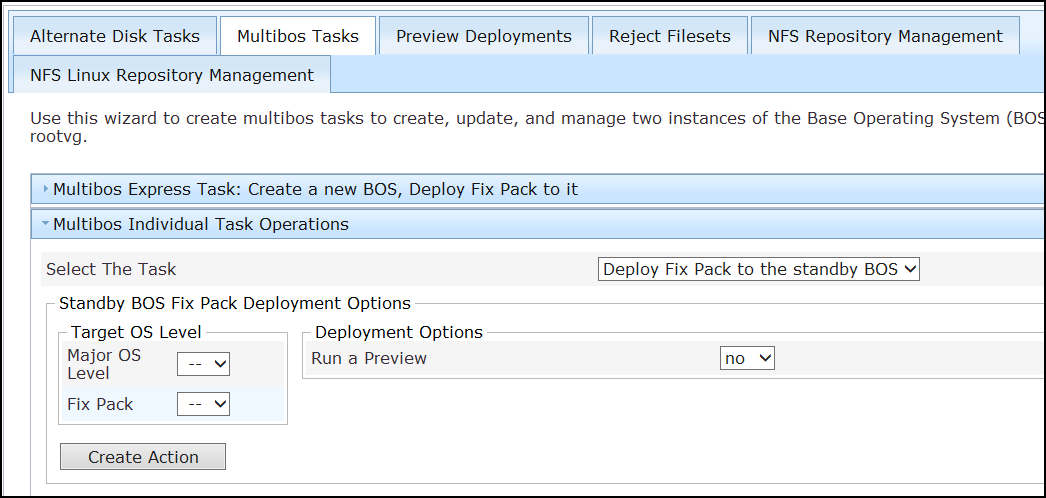
- Select the major version and fix pack of the operating system level that you want to deploy to the standby BOS.
- Verify that the preview option is at the preferred setting.
- Click Create Action.
- Deploy the action.