
Creating a new BOS
Use the VIOS Advanced Deployment Wizard to create a standby Base Operating System (BOS) from the active BOS that is on the same volume group (rootvg).
Before you begin
You must run the Deploy VIOS StartUp/Shutdown script for multibos reboot
task (ID # 92). By running this task, the scripts (KZCopyMultibosBESDATA and
SZCopyMultibosBESDATA), which are responsible for copying the BESClient data
to the standby BOS, are created in the /etc/rc.d/rc2.d folder. These
scripts are crucial for multibos patching.
About this task
The individual multibos operation to create a new BOS runs a preview of the creation before it creates the BOS.
The
multibos create command that is used in this operation, by default,
changes the boot list by adding the standby BOS to the beginning.
The BOS filesystems (/, /var, /opt,
and /home directories), associated log devices, and
the boot logical volume are copied to the new standby BOS.
Procedure
- From the BigFix console, click .
- Under the Multibos Tasks tab, click Multibos Individual Task Operations to expand the individual task selection options pane.
- Select Create a New BOS.
Figure 1. Creating a standby BOS 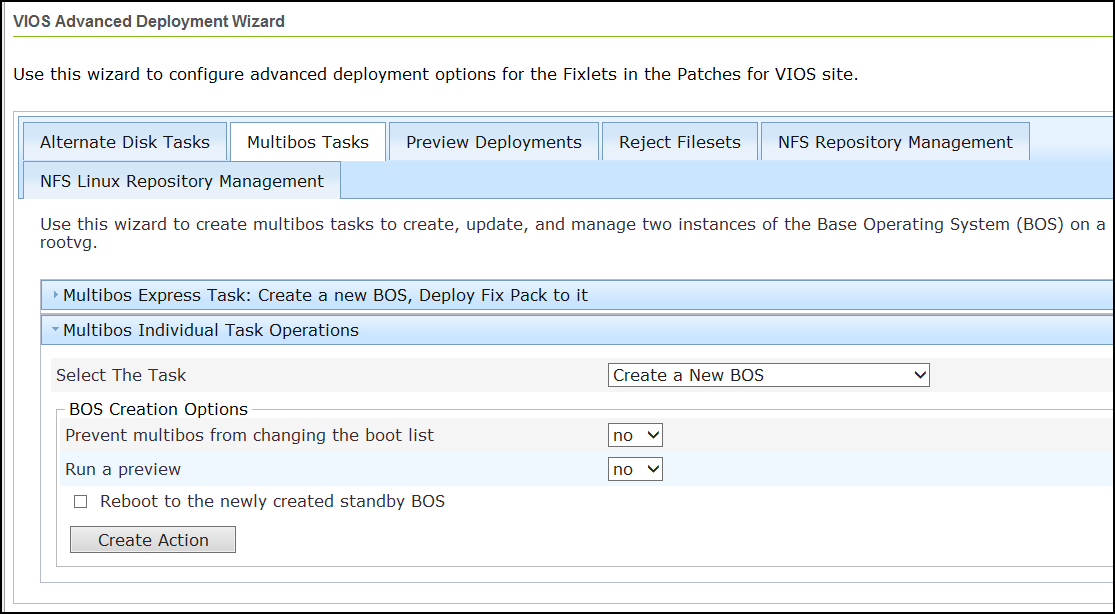
- Specify whether you want to change the boot list with the new standby BOS.
- Verify that the preview option is at the preferred setting.
- Verify that the reboot option is at the preferred setting.
- Click Create Action.
- Deploy the action.