
Using the VIOS download cacher for PowerVM VIOS
You can use the AIX download cacher for PowerVM VIOS to deploy Fix Packs fixes. The download cacher uses HTTP to download specific fix packs. Ensure that HTTP network traffic is not blocked in your environment.
The AIX download cacher tool is a Python executable that automatically downloads and caches PowerVM VIOS Fix Packs on the Windows BigFix server to facilitate deployment of PowerVM VIOS Fixlets.
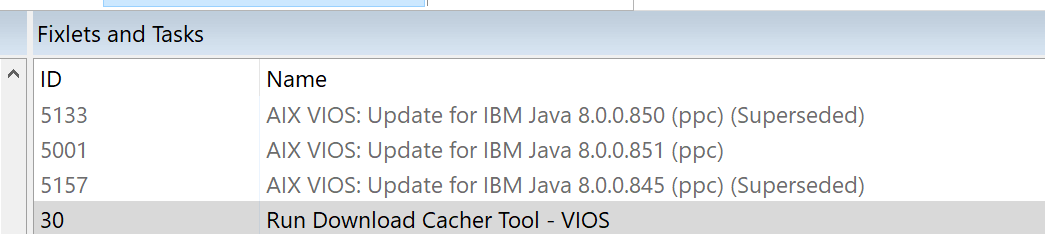
- Click .Note: The Windows BigFix server and relays must be subscribed to the Patches for VIOS site for the task to be relevant.
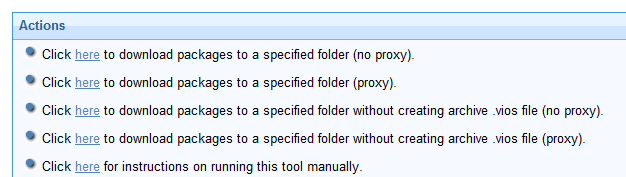
- Select the appropriate link in the Actions box to start the download.
- download packages to a specified folder without creating archive .VIOS file (no proxy)
- download packages to a specified folder without creating archive .VIOS file (proxy)
Running the download cacher tool manually
The Run Download Cacher Tool - VIOS task might require you to enter your proxy server user name and password. If you deploy the action, any action parameter you enter will be accessible in plain text on all client endpoints. Do not deploy the actions unless this behavior is acceptable in your environment. If this presents a security issue, run the Download Cacher tool manually.
- Download the BFArchive tool from the BigFix software website at IBM
Support.
This tool uses HTTP to download specified fix packs, ensure such behavior is acceptable in your environment.
- Download the AIX Download Cacher Package Tool for PowerVM VIOS from
the BigFix software website at IBM
Support, and store it in the same directory as the BFArchive tool.
This package consists of the Python executable, JRE, and the Electronic Customer Care (ECC) client.
- Use the BFArchive Tool to extract the download cacher package tool. Use the following
command:
For example:<name of the BFArchive tool executable file> -x <source archive> <target directory>BFArchive-win-x86-9.3.1.0.exe -x AIXDownloadCacher.bfarchive c:/AIXDownloadCacher - To run the AIX Download Cacher tool for PowerVM VIOS, you can
create a batch file with the listed parameters. If you run the tool without specifying
any parameters, you are prompted to enter the parameters at the command line. A sample
.batfile:AIXDownloadCacher.exe --dir "C:\SavedFiles" --logdir "C:\logs" --repo "C:\MyAIXRepo" --proxyserver http://proxy.server.com:8080 --proxyuser myuser --proxypass secretpass --fixid VIOS_FP_4.1.0.30Usage:AIXDownloadCacher.exe --dir <directory> --fixid <Fix Pack ID> [optional parameters]
- --dir <path to output directory>
- Directory where downloaded files will be saved. This directory is also used for temporary storage of downloaded files before being compressed into a single archived file.
- --fixid <Fix Pack ID>
- PowerVM VIOS Fix Pack ID or Interim Fix APAR ID to be downloaded. For example, PowerVM
VIOS_FP_4.1.0.30 or IZ93611. Note: You must specify the operating system level, Fix Packs, and build number in the Fix Pack ID.
- --CountryCode <COUNTRY CODE>
- The Country code selection is based on the location of your IBM system.
- --MachineSerialNumber <MACHINE SERIAL NUMBER >
- The Serial Number is a 7 digit ID labeled "S/N" on the exterior of your IBM system. Dash ("-") characters may be omitted.
- --MachineType <MACHINE TYPE>
- The Type Number is a 4-digit number (usually followed by a 3-character Model identifier) printed on the exterior of your IBM system. It may be the first part of an ID labeled "Model" or "System Model" ID.
- --proxyserver <servername:port>
- Name and port of proxy server (for example,
http://myproxy.company.com:8080). - --proxyuser <username>
- Proxy username if required by server.
- --proxypass <password>
- Proxy password if required by server.
- --logdir <path to log directory>
- Specify the directory to write the log file to. Defaults to the current working directory.
- --repo <path to local repository of .bff files>
- Specify the location of the local cache to check before attempting to download files from the Internet. Missing files are added to the cache directory if write access is enabled.
- --no-archive
- Skip creation of
PowerVM VIOSarchive file. The output directory will contain the individual filesets. - --clean
- Remove temporary files after each run. Enabling this option disables the ability to resume failed and incomplete downloads. Default behavior is to remove temporary files only after all files for the fileset have been downloaded and a complete archive has been created.
- --sha1
- Renames the archived
PowerVM VIOSfile to its SHA1 value. - --version
- Display version information.
- --help
- Displays usage information.
Examples:
 AIXDownloadCacher --dir "C:\temp" --fixid VIOS_FP_4.1.0.30
 --proxyserver http://proxy.server.com:8080 --proxyuser myuser
--proxypass secretpass --repo "D:\AIXCache".PowerVM VIOS archive file to its SHA1
value. AIXDownloadCacher --dir "C:\temp" --fixid VIOS_FP_4.1.0.30.PowerVM
VIOS archive
file. AIXDownloadCacher --dir "C:\temp" --fixid VIOS_FP_4.1.0.30- If you run the tool without specifying any parameters, you are prompted to enter the parameters at the command line.
- The
--sha1parameter works only with created archive files and is ignored if it used with the--no-archiveparameter.