
Managing applications on ChromeOS devices
ChromeOS Application Management enables administrators to remotely configure, deploy, manage, and enforce applications—including Web Apps and Chrome Extensions across managed ChromeOS devices and Organizational Units (OUs) using the BigFix Web UI.
Key Capabilities:
-
WebUI Support & Verification: End-to-end verification and WebUI support for creating, updating, and managing Chrome App Deployment policies for Web Apps and Extensions.
-
Variable Substitution: Supports dynamic user variable substitution in ChromeOS policy payloads to resolve user-specific variables automatically.
-
Policy Group Validations: Enforces validations to prevent selecting multiple app deployment policies of the same type within a single ChromeOS Policy Group.
Supported Application Types
The following application types are supported for deployment through ChromeOS App Deployment policies:
- Web Apps
- Configure and deploy web applications by specifying launch URLs and display behaviors.
- Extensions
- Force-install, allow, or block Chrome Extensions and Web Store apps with custom configuration settings.
App Deployment Workflow:
- Add Application to Catalog: Add the Web App or Extension in the MCM Web UI App Catalog specifying the required app name and URL.
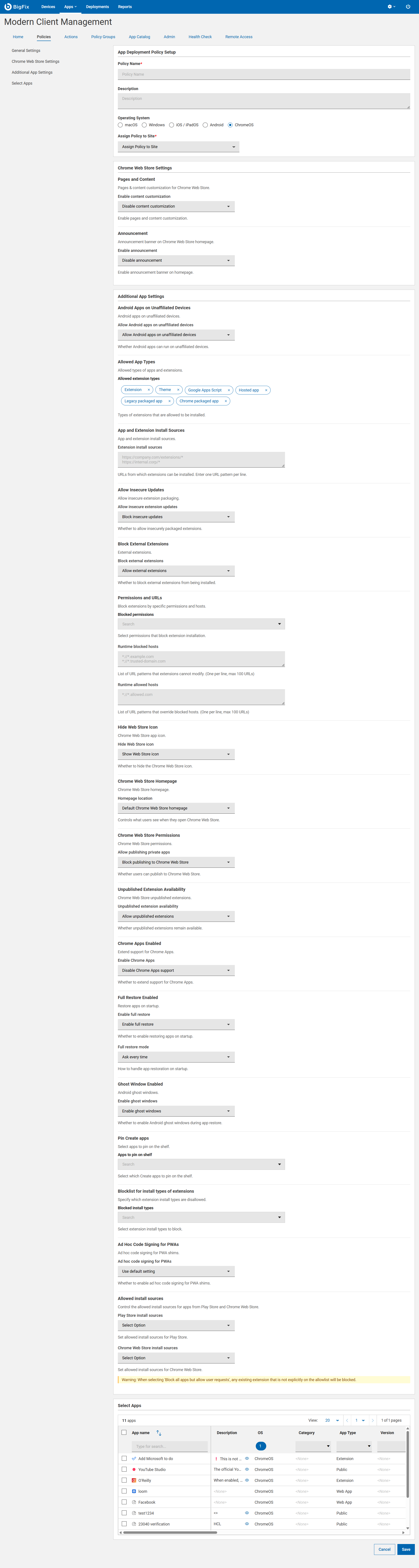
- Create App Policy: From BigFix WebUI , create and configure the
ChromeOS App Management policy by
selecting target applications from the App Catalog.
-
Assign to Policy Group & Deploy: Associate the configured policy with a ChromeOS Policy Group and target the appropriate Organizational Unit (OU) for deployment.
Important Rules & Guidelines
- Policy Group Restrictions: Each ChromeOS Policy Group can have only one App Deployment policy per application type (e.g., one Web App policy and one Extension policy). Selecting multiple policies of the same type within the same Policy Group is not permitted.
- URL Formatting: Ensure all application and extension URLs are properly configured. Incorrect URLs may result in deployment or payload parsing failures.