Using the Get Oracle Database Measurements fixlet
Use this fixlet to collect information about database editions and features for measuring the assets installed in your infrastructure. The task executes Oracle usage reporting script and uploads results to BigFix server.
Oracle Database Measurements by default processes data for Oracle Databases and Software Classification reports. It has a checkbox that the user has to mark when using the fixlet to collect for constructing Oracle Auditing Package. The default behavior is intended to be used in scheduled frequent runs while the optional one shall be used sparingly, to conserve resources.
Deployment procedure
To deploy the Get Oracle Measurements Data fixlet, perform the following steps:
- Log in to the BigFix console.
- Go to .
- Select the Get Oracle Database Measurements fixlet.
Get Oracle Database Measurements task
 Get Oracle Database Measurements in its default behavior of
collecting editions and features can be executed on Unix (Linux, AIX, and Solaris)
endpoints only.
Get Oracle Database Measurements in its default behavior of
collecting editions and features can be executed on Unix (Linux, AIX, and Solaris)
endpoints only.
 Get Oracle Database Measurements can be executed on Windows
endpoints.
Get Oracle Database Measurements can be executed on Windows
endpoints.
Get Oracle Database Measurements can be also used to collect Oracle Auditing Package. This option, enabled when Oracle Audit Preparation checkbox is selected, can be executed on both Windows and Unix endpoints. For instruction on how to prepare Oracle Auditing Package, see Collecting the data.
ps -ef | grep ‘ora_pmon_’Ensure that this user has the Oracle SYSDBA privilege.
The following examples show the available usage of Oracle features :
- Potential use of Tuning Pack or Real Application Testing might be reported based on the data from SQL Tuning Sets. If they are contained in the results, the Tuning Pack or Real Application Testing license is required.
- Potential use of Diagnostic Pack might be reported based on
control_management_pack_access data if the value of
control_management_pack_access is
DIAGNOSTICorDIAGNOSTIC+TUNING.
- To retrieve information about features of the used Oracle databases, log in to the BigFix console, and go to . Then, click Get Oracle Database Measurements.
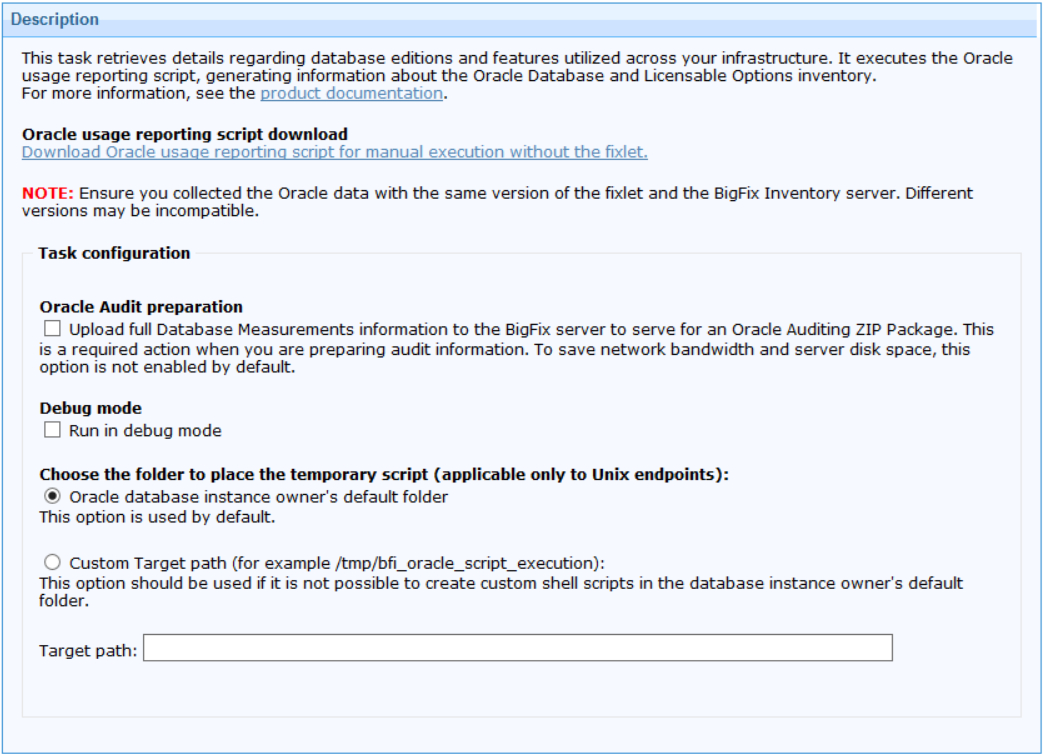
- Optional: To enable creation of the auditing report, enable Oracle Audit preparation. This enables upload of a large portion of the gathered data for further processing at the server side. As it may impact network and server performance, it's advised to enable it only when full audit report is required..
- Optional: To enable debug logging, select Debug
mode.The information is logged in the script_trace.txt file. By default, the file is in the following location.
 /var/opt/BESClient/LMT/ORACLE/auditing/database
 C:\Program Files (x86)\BigFix Enterprise\BES
Client\LMT\ORACLE\auditing\database
C:\Program Files (x86)\BigFix Enterprise\BES
Client\LMT\ORACLE\auditing\database
- Optional: On Unix endpoints, you can change the folder in which the temporary script used by the fixlet is created. By default, it is Oracle instance owner's default folder. In case there is a security policy in place which forbids keeping executable scripts in this folder, you can select a subfolder of /tmp folder.
- To run the task, click Take Action. On the Target tab, select computers from which you want to retrieve the information, and click OK.
- Ensure that software identification tags scan and upload of its results are scheduled. For more information, see: Initiating software scans and Uploading software scan results.
- To make the data available in BigFix Inventory, wait for the scheduled import of data or run it manually.
Results: Information about the used features is available on the Oracle Databases report. It is also included on the Software Installations report.
Additionally, raw output of the script is sent to the to BigFix server. It can be found in the following directory: <BigFix Enterprise>\BES Server\UploadManagerData\BufferDir\sha1\<last_2digits_of_computer_ID>\<computer_ID>\oracleresults_0_<computer_ID>(.zip/.tar.gz).
 Starting from
BigFix Inventory version 11.0.2.0, the Get Oracle Measurements Data fixlet has a
feature on AIX, Solaris, and Linux operating systems to prevent using up all disk
space in a file system that contains the
/var/opt/BESClient/LMT/ORACLE/auditing/database/ folder.
The feature is applicable for file system that contains the temporary folder used by
the fixlet, usually /tmp. The fixlet terminates with exit code
3 if there is less than 100 MB of free disk space on each of these file systems
either before or during fixlet execution. If there is not enough disk space, the
fixlet deletes all data collected from Oracle databases stored in these two
directories.
Starting from
BigFix Inventory version 11.0.2.0, the Get Oracle Measurements Data fixlet has a
feature on AIX, Solaris, and Linux operating systems to prevent using up all disk
space in a file system that contains the
/var/opt/BESClient/LMT/ORACLE/auditing/database/ folder.
The feature is applicable for file system that contains the temporary folder used by
the fixlet, usually /tmp. The fixlet terminates with exit code
3 if there is less than 100 MB of free disk space on each of these file systems
either before or during fixlet execution. If there is not enough disk space, the
fixlet deletes all data collected from Oracle databases stored in these two
directories.
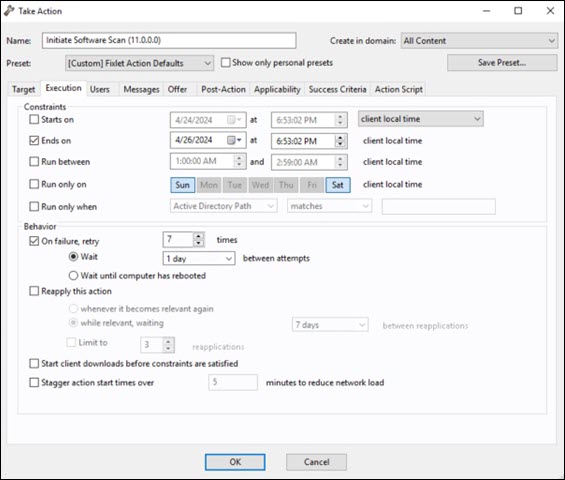
Initiate software scan
After executing the Oracle Database Auditing Data fixlet, run the Initiate Software Scan fixlet. The Initiate Software Scan fixlet can be run only once. Wait a few hours until all the background processes are completed, then run the Data Import in BigFix Inventory.