
 HCL BigFix SaaS
Management Platform Integration
HCL BigFix SaaS
Management Platform Integration
BigFix Inventory can be integrated with HCL BigFix SaaS Management Platform. HCL BigFix SaaS Management Platform enables you to discover, manage, and optimize license spend on Software as a Service (SaaS) used in your organization. For more information on the HCL BigFix SaaS Management Platform, refer to https://www.hcl-software.com/bigfix/offerings/saas-management.
Integration overview
Once logged in to BigFix Inventory, you can seamlessly switch to HCL BigFix SaaS Management Platform using the Single Sign-On (SSO) feature.
 In
BigFix Inventory version 11.0.8.0, the 'Saas Management,' option has been moved to
the left panel.
In
BigFix Inventory version 11.0.8.0, the 'Saas Management,' option has been moved to
the left panel.

The integration is not configured by default. When you click on the button, the following message is displayed.
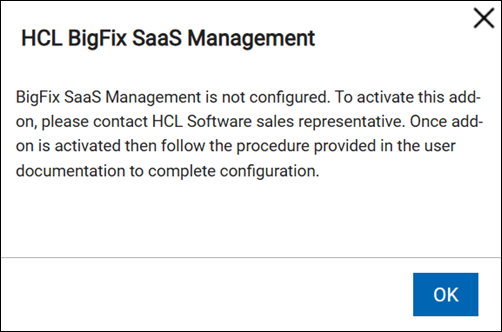
When the integration is configured, clicking on the icon opens a new tab in the web browser. In this tab, the HCL BigFix SaaS Management Platform is displayed. You can log in to it using the Single Sign-On with the same user that you used to log in to BigFix Inventory.
Steps for setting up BigFix SaaS integration on Microsoft Entra ID Single-Sign-On example
To set up the BigFix SaaS Integration, perform the following steps:
- Contact your HCL Salesperson to obtain details on the process to set up authentication for the HCL BigFix SaaS Management Platform with your Microsoft Entra ID tenant.
- In the Microsoft Entra ID tenant from the previous step, create a configuration allowing to log in to your BigFix Inventory server through SAML Single Sign-On (SSO), and enable Single-Sign On in your BigFix Server. For more information, refer to Configuring and enabling single sign-on (SSO).
- From the Microsoft Entra ID tenant used in the previous step, get the user access URL for the HCL BigFix SaaS Management Platform configured on the tenant. For more information on how to obtain a user access URL in Microsoft Entra ID, refer to https://learn.microsoft.com/en-us/entra/identity/enterprise-apps/end-user-experiences.
- Change the value of saas_management_navbar_url in the Advanced Server Setting to the user access URL obtained in the previous step.
- When you log in to HCL BigFix SaaS Management Platform for the first time, a user is provisioned there with default access and configuration. You may change the defaults in the HCL BigFix SaaS Management Platform.