
 Health Check
The Health Check dashboard in BigFix Inventory provides overall statistics about software and hardware scan and more granular information about each endpoint’s scan status to help with troubleshooting.
 Required permission:
View Endpoints and View Hardware Inventory
Required permission:
View Endpoints and View Hardware Inventory
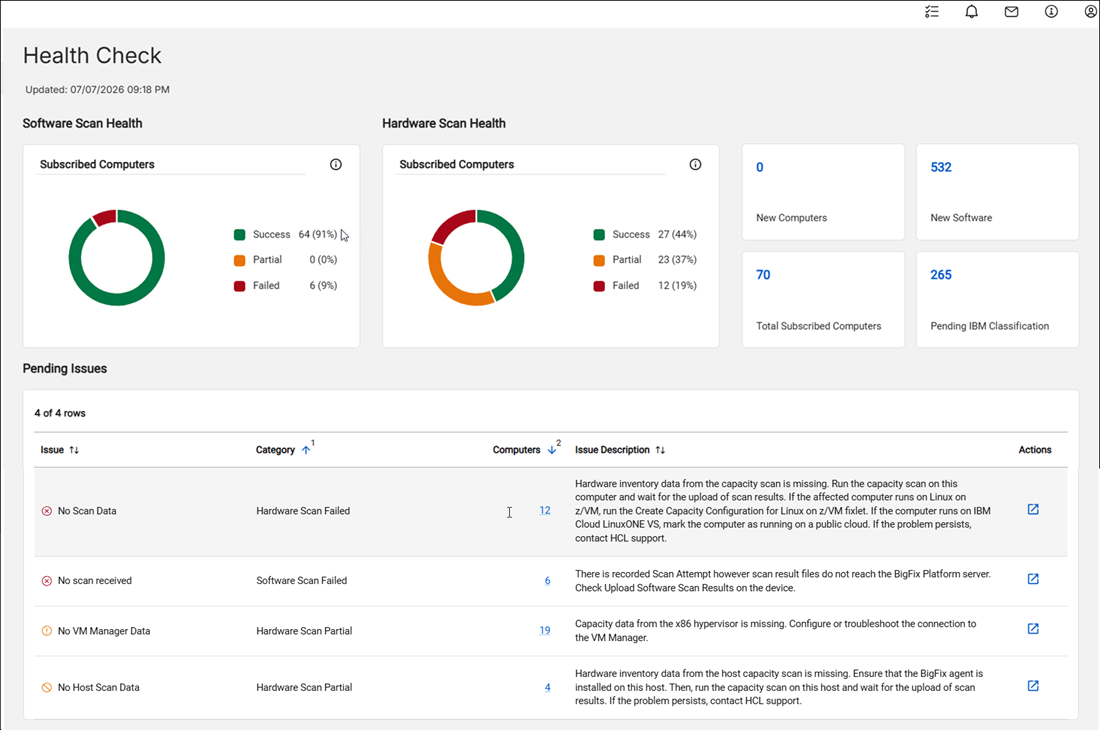
Health Check dashboard widgets
- Hardware/Software Scan Health widget
-
The number of subscribed computers by software/hardware scan status.
- 'Success' means that there is no significant problems with the scan.
- 'Partial' means that there are medium problem resulting in partial or obsolete scan data.
- 'Failed' means that there are major problems resulting in lack of scan data.
Drill down to Computers panel using the Is Subscribed filter set to 'Yes' and hardware/software scan status from the given category.
For the complete list of hardware scan statuses, refer to Computer statuses.
For the complete list of software scan statuses, refer to Software Scan Status.Note:-
Versions prior to 11.0.9: Hardware Scan Health excludes macOS endpoints because hardware scan status was not applicable.
-
Version 11.0.9 and later: Hardware discovery is available on macOS 12 and later, and Hardware Scan Health now includes macOS endpoints.
 New Computers
-
The number of computers discovered since the last successful import by continuous discovery processing. To view these computers, drill down to the Computers panel and filter for computers whose First Seen date is later than the last successful import date. Refer to 11.0.3 Continuous Discovery Processing.
- New Software
-
The number of software instances discovered since the last successful import by continuous discovery processing. To view these software, drill down to Software Classification panel and filter for present, non-suppressed software instances whose discovery start date is later than the last successful import date. Refer to 11.0.3 Continuous Discovery Processing.
- Pending issues
-
The list of issues related to partial or failed software and hardware scans, grouped by specific statuses. Each row includes more details and troubleshooting hints for a given status, and the number of impacted computers. The data is initially sorted to prioritize issues in failed category and with higher computer count. Drill down to Computers panel to see the list of affected computers.
- Total Subscribed Computers
-
The number of computers subscribed to the BigFix Inventory site. To view these computers, drill down to Computers panel using the Is Subscribed filter set to 'Yes'.
- Pending IBM Classification
-
The number of not confirmed IBM software instances which were reported during the last 90 days. To view these classifications, drill down to Software Classification panel using the not suppressed software instances filter with component publisher equal to ‘IBM’, having discovery end date within last 90 days or still present, and Confirmed not equal to 'Yes'.