AI Management
BigFix Inventory includes a ready-to-use dashboard that delivers a single view of AI solutions across your fleet, local AI model files and MCP servers - with inventory, usage, spend, and compliance against FedRAMP, ISO 42001, and the EU AI Act.
BigFix Inventory discovers and governs the AI footprint on your computers, including the surfaces that network-based discovery tools miss: locally-hosted LLM weight files, local AI software and Model Context Protocol connections configured in agentic AI clients.
 Required permission:
View Raw Data, View Endpoints, View License Metrics, View Contracts, Manage Catalogs
Required permission:
View Raw Data, View Endpoints, View License Metrics, View Contracts, Manage Catalogs
You can perform the following actions using the dashboard:
- Classify discovered AI products against your organization's policy and the EU AI Act risk tiers (Unacceptable, High, Limited, Minimal).
- Manage AI-related risk directly from the dashboard. Products carrying compliance obligations are flagged when those obligations haven't been activated in your program.
- Track spend and enterprise plan coverage to identify uncontracted use of paid AI tools at scale.
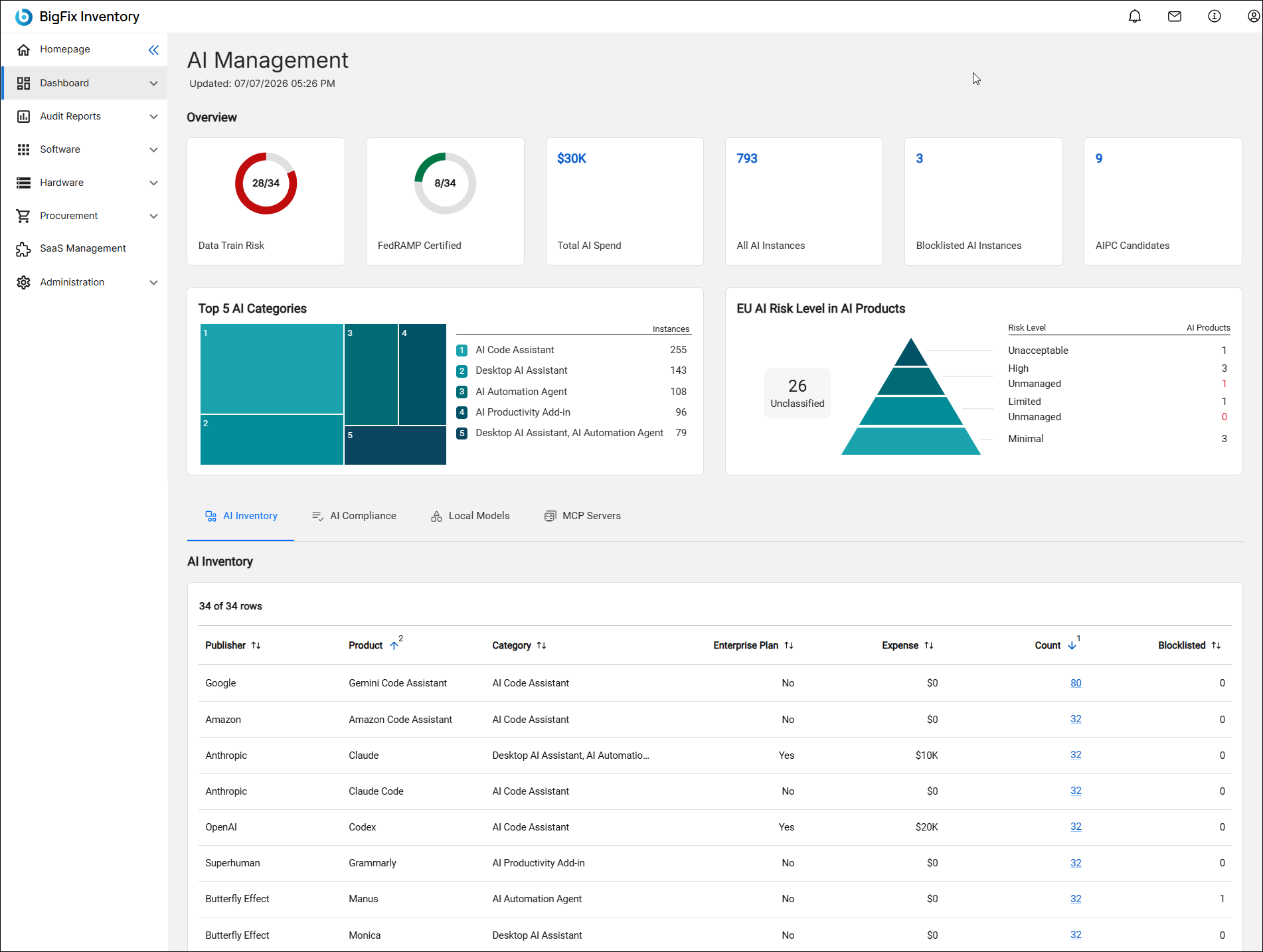
AI Management dashboard widgets
- Overview
- The Overview tile shows the following:
- Data Train Risk: The number of discovered AI Tool products which have High data train risk
- FedRAMP Certified: The number of discovered AI Tool products which have FedRAMP certification class: High, Moderate, and Low
- Total AI Spend: The sum of expenses in contracts having AI Tool category. Note: in some cases the value may be different than the sum of expenses in AI Inventory grid. For example, a contract has an AI product but its metric does not match the metric assign to discovered software (0 software installations under a contract but > 0 instances under a product in AI Inventory grid), or when a contract contains multiple products. Drill down to All Contracts report with the filter by AI Tool category.
- Blocklisted AI Instances: This is the number of discovered software instances of software in AI Tool category, which have 'blocklist' tag on software component or software instance level.
- AIPC Candidates: The number of computers which are not AI capable but have currently non-blocklisted software containing ‘Local LLM Runtime’ or ‘AI Automation Agent’ subcategory. ‘Not AI capable’ means a desktop computer with Intel or AMD processor not indicated as AI capable by the manufacturer, what is recognized by Processor Brand String.
- Top 5 AI Categories
- Shows the top five subcategories of AI Tool category per the number of discovered software instances. Click on the links to view the Software Classification with the respective filters.
- EU AI Risk Level in AI Products
-
Discovered AI Tool products per assigned EU AI Risk Assessment and Managed values
Grids in the dashboard
- AI Inventory
- Every AI product discovered across managed endpoints, with instances count, expense, enterprise plan status, and blocklist counts.
- AI Compliance
- Per-product compliance attributes covering FedRAMP authorization class, data and vendor residency, training-data risk, EU AI Act risk classification with management status, and ISO 42001 certification.
- Local Models
- It lists discovered locally stored AI model files.
- MCP Servers
-
The detection mechanism relies on identifying MCP configuration files on the local disk and scanning for specific patterns within them. This approach enables the detection of potential MCP server usage by popular AI tools, such as Claude and ChatGPT, while also capturing the exact file paths. Detailed information regarding the detection and data-gathering processes for MCP servers can be found in a separate section.
AI Management dashboard actions
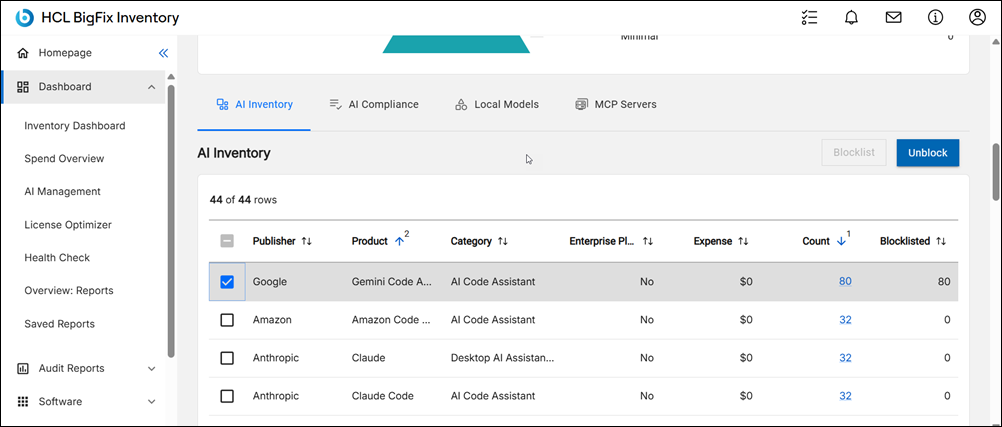
In the AI Management dashboard, you can set the selected product's risk tier against your organization's policy and mark it as managed according to EU AI Act. You may choose High, Limited, or Minimal risk and Managed equal to Yes or No, or Unclassified or Unmanaged risk with Managed equal to No. The default value is Unclassified.
 You can also add
'blocklist' tag to the selected product in order to mark it as unwanted software.
Software instances of the product will be included in Software Blocklist report and
also taken into account when calculating values of: AIPC candidates, Blocklisted
instances on AI Management Dashboard, or Top 5 Blocklisted on Inventory dashboard.
See also Adding and removing tags.
You can also add
'blocklist' tag to the selected product in order to mark it as unwanted software.
Software instances of the product will be included in Software Blocklist report and
also taken into account when calculating values of: AIPC candidates, Blocklisted
instances on AI Management Dashboard, or Top 5 Blocklisted on Inventory dashboard.
See also Adding and removing tags.
Use the Unblock option to remove the 'blocklist' tag from the selected product.