Power Management settings

The Power Management Settings report shows the percentage of computers with power management settings enabled on a given day, and can be configured to compare improvements between two different days.
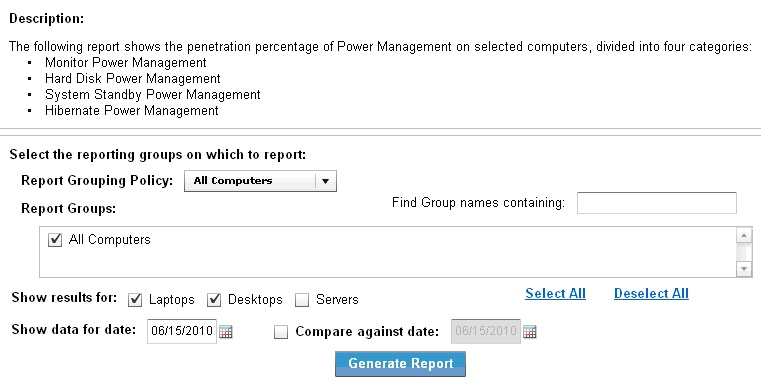
Power Management Settings report configuration screen showing report grouping policy set to All Computers, results for Laptops and Desktops, and date fields for current and comparison dates

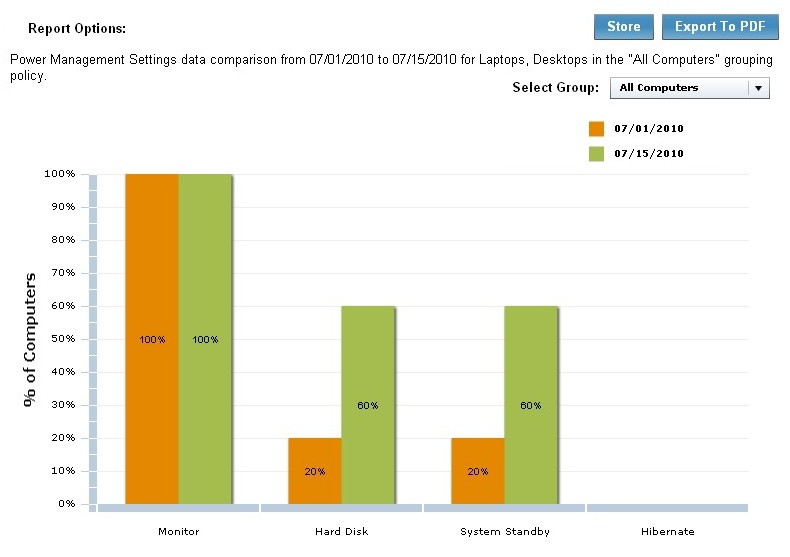
Power Management Settings report bar chart comparing Monitor, Hard Disk, System Standby, and Hibernate power management penetration between 07/01/2010 (orange) and 07/15/2010 (green), showing increases from 20% to 60% for Hard Disk and System Standby
Note: If you select the current date as the compare against date, the report might take significantly longer to generate because previous dates are pre-calculated.