Power Management Health Checks dashboard

The Power Management Health Checks dashboard provides troubleshooting and optimization checks for your Power Management deployment. The dashboard is organized into Setup, Historical Power Tracking, and Wake-on-LAN sections.
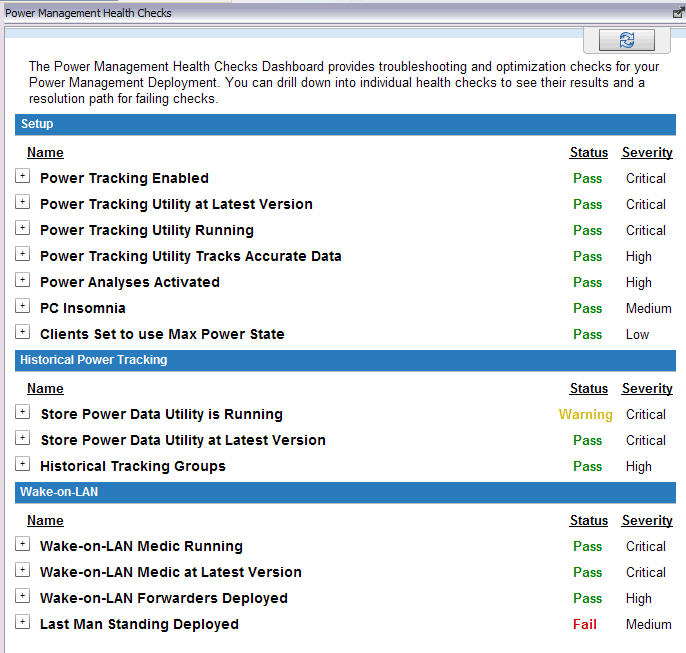

Power Management Health Checks dashboard showing Setup checks (all Pass), Historical Power Tracking checks (Store Power Data Utility showing Warning), and Wake-on-LAN checks with Last Man Standing Deployed showing Fail

You can drill down into individual health checks to see their results and a resolution path for failing checks. Expand each item to see the detailed results and resolution.
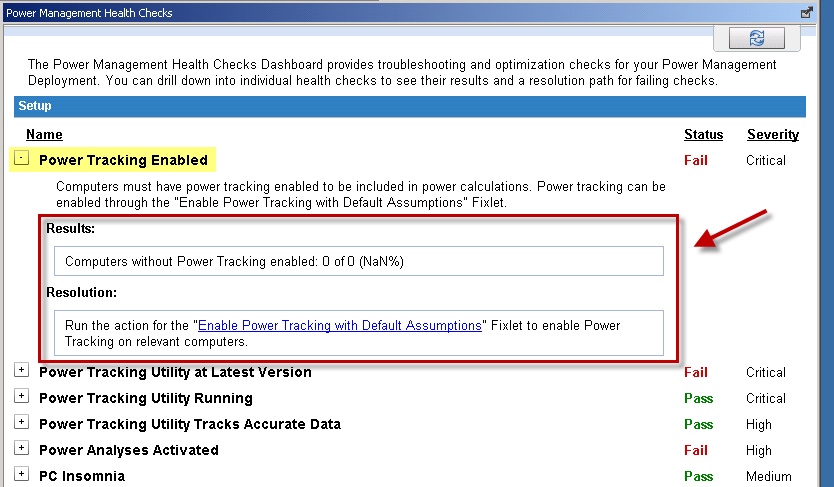

Power Management Health Checks dashboard with the Power Tracking Enabled check expanded, showing a Fail status, a Results field indicating computers without power tracking, and a Resolution field with a link to the Enable Power Tracking Fixlet