Write/Modify Pre-defined method(s)
Below are some pre-defined JavaScript methods that are being called by the Parent page before performing any action on it.
Write/ Modify Pre-defined Methods
| Parent Page Name | Method Name | Description | ||||||||||||||||||||||||||||||||||||
|---|---|---|---|---|---|---|---|---|---|---|---|---|---|---|---|---|---|---|---|---|---|---|---|---|---|---|---|---|---|---|---|---|---|---|---|---|---|---|
| Requester | ShowCost() |
This function is called from Requester screen by clicking, “Show Cost” and returns the value as true or false, else parent page level functionality does not move forward. There are two type of cost. Cloud Platform Wise Cost based on cost model configuration. Consumed service cost by Cloud Provider (service cost dependent on native cloud provider price list) Note: Recommended approach to calculate cost is Consumed service cost by Cloud Provider and the billing job must be enabled for the public cloud. Cloud Platform Wise Cost based on cost model configuration. Use below method Based on Cloud platform to show the cost: Cloud Platform: VMWAR / SCVMM Method: PrivateCloud_ExpectedCost(Period, PeriodID,Location,ServicePlanID, CostType, Size, vCPU, Memory, Storage, OsDisk) Cloud Provider: ARM Method: ARM_ExpectedCost(Period, PeriodID, ServicePlanID, CostType, Size) Cloud Provider: AMAZN Method: AMAZN_ExpectedCost(Period, PeriodID, Size, ServicePlanID, CostType, OrderType, InstanceTypeID, IsEIPRequested, IsDetailedMonitoringEnabled, IsELBSelected, IsEBSRequested, requesttodate, requestfromdate) Cloud Provider: GCP Method: GCP_ExpectedCost(Period, PeriodID, ServicePlanID, CostType, Size, Storage, MachineClass, Series) Parameters Details: Period: it is a numeric value like 1,2,3....9 PeriodID: It can be ‘d’ for ‘Day(s)’, ‘m’ for ‘Month(s)’, ‘w’ for ‘Week(s)’, or ‘y’ for ‘Year(s)’. Location: it contains the datacenter location. ServicePlanID: Service Plan ID is a plan related to cost model created by provider and map to the resource in HCL BigFix CLM. E.g., Silver, Platinum etc. ServicePlanID must be saved in CIMaster. Otherwise, Billing reports will not be populated. CostType: It can be Allocation Based Model and Time-Based Model. Size: it takes supported size based on cloud platform. vCPU: It defines the no. of vCPUs. Memory: It defines the size of Memory. Storage: It defines the size of storage. OsDisk: Size of the OS disk. OrderType: It defines the type of Order like OND/ONS. InstanceTypeID: Size of the cloud Platform (AMAZN). IsEIPRequested: It required “Y” - Yes and “N” - No values either EIP request or not. IsDetailedMonitoringEnabled: It required “Y” - Yes and “N” - No values either Detailed Monitoring enable or not. IsELBSelected: It required “Y” - Yes and “N” - No values either ELB selected or not. IsEBSRequested: It required “Y” - Yes and “N” - No values either EBS request or not. Requesttodate: it required Date when request submitted. (Optional) Requestfromdate: it required Date when request submitted. (Optional) MachineClass: It requires GCP expected cost. Series: It requires for GCP expected cost. Note: Above method of expected cost is going to obsolete. It is recommended to use a new method (define below) to calculate expected cost of all platforms. Consumed service cost by Cloud Provider (New methods of expected cost) Use below method to show the cost of the native cloud provider services (Virtual Machine, disk, app gateway etc.) also this method will calculate the prices of services mapped by provider in cost modal. Example (operation cost, maintenance cost) Method: GetServiceExpectedCost (serviceName, jsonParams, Summary) Parameters Details: ServiceName: Service Name to show the cost. For example: VirtualMachine, Disk etc. JsonParams: items json to show the cost. If multiple items, then multiple items with “|” separated multiple values. Sample json: {"items":[{"KeyName":"Region","KeyValue":"USEast|UsWest"},{"KeyName":"OS","KeyValue":"Win|Lin"},{"KeyName":"Usage","KeyValue":"24|9"},{"KeyName":"Disk","KeyValue":"SDD~D4|HDD~A1"}]} Summary: it required Yes and No values either summary required or not. Note: User can create JsonPrams by their own and use give below method to get the json. Method: GenerateServiceItemJson(keyList,valueList) Parameters Details: keyList: it is an array of keys. For example: ["Region","Os","Usage","Period","PeriodId","ServicePlan"] valueList: It is an array of values respective to the keys. KeyList and valueList array sequence should be same. For example, ["UsWest","Win","24","12","Day(s)","ARM Service"] If we have multiple items, then valueList would be “pipe (|)” separated values for the items and key list would remain same. For example: ["UsWest|UsWest","Win|Lin","24|9","12|1","Day(s)|Month(s)","Silver|Platinum"] In case of Multiple Disk, DiskType and value should be separated by “tild(~)” and more than 1 disk in an item should be separated by “comma( , )”. For example, One item one disk => ["DiskType~Value] or ["SDD~S1"] One item multiple disk => ["DiskType1~Value1, "DiskType2~Value2] or ["HDD~A0, HDD~A1"] Multiple item multiple disk => ["DiskTypeItem1~ValueItem1, "DiskTypeItem1~Valueitem1 | DiskTypeItem2~ValueItem2] OR ["HDD~A0, HDD~A1"|"SDD~S1"] Below is service wise keyList and ValueList sample values:
|
||||||||||||||||||||||||||||||||||||
| Requester/Object Action | request_process_start() | This function is called from Requester/Object Action screen by clicking, "Submit"/ “Save Draft”. This returns the value in true or false, else parent page level functionality does not move forward. | ||||||||||||||||||||||||||||||||||||
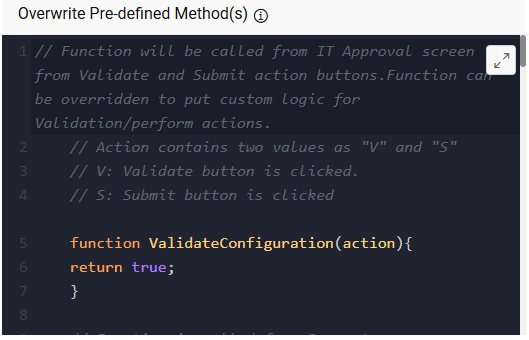
| IT Approval | ValidateConfiguration(Action) |
This function will be called from IT Approval screen by clicking, Validate and Submit action. The method is overridden to put custom logic for Validation/perform actions. Action contains two values as "V" and "S" V: Validate button is clicked. S: Submit button is clicked To validate the form use “GenericValidateITData” method for Action value as “V”. Method: GenericValidateITData(action) It will validate the request and shown all the resource available/demanded status as information popup. 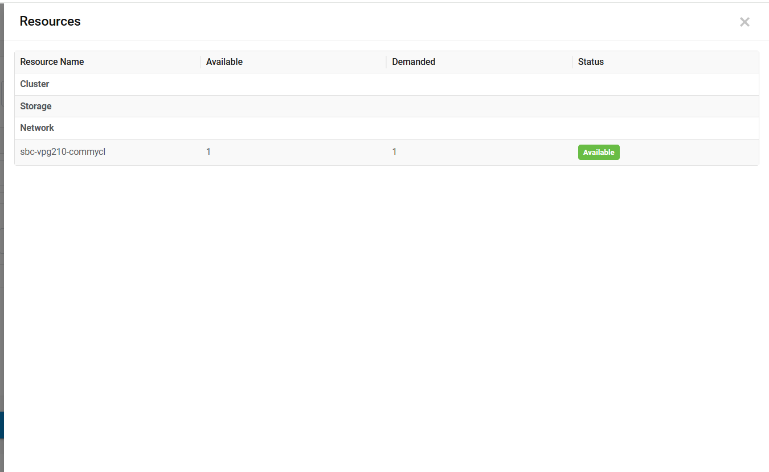
This returns a value in true or false, else parent page level functionality does not move forward. |
||||||||||||||||||||||||||||||||||||
| Self (Customized Form) | ctr_keyValuePair_addNew() |
This function is called by the customized page from Key value pair controls by clicking, Add. This returns a value in true or false, else parent page level functionality does not move forward. |
||||||||||||||||||||||||||||||||||||
| Self (Customized Form) | ctr_keyValuePair_Remove() | This page calls the function from Key value pair controls by clicking, Remove. This returns a value in true or false and if it is False then parent page level functionality does not move forward. | ||||||||||||||||||||||||||||||||||||
| Self (Customized Form) | ctr_Addl_storage_addNew () | This page calls the function from Addl. storage controls by clicking Add New. This returns a value in true or false and if it is False then parent page level functionality does not move forward. | ||||||||||||||||||||||||||||||||||||
| Self (Customized Form) | ctr_Addl_storage_Remove () |
This function is called by the customized page itself from Addl. storage controls by clicking, Remove. This returns a value in true or false, else parent page level functionality does not move forward. |
||||||||||||||||||||||||||||||||||||
| Self (Customized Form) | customcontrolinsertvalues(ctrl) |
This page calls the function from custom control by clicking Add. ctrl is an object that contains the reference of clicked control. This returns a value in true or false, else parent page level functionality does not move forward. |
||||||||||||||||||||||||||||||||||||
| Self (Customized Form) | customcontrolremovevalues(ctrl) |
This page calls the function from custom control by clicking, Delete. ctrl is an object that contains the reference of clicked control. This returns a value in true or false, else parent page level functionality does not move forward. |
||||||||||||||||||||||||||||||||||||
| Self (Customized Form) | request_process_beforeConfirmation(requestJson) |
This function is called from Requester screen by clicking, Submit button. This method is called after final JSON is created and before confirmation popup is displayed. Method can be overridden to put custom logic/action/validation. requestJson have various methods to override final JSON key values. E.g. UpdateKeyValue(itemNo,keyName,keyValue,systemErrorMessage) : it takes four parameters to update value in JSON. itemNo: Unique item no for update value. keyName: JSON key name i.e., UI control unique Id. keyValue: Value to update in existing JSON. systemErrorMessage: it is either “true” or “false”. True shows system defined error message. Whereas False shows custom message. |
||||||||||||||||||||||||||||||||||||
| Requester | OnConfirmationClick(requestJson) |
This function is called from Requester screen, confirmation popup by clicking, Confirm button. Method can be overridden to put custom logic/action/validation. requestJson have various methods to perform operations on final JSON key values. E.g. GetJsonKeyValue(itemNo,keyName,systemErrorMessage) : it takes three parameters to get value in JSON. itemNo: Unique item no to get value. keyName: JSON key name i.e., UI control unique Id. systemErrorMessage: it is either “true” or “false”. True shows system defined error message. Whereas False shows custom message. |