Deploying CDP Core API
This section provides detailed instructions on how to deploy HCL CDP Core API using the Devtron in the OpenShift.
Before you begin
Make sure to create a core-api secret with required data in the HashiCorp vault before deploying the CDP core api.
{
  "dbHost": "",
  "dbPassword": "",
  "dbUser": "",
  "dbDatabase": "vrm",
  "dbConnectionLimit": "80",
  "dbPort": "3307",
  "amqpHost": "",
  "amqpPort": "5672",
  "amqpLogin": "",
  "amqpPassword": "",
  "userIdentifierAuthKey": "",
  "X_API_KEY": "",
  "X_API_SECRET": "",
  "akamaiKeyName": "",
  "akamaiKey": "",
  "akamaiHost": "",
  "akamaiPath": "",
  "akamaiPurgeauthkey": "",
  "hclcdp_mailId": "",
  "hclcdp_mailPassword": "",
  "mailId": "",
  "mailPassword": "",
  "stagingS3AccessKey": "",
  "stagingSecretAccessKey": "",
  "amqpAuthMechanism": "AMQPLAIN",
  "clientId": "",
  "clientSecret": ""
}
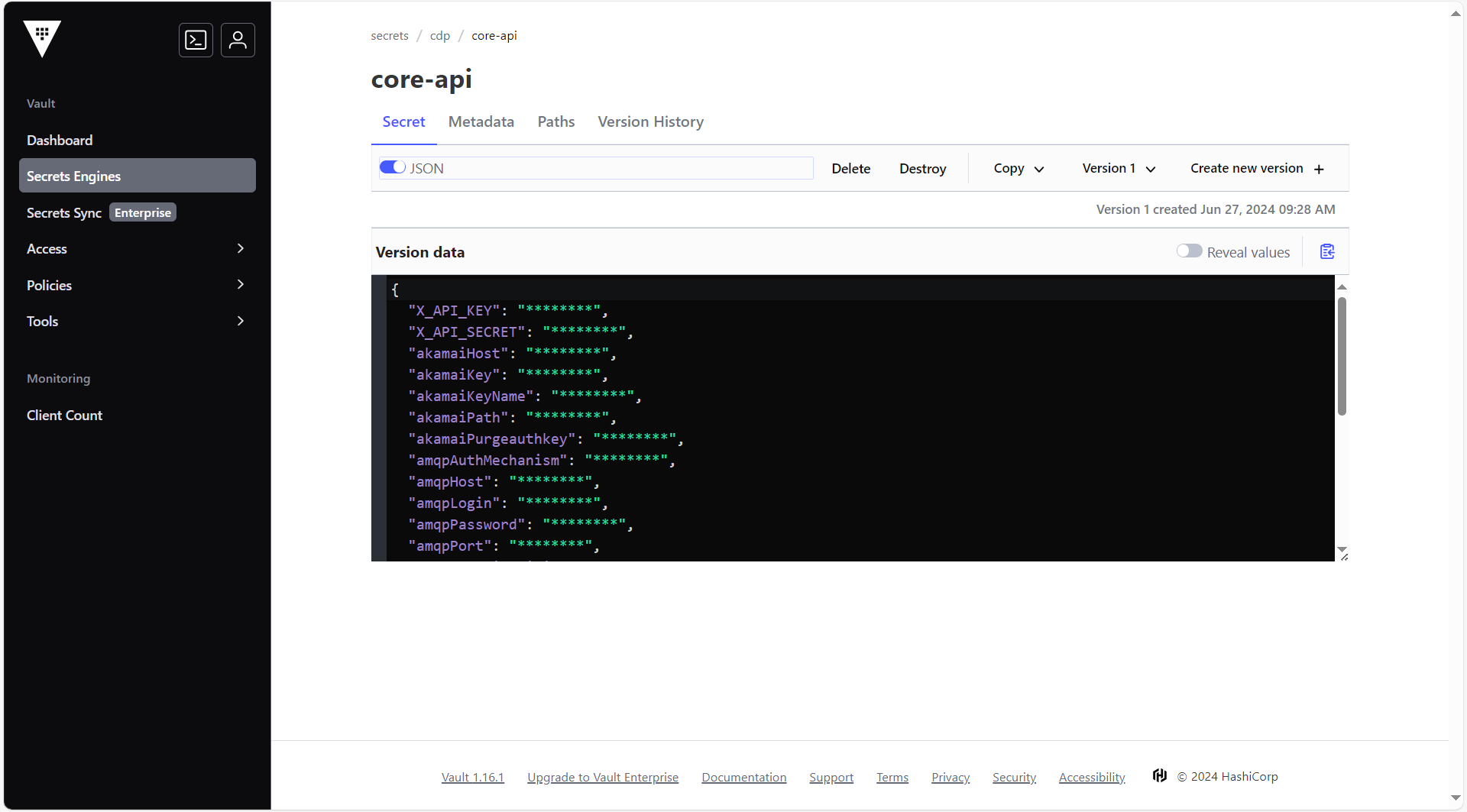
To create the core api secret in the HashiCorp Vault, follow the steps below:
- Create a core api secret sample key and value in the core api secret, and update
ConfigMaps data with actual values.
{
  "X_API_KEY": "\"\"",
  "X_API_SECRET": "\"\"",
  "akamaiHost": "\"\"",
  "akamaiKey": "\"\"",
  "akamaiKeyName": "\"\"",
  "akamaiPath": "\"\"",
  "akamaiPurgeauthkey": "\"\"",
  "amqpAuthMechanism": "\"\"",
  "amqpHost": "\"\"",
  "amqpLogin": "\"\"",
  "amqpPassword": "\"\"",
  "amqpPort": "\"\"",
  "dbConnectionLimit": "\"80\"",
  "dbDatabase": "\"<dbName>\"",
  "dbHost": "\"<dbHost>\"",
  "dbPassword": "\"<dbPassword>\"",
  "dbPort": "\"<dbPort>\"",
  "dbUser": "\"<dbUser>\"",
  "hclcdp_mailId": "\"\"",
  "hclcdp_mailPassword": "\"\"",
  "mailId": "\"\"",
  "mailPassword": "\"\"",
  "stagingS3AccessKey": "\"\"",
  "stagingSecretAccessKey": "\"\"",
  "userIdentifierAuthKey": "\"<userIdentifierAuthKey>\""
}
Procedure
-
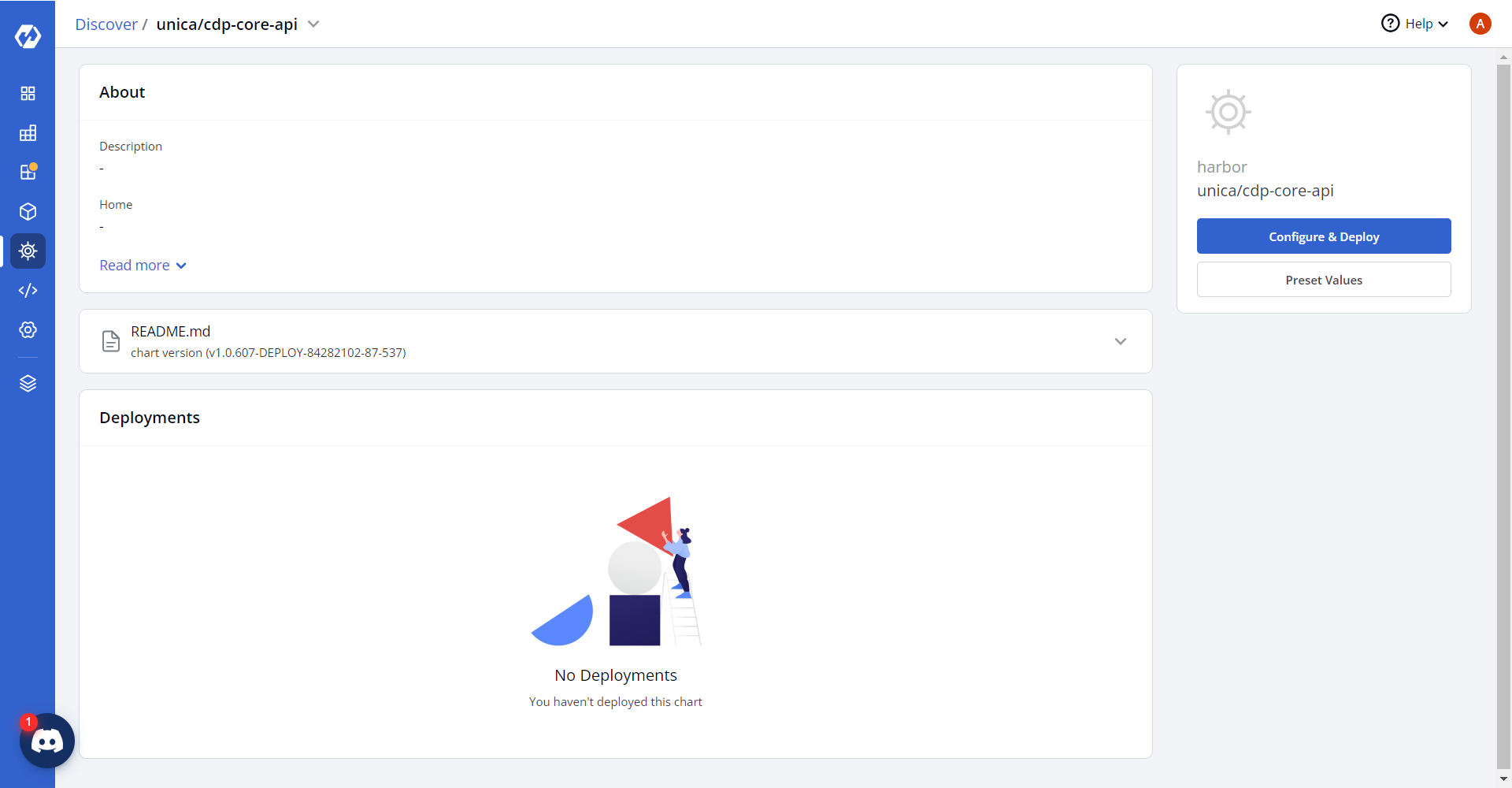
Navigate to the Devtron Chart Store, and select the cdp-core-api chart to
deploy.
.png)
-
Now, configure and deploy the cdp core api charts.
-
In the YAML section, update the ConfigMap using below details and deploy
the charts.
druidURL: "http://<internal-ip>:8888/druid/v2/sql" tsdbURL: "''" uploadsBucket: "hclsw-hss-hxcd-dev-s3-cloudfront" uploadsFolder: "coreapi" segmentUserListuploadsBucket: "hclsw-hxcd-hss-prd-s3-cdp-app" segmentUserListuploadsFolder: "segmentUpload" TPPActivationUrl: "https://cdp-audienceuploader.<domain>.cloud/api" hasSegRefreshQueueEnabled: "[4658,6112,6142,6153,6154]" whiteListCrudAlertMails: "[]" enablePrometheus: "true" suppressionList: '""' productCatalog: '""' rts_endpoint: "https://rts-ms.<domain>.cloud" disableActivation: | [5459] s3Bucket: "hclsw-hxcd-hss-prd-s3-cdp-app" DSN: "''" cdpDashboardService: "https://rts-ms.<domain>.cloud" rmq: "jb_triggers_us" javascript_sdk_endpoint: "https://js-sdk.<domain>.cloud" sendRabbitmqMessageDisabled: "true" API: "''" cdnImagePrefixWithoutProtocol: '""' cdnImageWithProtocol: '""' cdnFallbackImageWithoutProtocol: '""' urlShortnerConfigDomain: '""' sendEmailDomain: '""' uibase: "''" hclcdp_uibase: "''" reportAutomationApiKeyUrl: '""' accessTokenLifeTime: "86400" segRefreshQueue: "''" enableCrudAlertForCampaigns: | [] isKmsEncryptDisabled: "false" disablePageres: "false" tableauProxy: "''" channelQueue: "''" engagementScheduleQueue: "engagementschedule" journeyDisableQueue: "''" webPushQueue: "web_push" adhocBucket: "''" adhocQueue: "''" adHocFileLoc: "''" adHocCancelQueue: "''" sslEnabled: "false" offlineProfileUploadBucket: "''" offlineProfileUploadFolder: "''" disableNotification: "''" tableauURL: "''" kms_encrypt: "https://kms.<domain>.cloud/kms-service/kms/encrypt" kms_decrypt: "https://kms.<domain>.cloud/kms-service/kms/decrypt" kms_region: "aps1" allowedTags: "['h1','h2','h3','h4','h5','h6','div','hr','li','ol','p','pre','ul','a','b','br','em','i','span','strong','sub','sup','u']" allowedAttributes: "{'*':['href','align','target','alt','style','class','name','id','fr-original-style']}" tawuniyaCoreApi: "''" psql_endpoint: "https://psql-api.<domain>.cloud" psql_host: "psql-api.<domain>.cloud" fileUploadTimeout: "40000" CampaignRegionList: "{aps1:['6525','6532','6533','6534','6530','6529','6528','6527','6526','6536','6537','6538','6539','6540','6542','6543','6552','6553']}" muUserIdentifierDomain: "https://dmp-sst-api.<domain>.cloud" sftpFilePath: "''" usUserIdentifierDomain: "''" sstApiVersion: "v1" devMode: "false" FROM_EMAIL_ID: "user@domain.com" ALERT_TO_EMAIL_ID: "user@domain.com" DEFAULT_SRC: '"http://*.dev.<domain>.cloud","https://*.dev.<domain>.cloud","https://www.google-analytics.com","http://*.<domain>.cloud","https://*.<domain>.cloud"' FONT_SRC: '"http://*.dev.<domain>.cloud","https://*.dev.<domain>.cloud","https://www.google-analytics.com","fonts.gstatic.com","data:"' IMG_SRC: '"http://*.dev.<domain>.cloud","https://*.dev.<domain>.cloud","https://www.google-analytics.com","data:","blob:"' SCRIPT_SRC: '"http://*.dev.<domain>.cloud","https://*.dev.<domain>.cloud","https://www.google-analytics.com","unsafe-inline","unsafe-eval"' STYLE_SRC: '"http://*.dev.<domain>.cloud","https://*.dev.<domain>.cloud","https://www.google-analytics.com","unsafe-inline"' minioAccessKeyId: "''" minioSecretAccessKey: "''" minioEndpoint: "''" BUCKET_TYPE: "s3" CORS: | ^https?:\/\/([^.]+\.)?<domain>\.cloud(:\d+)?$ hclcdp_uibase: "' '" hclcdp_mailId: "' '" hclcdp_mailPassword: "' '" awsAccessKeyId: "s3" sampleBucket: "''" sampleFolder: "''" webpushBucket: "' '" webpushFolder: "' '" engageQueue: "' '" notificationQueue: "OnsiteNotificationQueue" clickTrackerEmail: "''" clientRequestEmailTo: "''" clientRequestEmailCC: "''" apibase: "api.vizury.com" adserver: "https://sslads.vizury.com" imageLink: "https://d2pr63iyhfcrqt.cloudfront.net/core-api/" imageLinkWithoutProtocol: "https://d2pr63iyhfcrqt.cloudfront.net/core-api/" cdnImageWithoutProtocol: "https://d2pr63iyhfcrqt.cloudfront.net/core-api/" retargetStage: "''" retargetSection: "1" retargetLevel: "1" segmentationSuffix: "segmentation" segmentationCountSuffix: "segmentation_count" programmaticId: "47" fbRhsId: "377" fbNfId: "522" onsiteRecoId: "2192" port: "3000" channelsProgrammatic: "3" channelsFbnf: "1" channelsFbrhs: "2" channelsOnsitereco: "7" channelsOnsitenot: "8" channelsEmail: "5" channelsAppPush: "6" channelsSms: "4" channelsWebpush: "10" channelsNb: "13" channelsBp: "14" channelsInApp: "26" channelsWhatsapp: "27" verticalIdFlight: "1" verticalIdEcommerce: "3" mobidmpBucket: "''" mobidmpFolder: "''" googleApiClientId: "''" googleApiClientSecret: "''" googleApiRedirectUrl: "''" facebookAccessToken: "''" facebookPageId: "''" facebookBusinessId: "''" facebookSystemUserId: "''" facebookVersion: "2.5" flowThroughChannelsSms: "4" flowThroughChannelsEmail: "5" crudAlertsRegion: "ap-south-1" crudAlertsVersion: "2010-12-01" crudAlertsFrom: "user@domain.com" crudAlertsTo: "user@domain.com" sesConfigRegion: "ap-south-1" sesConfigVersion: "2010-12-01" sesConfigFrom: "user@domain.com" sesConfigTo: "user@domain.com" ConfigDMPchannelIdJourneyApi: "31" ConfigDMPchannelIdExternalApi: "25" detectConfig: "[{\"default\":[\"https://detect.<domain>.cloud/drive\",\"admin\",\"Admin1\",\"762\"]}]" blowFishKey: "<secret_key>" LINK_USERNAME: "admin" LINK_PASSWORD: "<secret_password>" linkBaseUrl: "https://link-demo.<domain>.cloud" linkBaseUrlClient: "https://link-demo.<domain>.cloud" linkProjectId: "68722e56870f2d5902becfdc" LINK_RUNTIME_SERVER: "https://link-demo.<domain>.cloud/hip-rest" LINK_SERVER_ID: "68722e4bf081f0733488866c" LINK_DESIGN_SERVER: "https://link-demo.<domain>.cloud/tx-server" LINK_CLIENT_URL: "https://link-demo.<domain>.cloud" LINK_PROJECT_ID: "https://link-demo.<domain>.cloud" LINK_PROJECT_NAME: "_app_cdp" LINK_SERVER_NAME: "Link Runtime" ALLOWED_HOSTS: | '''coreapi.<domain>.cloud''', '''coreapi.<domain>.cloud''', '''cdp-core-api-<masked>.apps.ocp.cluster''' CLICKHOUSE_URL: "''" isClickhouseEnabled: "false" ES_DD_MAX_VALUE: "2147483647".png)
-
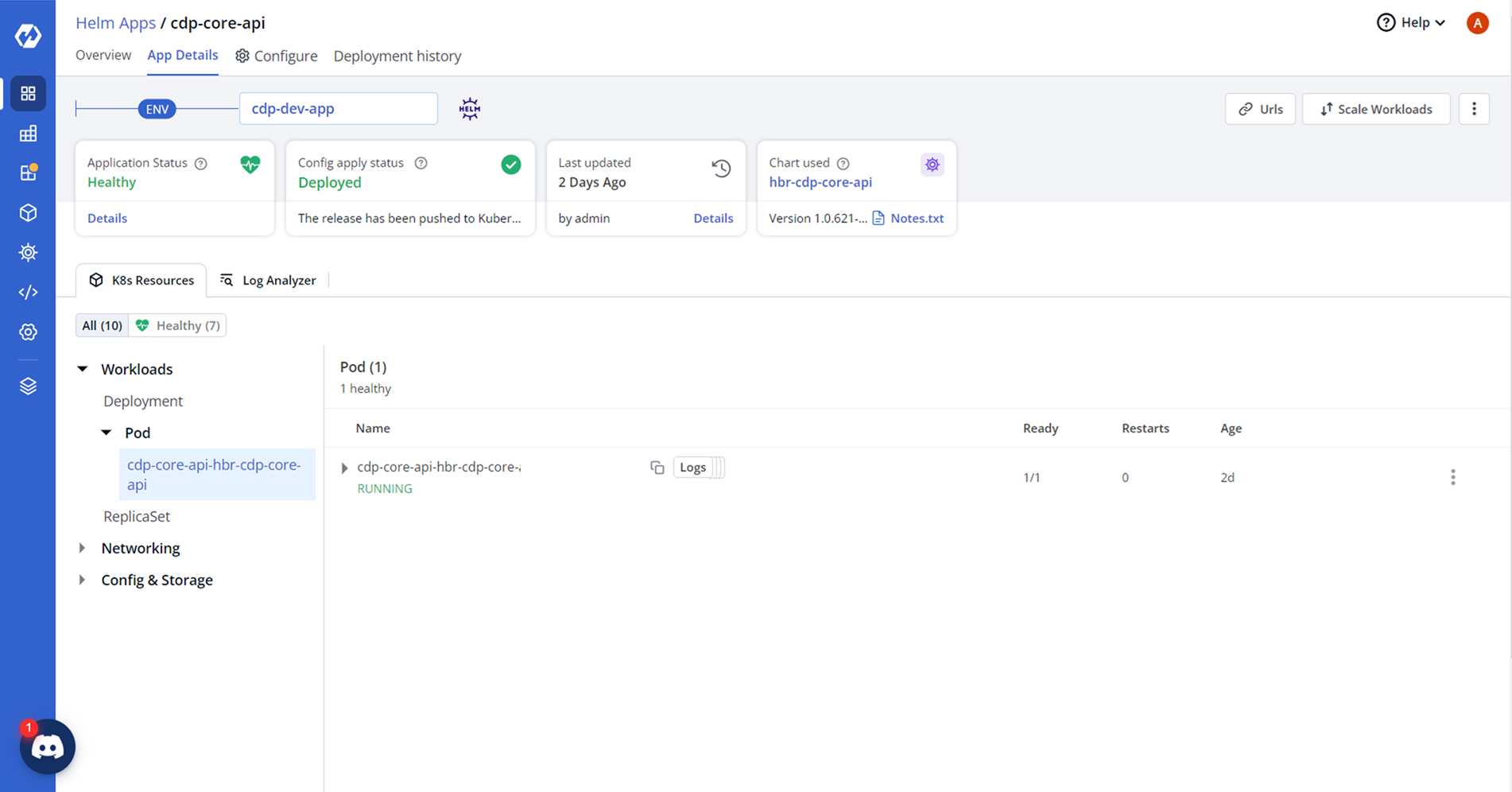
On successful deployment, validate the deployment as shown below.