
Enabling volume pricing for Ruby storefronts (B2C and B2B)
In the Ruby storefront, you can enable volume pricing for the users from the Commerce Lab.
About this task
Procedure
Enable the volume pricing for the Ruby storefront user interface by
following the steps given below:
- Open Commerce Lab Tools.
- From the left navigation menu, go to .
-
Enter the product SKU in the search box on the right side.
The SKU details appear.
- Navigate to .
-
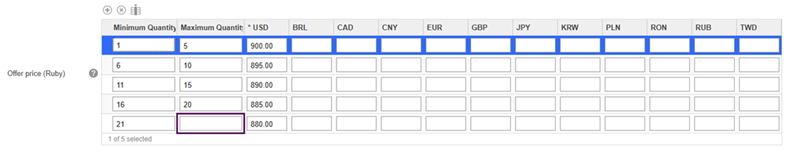
Enter the Minimum and Maximum
quantities and price values.
Note: In the last row, leave the Maximum Quantity field empty to allow the user to enter any quantity.
- Click the Save button.