
WebUI IVR: Device Centric view
The Device-Centric View in IVR 4.3 provides a unified device-level dashboard for tracking vulnerabilities, remediation actions, and deployment history.
The Device-Centric View is available for:
- Qualys–based Vulnerabilities
- Rapid7-based Vulnerabilities
- CrowdStrike-based Vulnerabilities
-
Tenable IO/SC–based vulnerabilities
-
CSV-based imports
The Device Centric View feature has been introduced to provide the following improvements:
- To offer real-time visibility into vulnerabilities for each device
- To improve remediation options with advanced filtering and sorting capabilities
Device-centric view shows the number of vulnerabilities associated with each device after vulnerabilities are imported into IVR either through File Import or through direct Tenable/Qualys integration.

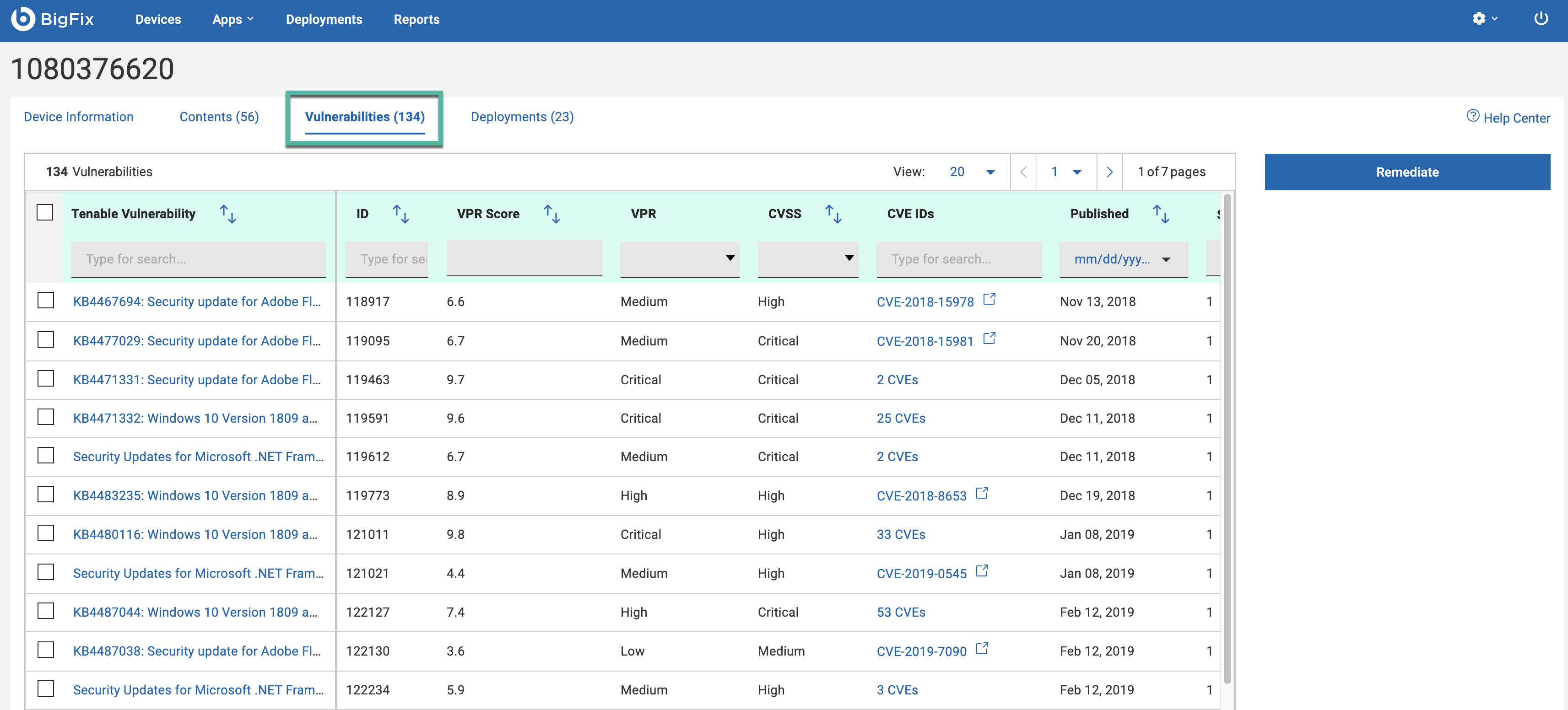
Click on a Computer Name to display detailed device information, including applicable patches and a list of all vulnerabilities for that device. Remediate button initiates the remediation process for the selected device.

Contents tab provides a list of patches for a device. Remediate action will apply to the selected list.

The Vulnerabilities tab provides a list of vulnerabilities for the selected device.
The Remediate button in the panel will apply to the specific vulnerability for that device.
The right-side Remediation button applies all relevant fixlets to that device.
Deployments tab provides list of deployments for a selected device.
Deployment status is logged and updated in the Deployments history tab. Deployment history shows timestamp, fixlet applied, and remediation status.
