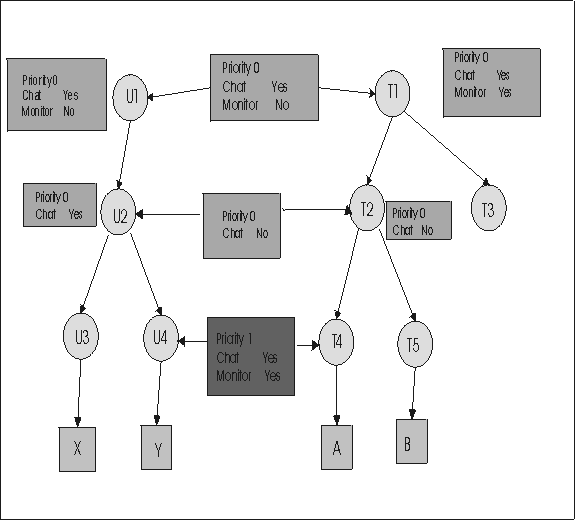
Example 5: Higher priority Yes overrides lower priority No
Edit an existing link in Manage Permissions to change the value of the priority 1 link that is defined between U4 and T4. Change the value of Chat from No to Yes.
Edit the Permissions link
- Click .
- Select T4.
- Click Manage Permissions.
- The Manage Permissions screen is displayed.
- Click the Existing Profile button.
- Select the link between U4 and T4.
- Click the selector button.
- Keep the priority 1 option selected for Chat. Select the value Yes.
- Click Submit.
TVT instruction:example5.eps The eaxmple5.cdr file needs to be converted to an example5.gif and an example5.eps once it has been translated.