User can also upload bulk data at a time. For that, click on icon and then
select Bulk upload option.Figure 5. Profile Management (Cont.)
Download the template and fill in all the details and upload it.
The data gets populated in the grid.Figure 6. Profile Management (Cont.)
To edit any record, click on icon, update the required details and click on update.
Below alert is generated successfully.Figure 7. Profile Management (Cont.)
To delete a record, click on , a confirmation box appears and when clicks on Yes, the
details get deleted and the below alert is generated.Figure 8. Profile Management (Cont.)

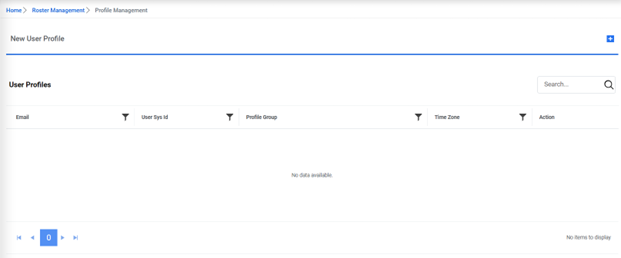
 icon to
add profile for a user.
icon to
add profile for a user.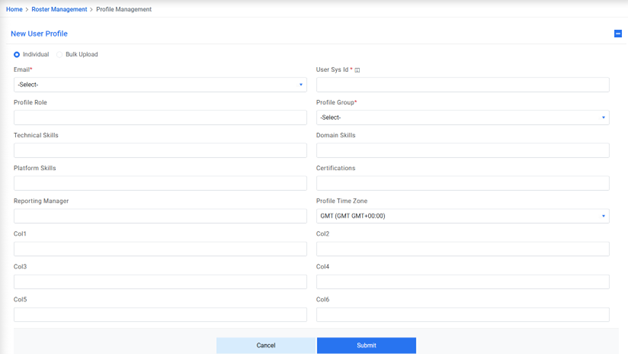
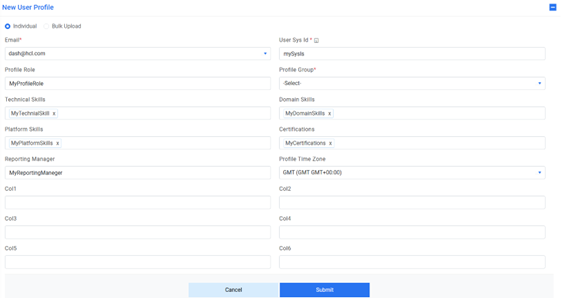



 icon, update the required details and click on update.
Below alert is generated successfully.
icon, update the required details and click on update.
Below alert is generated successfully.
 , a confirmation box appears and when clicks on Yes, the
details get deleted and the below alert is generated.
, a confirmation box appears and when clicks on Yes, the
details get deleted and the below alert is generated.