
DevOps Code overview
DevOps Code (Code) is a cloud-based integrated development environment on HCL DevOps Loop, with which you can write, compile, build, and debug software applications in a so-called dev container, accessible directly from a web browser. The editor provides a completely configured development environment with preinstalled extensions, tools, and libraries. You can start coding without the need to set up the environment on your local machine.
Architecture of the dev container
The general architecture of the Code platform is shown in the following diagram.
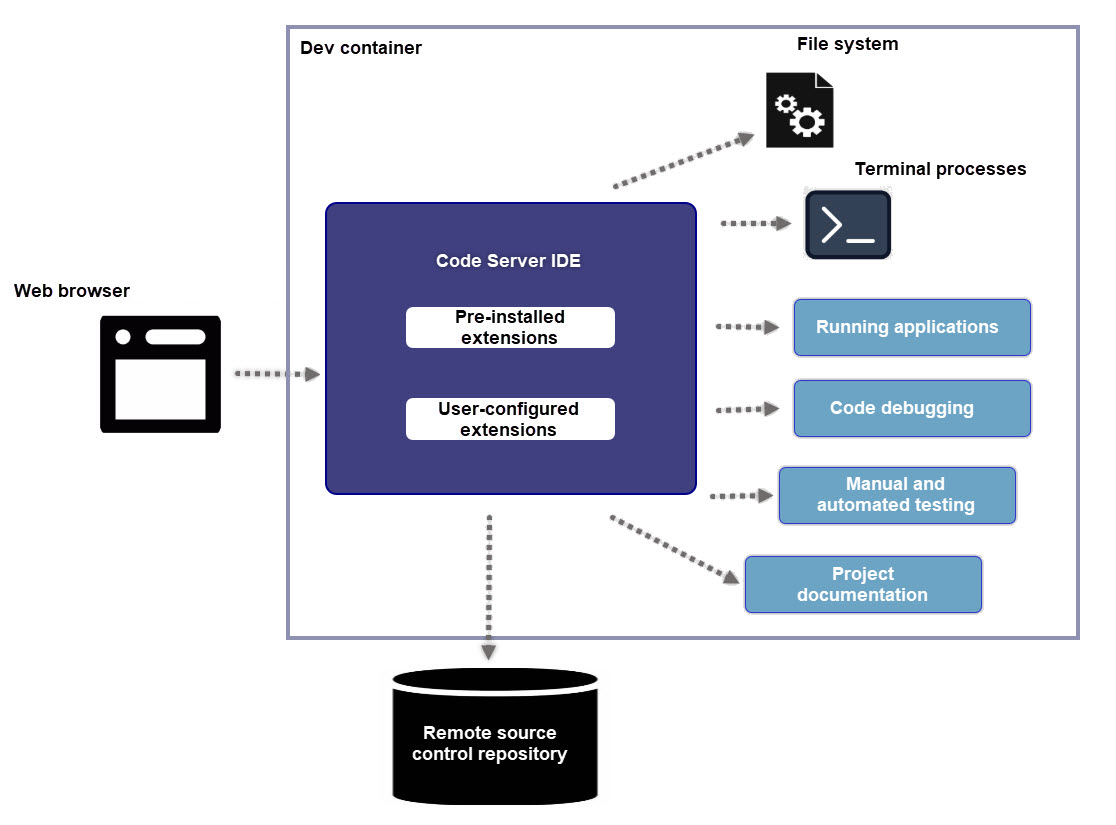
Code provides personal dev containers that are configured for individual users. By using each dev container, you can write, build and debug your code in an integrated environment without affecting the work of other users in the team. Each container is isolated for a specific user to prevent conflicts with different project setups. Additionally, you can also customize the individual dev container to meet your specific needs, by ensuring that all the necessary extensions and libraries are available for use.
The dev container integrates essential tools and processes, with the web browser serving as an interface for accessing the browser IDE, supporting coding, debugging, version control, and more.
Visual Studio Code-based environment
The browser development environment is based on Visual Studio Code, which means that almost all features the latter provides are also available in Code. For more information, refer to Visual Studio Code documentation.
The development environment includes preinstalled extensions. However, you can also add custom extensions to suit project needs. It includes a file system for file management, a terminal for command-line operations, and tools for application execution, debugging, testing, and maintaining documentation.
Source control integration
Code integrates with remote source control repositories, ensuring secure, accessible version control and project continuity across sessions. Code offers built-in support for Git repositories (for example hosted in https://help.hcl-software.com/devops/plan/3.0.3/oxy_ex-1/control/content/index.en-us.html). Other types of source control repositories are supported by means of extensions that you can install into the dev container.