
User interface
The DevOps Code (Code) user interface offers key features that are designed to facilitate navigation, file management, source control, debugging, and extension management within the browser IDE.
The following image shows the user interface with a vertical toolbar on the left-hand side of the Code IDE.
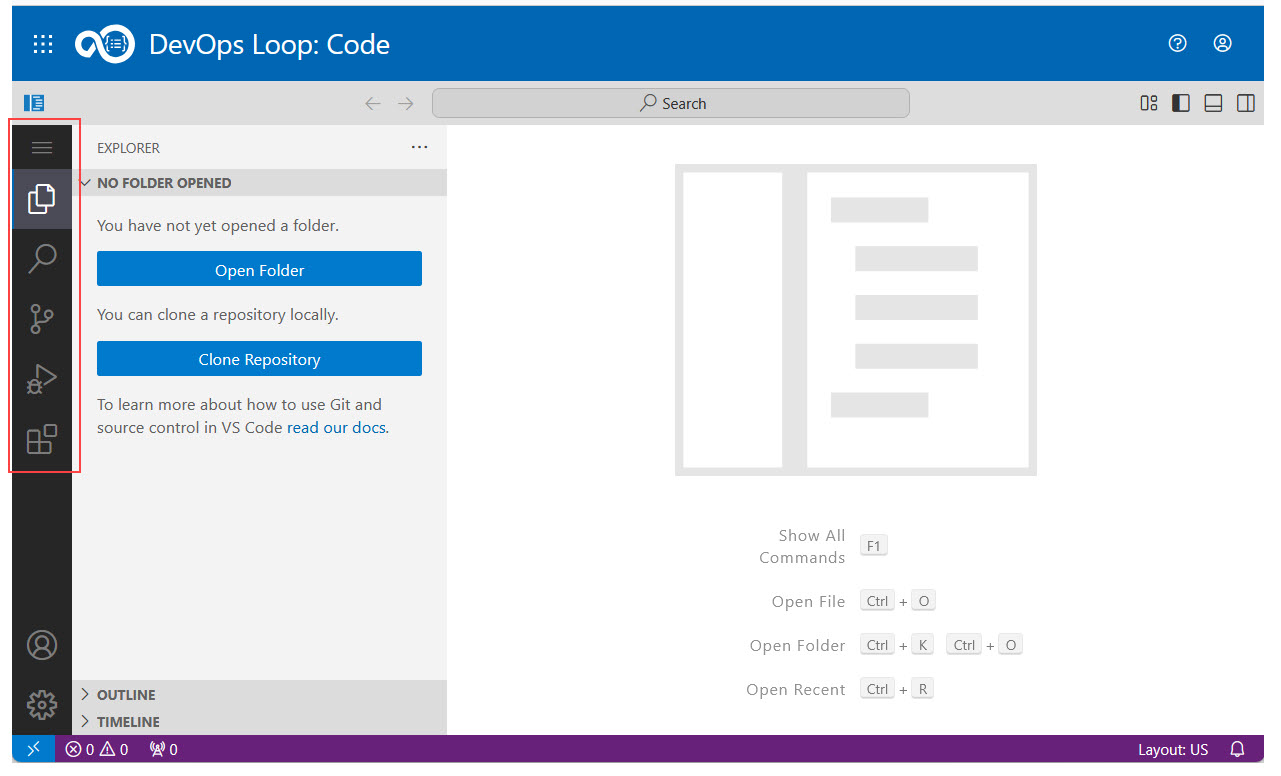
The following list outlines the main highlights of the Code user interface:
| Menu item | Description |
|---|---|
 Main menu Main menu |
Opens a collapsible side menu in a dropdown, and includes general menu items such as File, Edit, Selection, View, Go, Terminal and Help. These menus are mostly the same as those that are present in the main toolbar of Visual Studio Code. |
 Folder button Folder button |
Opens the Explorer panel that provides tree-like navigation of the workspace structure. |
 Search button Search button |
Provides the search and replace functionality for files in the workspace. |
 Source control button Source control button |
Provides the source control panel from which you can perform commands on Git repositories that are used in your workspace. |
 Run and Debug button Run and Debug button |
Provides common actions for running and debugging applications. |
 Extensions button Extensions button |
Provides a menu to manage extensions. |
For more information about the UI of the browser IDE, refer to the documentation of Visual Studio Code.