Customizing the Elasticsearch-based search solution
The topics in this section describe tasks performed by an application developer to customize the Elasticsearch-based search solution. You can extend the Query Service to meet your business requirements.
These topics cover customization of the Search solution. Administrators working with and tuning the service on an ongoing basis can learn about the concepts and tools for this in Commerce+ Transaction Server Solr and Elasticsearch.
Basic architecture
The Elasticsearch Search solution is one component of a unified data environment. This environment is designed as a generic data-management system. The environment includes several major components, including the gateway, data services, and the ZooKeeper configuration management system.
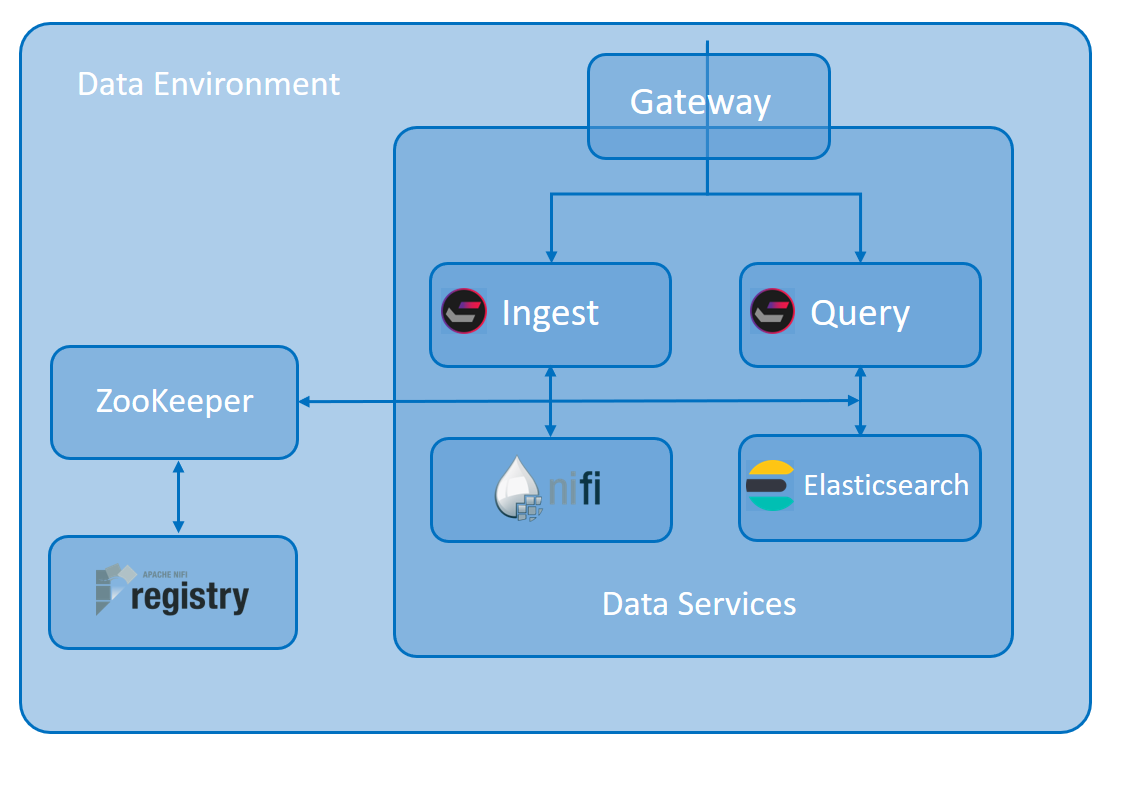
The Redis gateway and ZooKeeper/Registry support the data services. It is the data services that control Search behavior, so you customize Search by extending the Ingest data-uploading subsystem or the Elasticsearch-based Query subsystem. There are four main ways you can do this, as outlined below. In addition, you can develop migration and continuous-delivery strategies based on templates and examples provided by HCL.
| Concept | Details and audience | For more information |
|---|---|---|
| Introduction | Learn about the customization points in Commerce Search and how they can be used in your
implementation:
These topics are for Commerce+ Transaction Server developers who are learning to customize Commerce Search. |
|
| Ingest service | For an overview of how Commerce Search brings in data for indexing, see Ingest Service. | Customizing Ingest typically involves the creation
of new NiFi pipelines, which consist of connectors, processors, and
process groups.
|
| Search Query API | Commerce Search uses a REST API by
default to communicate with its microservices. This API is useful
for developers who want to extend existing browsing, NLP, and site
content features. This API is managed from a root node in ZooKeeper
with the name /configuration.You can add new extensions in child nodes under the root. For example, suppose you need to show products of a particular color and allow search based on color. You can extend the API with a custom endpoint for product search and color as parameter. |
If you want to use existing Query service features
or an existing index, you can extend the existing Query API by
calling the performSearch method from the
SearchServiceFacade service provided as
part of the query-api.jar.
|
| Search profiles | Use search profiles to control the storefront search experience at a page-level. Profiles group together sets of search runtime parameters. You can call default profiles or your own customized ones to control the behavior of the Query service. |
|
| Natural Language Processing profiles | Natural Language Processor (NLP) profiles are used
to control the preprocessing flow of search queries. You can find the default HCL_NLPProfile.json file in the resources\profiles\nlp directory of query runtime. A NLP profile can also be created through the /profiles REST endpoint and is stored inside of the Zookeeper “nlpprofiles” node. |
To understand the basics of customizing NLP
profiles, see Natural Language Processing profiles.
|
| Tutorials | Learn about Commerce Search by completing tutorials. | |
| Reference | Core concepts for administering Commerce Search can be found in the Commerce+ Transaction Server Solr and Elasticsearch section of the Help Center. |
|