Customizing Commerce+ Transaction Server using the externalized customization (xC) SDK
Commerce+ Transaction Server service includes access to an externalized customization server that runs your custom Connectors and any functional extensions you may write. The xC service uses an Open Liberty server on OpenJDK, with webapplications executed via Spring Boot 3.x for development.
HCL Commerce+ Transaction Server helps you extend Commerce+ Transaction Server core functionality using the xC programming model. The xC approach lets you integrate custom logic into the application without modifying default Commerce+ Transaction Server application code. The xC model leverages extension points provided by HCL, which can be used to implement both command extensions and Connectors, adding flexibility and scalability to the application.
The xC service runs on an standalone xC server, which is different
from the ts-app
Transaction server. This allows you to run your custom logic independently.
There are multiple benefits to this approach. For example, your customizations are not
impacted by Commerce system upgrades.
Setting up xC
For information about downloading the xC git bundle, see Downloading HCL Commerce+ Transaction Server software.
How the xC service works
The xC model allows for simple customizations using the provided extension points. For example, Commerce+ Transaction Server provides extension points to easily integrate external systems like tax or payment gateways into the workflow.
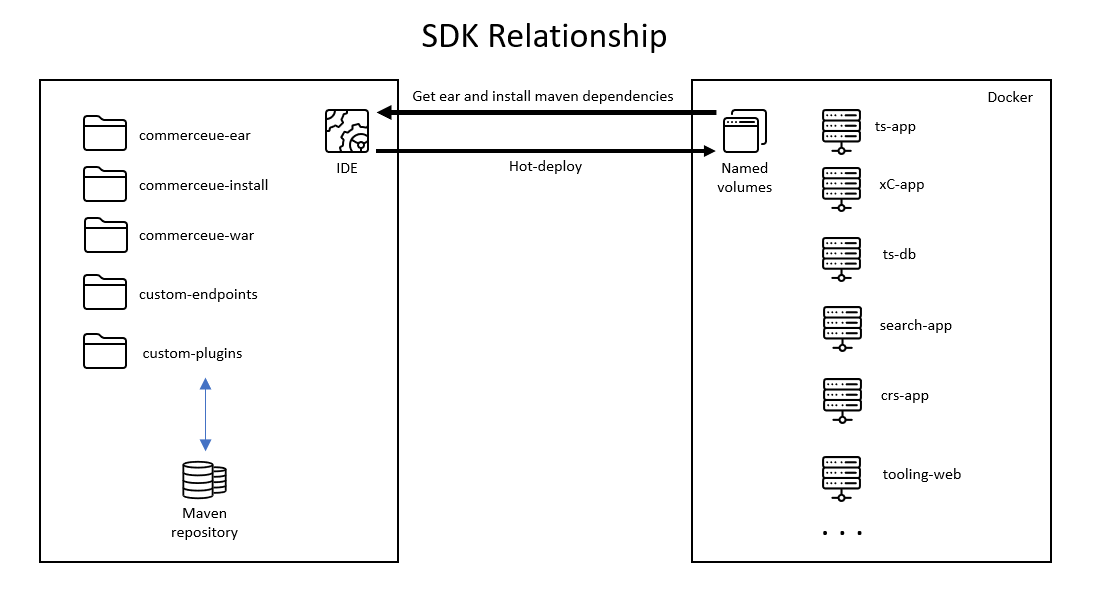
- custom-Connector
- Used for Connector customization following the Connector framework.
- commerceue-war
- Used for HCL Commerce command extensions.
- custom-endpoints
- Can be used for user defined APIs that can be consumed by front-end applications..
The project also provides an EAR project, commerceue-ear, which is used to package all WARs and utility JARs together for deployment on the Open Liberty Server.
Besides these J2EE projects, commerceue-install is also included in the maven project to help resolve the other Commerce library dependencies when building. The SDK does not provide the other commerce library artifacts. The xC runtime container must be deployed on the same development environment using the provided Docker-compose file. During container deployment, a named volume is created, and all commerce library artifacts are copied from the running container to this volume. Configure this volume path in the maven project so that maven build can locate the commerce artifacts locally from the volume path.
This volume can also be used for hot deploy purpose. Other runtime containers are not required for xC development and unit testing. Follow the provided instruction to build a xC container image and deploy it back to your ICC environment for integration testing. Optionally, you can deploy the other needed runtime containers, such as transaction server, to perform the integration testing.
Problems solved by the xC service
- The xC service allows the integration of custom extensions without modifying the core app code, allowing for better and smoother upgrades.
- The xC service model helps leverage Spring Boot and Open Liberty to simplify deployment of customization, so developers can focus on functionality.
- The xC model supports various IDEs rather than tying it to RAD in the past.
How to implement your xC extensions
- Define a Rest API.
- Register the extension code.
- Run the build commands and customize the flow: For more information, see
Commerce+ Transaction Server Command extensions.Note: Commerce+ Transaction Server only supports the xC customization model.
The xC service uses an Open Liberty Server on OpenJDK, with web applications executed via Spring Boot 3.x for development. For more information about setting up the server, see Setting up your xC development environment.