
Software Usage
Set up the initial configuration to import software usage data from BigFix Inventory into ServiceNow.
The Service Graph Connector (SGC) for HCL BigFix retrieves software usage data
and stores it in your ServiceNow tables. The Extract, Transform, and Load (ETL) process
stores data in the cmdb_sam_sw_usage table if the
com.snc.sam.core plugin is installed. Otherwise, the process stores
data in the x_hclte_sg_bigfix_software_usage custom table.
SG-BigFix Hardware
Inventory job.Activating Software Usage Data Import Job
- In the Application Menu, navigate to Service Graph Connector for
BigFix and select Import Schedules.
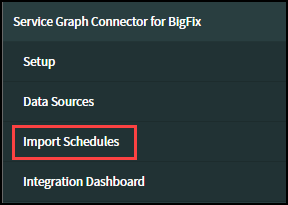
- In the list of import jobs, locate the SG-BigFix Software Usage and
SG-BigFix Software Usage Removal jobs. If the Active field
value for either job is false, change it to true.
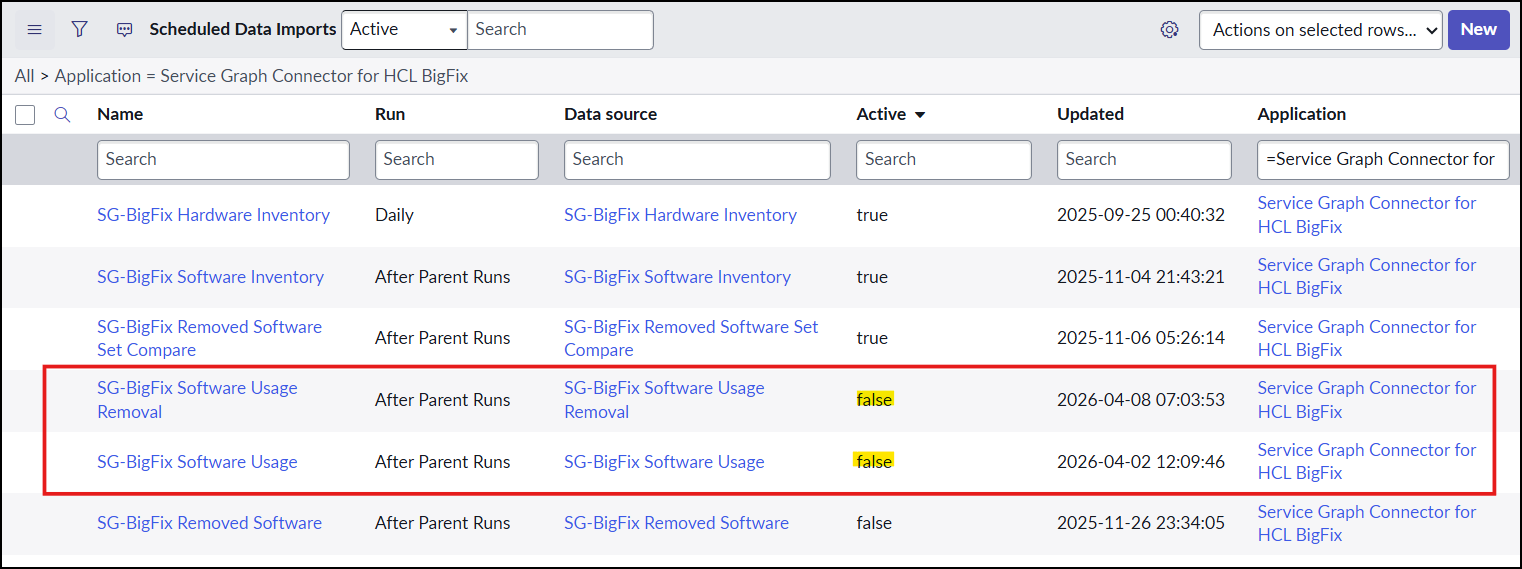
Once active, these jobs will be scheduled to run after the parent job (SG-BigFix Hardware Inventory) completes.
API Reference and Schema
For complete details on the API and schema, see the BigFix Inventory API documentation.
API URL
/api/sam/v2/software_instances?token=[FILTERED]&offset=0&limit=1000000&order[]=computer_id&criteria={"and":[["is_present","=","1"],["is_suppressed","=","0"],["computer_hardware.status","=","1"],["computer_os_type","!=","AIX"]]}&columns[]=computer_bigfix_id&columns[]=component_name&columns[]=component_release&columns[]=instance_id&columns[]=usage_data.avg_run_time&columns[]=usage_data.avg_runs_per_day&columns[]=usage_data.first_used&columns[]=usage_data.last_used&columns[]=usage_data.process&columns[]=usage_data.total_runs&columns[]=usage_data.total_time&columns[]=is_present&columns[]=is_suppressed&columns[]=computer_hardware.status&columns[]=component_detailed_version&columns[]=component_publisher_name&columns[]=computer_name&columns[]=computer_id&columns[]=discovery_start
Example API Response
{
  "Output Items": {
    "0": {
      "component_detailed_version": "2022.160.1000.6",
      "component_name": "Microsoft SQL Server for Microsoft SQL Server 2022 Developer Edition",
      "component_publisher_name": "Microsoft",
      "component_release": "2022.0",
      "computer_bigfix_id": "9963821",
      "computer_hardware": {
        "status": "1"
      },
      "computer_id": 1,
      "computer_name": "WIN-JI9D9AAQL7K",
      "connection_alias_id": "514ca7d21bba9090ff8c75561a4bcbf2",
      "discovery_start": "2025-09-24T03:09:54Z",
      "instance_id": 1,
      "is_present": true,
      "is_suppressed": "0",
      "usage_data": {
        "avg_run_time": 1549338.5555555555,
        "avg_runs_per_day": 0.05575303013703659,
        "first_used": "2025-09-23T17:51:52Z",
        "last_used": "2026-03-04T04:05:36Z",
        "process": "sqlservr.exe",
        "total_runs": 9,
        "total_time": 13944047
      }
    },
    "1": {
      "component_detailed_version": "16.0.1000.6",
      "component_name": "Microsoft SQL Server Import and Export Data",
      "component_publisher_name": "Microsoft",
      "component_release": "16.0",
      "computer_bigfix_id": "9963821",
      "computer_hardware": {
        "status": "1"
      },
      "computer_id": 1,
      "computer_name": "WIN-JI9D9AAQL7K",
      "connection_alias_id": "514ca7d21bba9090ff8c75561a4bcbf2",
      "discovery_start": "2025-09-24T03:09:54Z",
      "instance_id": 13,
      "is_present": true,
      "is_suppressed": "0",
      "usage_data": {
        "avg_run_time": null,
        "avg_runs_per_day": 0,
        "first_used": null,
        "last_used": null,
        "process": null,
        "total_runs": 0,
        "total_time": 0
      }
    }
  }
}
Data Field Mappings
| BigFix Inventory API | BigFix Inventory UI |
|---|---|
| computer_bigfix_id | Data Source Computer ID |
| component_name | Component Name |
| component_release | Component Version |
| instance_id | (not available) |
| usage_data.avg_run_time | Average Run Time |
| usage_data.avg_runs_per_day | Average Runs Per Day |
| usage_data.first_used | First Used |
| usage_data.last_used | Last Used |
| usage_data.process | Process Name |
| usage_data.total_runs | Total Runs |
| usage_data.total_time | Total Run Time |
| is_present | Present |
| is_suppressed | Suppressed |
| computer_hardware.status | Status |
| component_detailed_version | Component Detailed Version |
| component_publisher_name | Publisher Name |
| computer_name | Computer Name |
| computer_id | Internal Computer ID |
| CMDB Field Name | API Field Name | ETL Transformer |
|---|---|---|
| version | component_release | |
| times_used | usage_data.total_runs | |
| target_server | (internal computer reference) | |
| primary_key | component_publisher_name, component_name, component_release, computer_bigfix_id, SNOW Connection Alias ID | Yes |
| last_used | usage_data.last_used | |
| last_scanned | discovery_start | |
| duration | usage_data.total_time | Yes |
| display_name | component_name | |
| discovery_source | (value hard coded to SG-BigFix) | |
| publisher | component_publisher_name | |
| accessed_from | (internal computer reference) |
| Custom Table Field Name | API Field Name | ETL Transformer |
|---|---|---|
| u_first_used | usage_data.first_used | |
| u_last_used | usage_data.last_used | |
| u_discovery_source | (value hard coded to SG-BigFix) | |
| u_primary_key | component_publisher_name, component_name, component_release, computer_bigfix_id, SNOW Connection Alias ID | Yes |
| u_display_name | component_name | |
| u_total_time | usage_data.total_time | Yes |
| u_version | component_release | |
| u_average_runs_per_day | usage_data.avg_runs_per_day | |
| u_process | usage_data.process | |
| u_target_host | (internal computer reference) | |
| u_total_runs | usage_data.total_runs | |
| u_accessed_from | (internal computer reference) | |
| u_average_run_time | usage_data.avg_run_time | Yes |