
Wake-from-Standby by Magic Packet
Power Management tasks involve enabling or disabling Wake-from-Standby by Magic Packet, a broadcast packet that wakes computers. This can be done by adjusting network adapter settings in Windows to allow only magic packets to trigger the wake-up process.
Power Management includes two tasks for disabling and enabling Wake-from-Standby by Magic Packet. A Magic Packet, also known as the Wake-on-LAN packet, is a broadcast packet that wakes a computer.
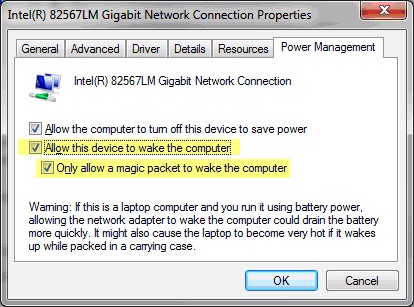
These tasks change the Windows network adapter setting from “Allow this device to wake the computer? to “Only allow a magic packet to wake the computer?. These settings are available in the network adapter properties in Windows.
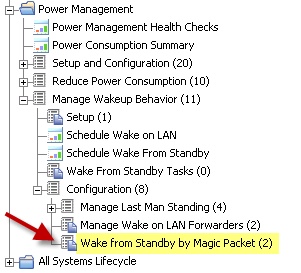
Access these tasks by clicking Wake-from-Standby by Magic Packet in the navigation tree and selecting the appropriate task in the List Panel.

To disable or enable Wake-from-Standby by Magic Packet, click the appropriate task and click in the Actions box of the task window to initiate the action.