
 Details panel for
component discovery
Details panel for
component discovery
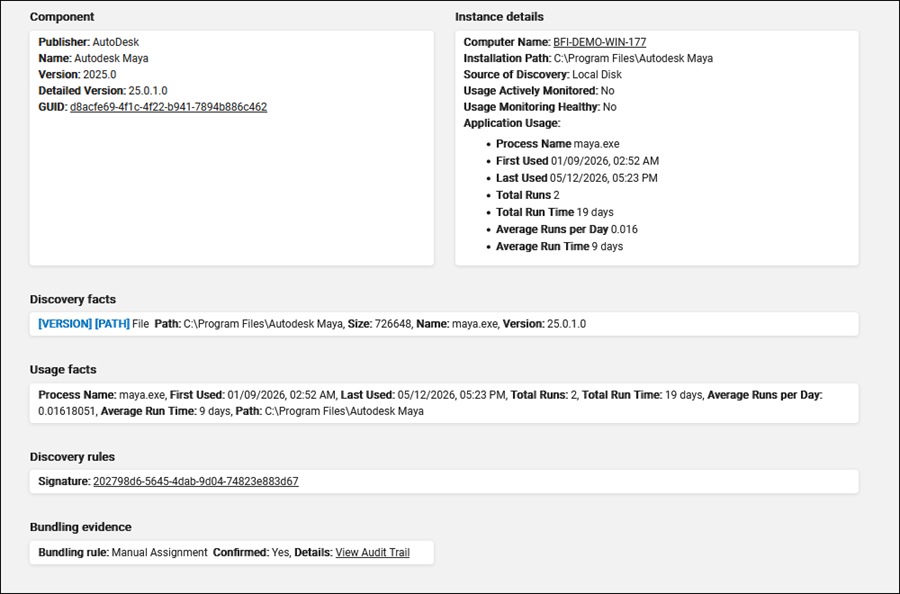
With version 11.0.4, BigFix Inventory provides more information in the Details panel for components discovered by Continuous Discovery Processing. Beginning with version 11.0.6.0, this information is also available for software discovered during regular imports, regardless of whether Continuous Discovery is enabled.
Notice:  From version 11.0.9, Discovery Facts section renamed to Discovery
Evidence
From version 11.0.9, Discovery Facts section renamed to Discovery
Evidence
From version 11.0.9, Discovery Facts section renamed to Discovery
EvidenceThe panel has six sections:
- Component - Provides important details about a software component, such as software name, software publisher, version, detailed version information, and the unique identifier (GUID).
- Instance Details - Shows the specific information about the instance, including the computer name, installation path, and detailed application usage data (if available), like process name, first and last used dates, total number of runs, total run time, average runs per day, and average run time.
- Discovery Evidence - Shows each fact that contributed to discovery. Labels like [PATH] and [VERSION] help you quickly identify the matched fact that was responsible for displaying a specific version or path of the component.
- Discovery Rules - Shows all signatures that matched this instance. Signatures marked with custom label indicate custom signatures, which helps you immediately distinguish them from standard catalog signatures.
- Instance Details - Shows the specific information about the instance, including the computer name, installation path, source of discovery, and detailed application usage data (if available), like process name, first and last used dates, total number of runs, total run time, average runs per day, and average run time.
- Usage Facts - List of matched processes with full paths and usage statistics.
 Bundling Evidence - The rule used to assign the component to a product.
Possible values include: Manual Assignment, Single Bundling Option, Upgrade
Based Inheritance, Computer Best Fit, Environment Wide Best Fit, Final Tie
Breaker.Depending on the rule, it can contain details that had an impact on choosing the current bundling:
Bundling Evidence - The rule used to assign the component to a product.
Possible values include: Manual Assignment, Single Bundling Option, Upgrade
Based Inheritance, Computer Best Fit, Environment Wide Best Fit, Final Tie
Breaker.Depending on the rule, it can contain details that had an impact on choosing the current bundling:- Confirmed - the source/target instance was confirmed,
- Shared - the source instance was shared,
- Source Computer ID - ID of the computer the bundling was copied from,
- Source Instance ID - ID of the inventory record instance the bundling was copied from,
- Confirmed - the source instance was confirmed,
- Entitled - the product was entitled,
- Name matching - product has the same name as the component,
- Sorting used - selected first valid product alphabetically,
- Default product metric - selected default metric for this product,
- No allowed bundling defined.
Labels
The following label specifications are available on the Details panel:
- Path - Shows the facts that are responsible for displaying a specific installation path of the component.
- Version Path - Shows the facts that are responsible for displaying a specific version of the component. For example, software name, software identification tag, license name, etc.
- Custom - Custom signature that matches the instance.
- Application usage - Application usage is displayed in three ways depending on data availability. It includes details like process name, first used, last used, total runs, total run time, average runs per day, and average run time.
 Source of Discovery - Shows where a given software instance was detected:
local or shared disk.
Source of Discovery - Shows where a given software instance was detected:
local or shared disk.-
Usage Actively Monitored - Indicates whether the usage of the software
component version and the operating system of a software component instance is
actively monitored. It shows 'Yes' when the usage has been detected for at least
one instance of a software component version on a particular type of operating
system.
-
Usage Monitoring healthy - Indicates whether the monitored usage data
have been successfully collected and processed by BigFix Inventory for the
computer within 14 days.
Note: There is a limitation about the new evidence that the file name
and the file size are not displayed for facts detected based on scanner rules that have
been converted from file rules (specifically, files with non-standard
extensions).