
Bundling Assistant Overview
Bundling Assistant allows product assignment for instances of newly discovered components. It is based on bundling rules, such as bundling tags, part numbers, partition collocation, infrastructure collocation, and stand-alone product discovery. Results of this assignment are shown on the Software Classification.
- Component Path Updates
This step detects cases of new discoveries being continuation of previous installation in different paths. The case is only valid when the previous one is closed (Discovery End) in the current Data Import. In such a case the classification is transferred to the new installation path.
InventoryBuilder: before processInventory -> ProductInventoryBO.processPathUpdates File paths processing progress initialized for 0 records. File paths processing progress: 100%. Processing completed. ProductInventoryDAO::processPathUpdates::(all times in ms): All commits: 1, Total processPathUpdates: 734, Total time of finding computers count to update: 703, Total updateRecordQuery: 0, Total insertSharedQuery: 0, Total insertSuppressionQuery: 0, Total insertBundlingTagQuery: 0, Total insertInstanceTagQuery: 0, Total insertUsageInventoryRelQuery: 0 - Component Reinstallations
This step expands the Component Path Updates. Instances included in the component path updates are not considered in this step. This step includes cases when the component, with a given release and install path, has been earlier detected as uninstalled, as has bundling confirmed. If there will be a new discovery of the same component version in the same path, this step will apply the last confirmed bundling for the component release in this path.
Data Import log entryInventoryBuilder: before processInventory -> ProductInventoryBO.processReinstallations - Product referenced by Bundling Tag
The next step is to process the collocated bundling tags. If there is a bundling tag pointing to a product available in the catalog, it is used as bundling. Column 'Bundling Tag Used' indicates if this step was used against a component instance.
Data Import log entry.InventoryBuilder: Processing of bundling tags started TagComponent instances affected by above steps are no longer in scope of the Bundling Assistant operation.
After Bundling Assistant execution is completed there are executed Custom Rules against all of Component Instances whose Discovery Start is after the last successful Data Import.
The Bundling Assistant Data Import log entries:BundleManager: runAutomaticBundling starting BundleManager: runAutomaticBundling -> Computing bundling options in time: 859 BundleManager: runAutomaticBundling -> There are 0 instances to reassign. BundleManager: runAutomaticBundling -> Reassign instances total time: 0 ms. BundleManager: runAutomaticBundling -> Autobundling for all report groups total time: 859 ms. BundleManager: runAutomaticBundling completed
Bundling assistance process
After a component is discovered, it undergoes the process of bundling assistance. During the process, bundling rules are applied to discover possible component-product relations. Each relation is evaluated and assigned an internal score. The component is assigned to the product with the highest score.If the discovered component belongs to the product and license metric assigned during bundling assistance, you can confirm the assignment. Otherwise, assign the component to a different product or license metric so that the relation reflects your entitlement, and confirm it. If the assignment is not confirmed, it might be automatically changed. It might happen when a new software catalog is uploaded or when a different product is suggested as the best bundling option based on the new results of bundling assistance.
Bundling rules
| Rule | Description |
|---|---|
| Custom bundling | This rule assigns a component to the product and license metric based on the custom bundling that was defined manually. |
 Bundling tags
 |
This rule assigns a component to the product and license metric that are represented by the part number listed in the bundling tag. The tag is placed on the computer where the component is installed which allows for assigning the specific instance of the component to the right product and license metric. |
| Part numbers/Setting entitlements | This rule uses part numbers that you upload to BigFix Inventory to
narrow down the list of products and license metrics to which a component can be
assigned to the ones that you purchased. The rule instructs bundling algorithm to
prefer products selected manually by end user through Set Entitlement
function or by Upload of Part numbers that is uploaded when suggesting bundling
option. Tip: If you often rebundle to some
product mark it is as 'Entitled'. |
| Partition collocation | This rule discovers components that are installed on the same partition and are related to the same product in the software catalog. |
| Infrastructure collocation | This rule discovers components that are installed in the same infrastructure and are related to the same product in the software catalog. The search does not include the computer on which the component is installed. |
| Minimal Path | Add extra points for the Software Product whose name got the lowest Levenshtein distance to the Component Name. |
| Stand-alone product discovery | This rule identifies components that have more than one default component to product relation and chooses the closest one using string-based distance metric. |
Algorithm iterates over each rule and for each bundling rule score is calculated according to formula below:
cl = cl + (1 - cl) * ruleScore / 100where cl is the previous value with initial value of 0.
Listing of Products used in Partition and Infrastructure collocation rules
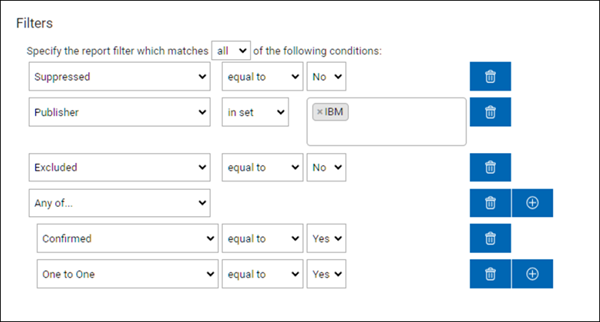
Software Classification can be filtered using following conditions for All Computers (Infrastructure) or given Computer (Partition) to get a list of Products used in Partition and Infrastructure collocation.
Adjusting Bundling rules scores
It is possible to tweak the score by making changes to adm.rule_type and
restarting the BigFix Inventory server. For new discoveries new scores will be used.
update adm.rule_type set score = 20 where rule_id='COLOC_AGT_RULE' --, 60, 'Partition Collocation')
update adm.rule_type set score = 40 where rule_id='MIN_PATH_RULE' --, 10, 'Min Path')
update adm.rule_type set score = 10 where rule_id='COLOC_SYS_RULE'--, 5, 'Infrastructure Collocation')
Upgrading Recognition
When a new component is discovered on a machine that already hosts one or more components previously assigned to a product, the Bundling Assistant attempts to inherit the product assignment from those existing components, regardless of whether the version is the same or different.
Upgrade Inheritance Rule
A newly discovered component inherits the product from an existing component on the same machine if that existing component qualifies under the selection criteria. Metric inheritance follows the same rule unless invalid for the new component.
- Confirmed Components (Highest Priority): Components marked as "confirmed" are evaluated first and always preferred.
- Present Components Over Non Present: If discovery dates tie, the following
order applies:
- Present Components (Discovery End Date blank)
- Non-Present: Components (Discovery End Date contains a date)
- Latest Discovery (Most Recent Discovery Start Date): If multiple candidates remain, the component with the newest discovery start date wins.