
Add New User
Following are the steps to add a new user:
- On the User page, select New User. The Add New User pop-up displays:
Figure 1. Add New User 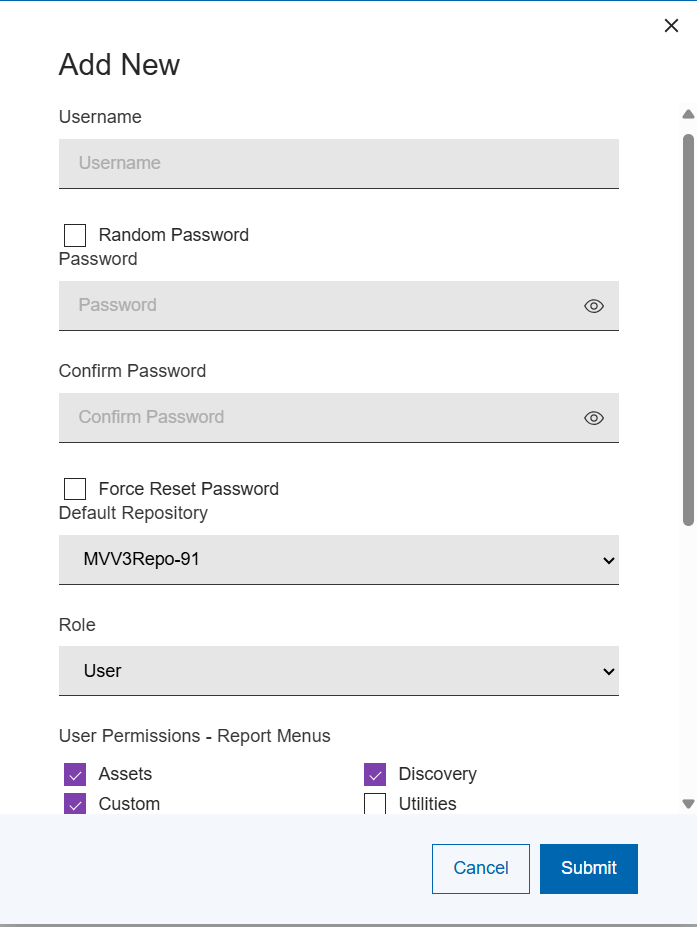
- Provide Username, Password, Default Repository, and Role for the new user
creation. The default role is User.
- The role can be either Admin, Auditor , or User based on preferences.
- When selecting the Admin role, you will have the same authority as the Admin, and the User Permissions section will be disabled as an Admin user has full authority enabled.
- Selecting an Auditor will enable a predefined set of read-only report and activity access permissions.
- For the User role, the Permissions section is enabled. Select the desired report access and repository database update actions for the user from the selections available.
- All account roles password rules are:
- Password must be min 8 characters long
- Password must contain at least one digit
- Password must contain at least one uppercase letter
- Password must contain at least one lowercase letter
- Password must contain at lease one special character
- Password must not contain any whitespace
- Select Save.