
Schedule replication
To keep your data current and accessible even while offline, HCL Nomad for Android
allows you to fully automate your data synchronization. From the dedicated Replication
page, you can easily schedule background replications, choosing the specific times
and intervals that best fit your daily workflow.
About this task
Procedure
- Tap the Replication Page button in the global action bar to open the replication page.
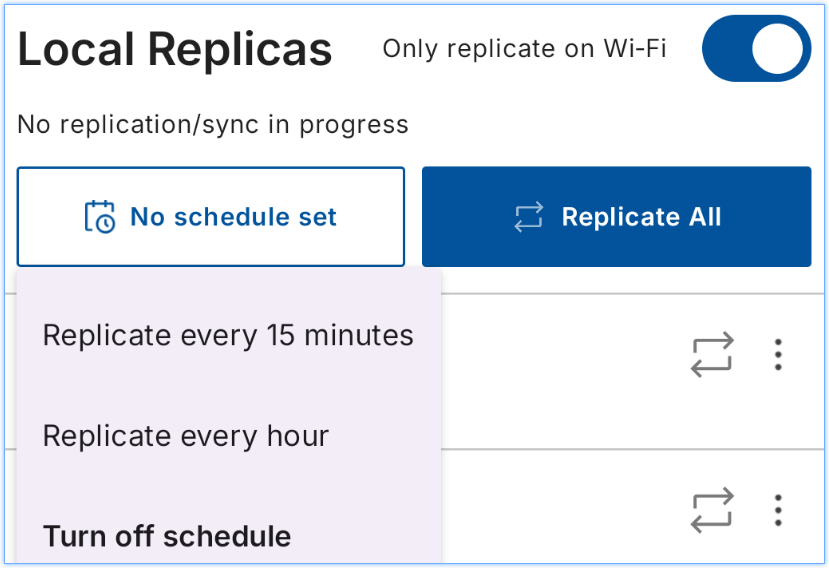
- Tap on the scheduled replication drown down menu on the top-left of the screen.
- Select from "Replicate every 15 minutes" or "Replicate every hour".
-
Nomad will replicate based on that interval. Due to Android restrictions if HCL
Nomad for Android is in the background, it is not guaranteed to execute
scheduled replication. If it does not, then it will execute scheduled
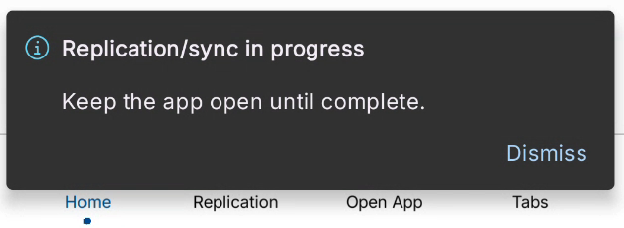
replication the next time the client comes to the foreground. Nomad will notify
the user when this happens with a banner message that says, "Replication/sync in
progress. Keep the app open until complete.
Example:
-
You can disable scheduled replication by tapping the scheduled replication drop
down and selecting "Turn off schedule".
Note: All your offline apps will now sync automatically based on the schedule you set. If you ever want to update them right away, you can still do it yourself at any time by tapping "Replicate All" or using the sync button inside a specific app.