
Activating License Servers
The following diagram shows a basic workflow that you need to follow to activate your license server:
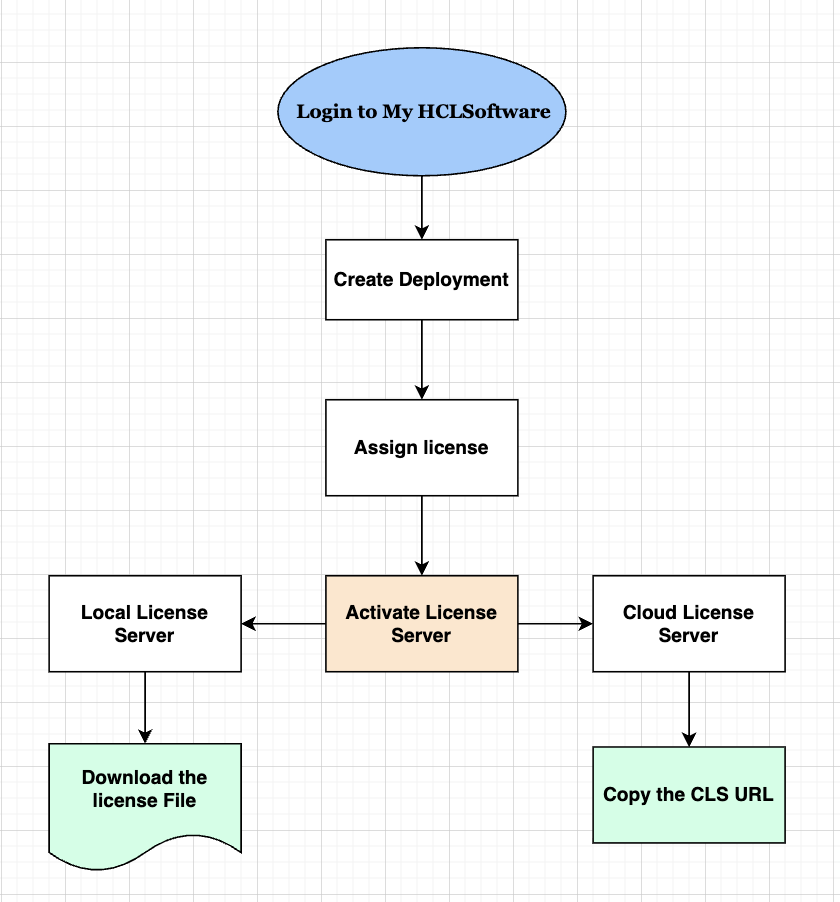
The License Server Activation is used to manage the activation of license servers within a deployment. It enables users to activate a license server that is associated with a specific deployment.
There are two types of license servers that can be activated:
- Local License Server: It is a centralized software system that serves licenses to HCLSoftware products. LLS is an application that users can install on a dedicated system within their network. LLS contains a pool of licenses that is consumed by the customer within the same network or shared network.
- Cloud License Server: It is an online licensing solution accessible from anywhere with an active network connection. Upon activation, MHS automatically provision a dedicated CLS instance and shares the corresponding URL for users to consume licenses.A URL to the cloud-based license server is provided.To check the available features and their expiration dates, users can use the CLS (Cloud License Server) URL.
After downloading the License Server file, users can update the fingerprint. However, updating the fingerprint is not allowed for all deployment types. Some deployment types are locked, preventing the fingerprint from being updated or modified once features have been allocated. If modifications are required for fingerprint updation of locked deployments, users can reach out to HCL support for assistance at https://support.hcl-software.com/csm?id=guest_csm_creation .