
Incident Management
For Integration of Jira ITSM tool with iAutomate, perform the following steps:
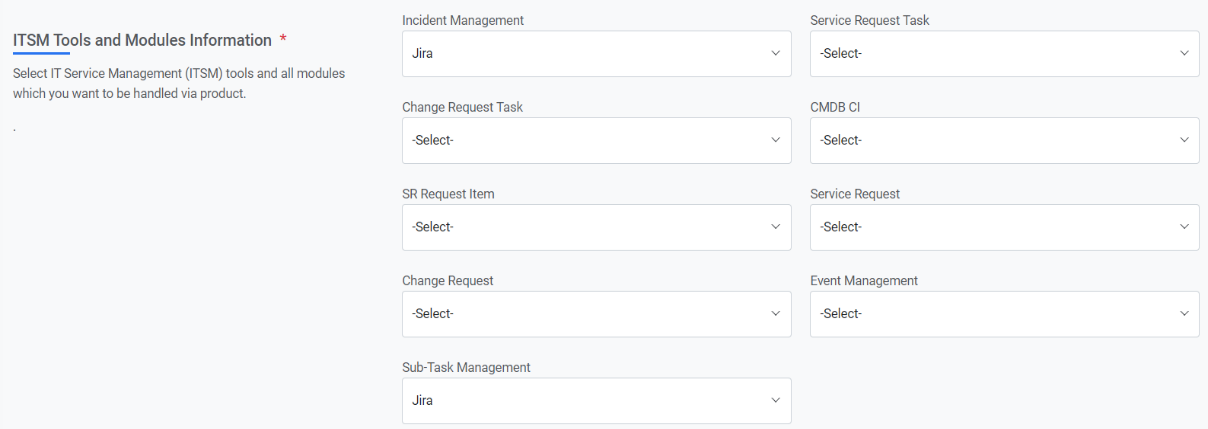
- Create Data Source:
- Fetch Data
- URL: URL>/rest/api/2/search?fields=#columns#&jql=issuetype=Incident AND status=Open AND updated >= "#start_date#" AND updated <= "#end_date#" ORDER BY updated DESC
- Authentication Type: Basic
- Request Method: GET
- URL Path Parameters:
Table 1. Sample Response Key Value Mapping Key Value Type Value #columns# Text key,description,summary,created,updated,
status,assignee,resolutiondate
#start_date# SQL UDF @@GetFromDateTimeUsingIncidentModifiedDate #end_date# SQL UDF @@GetToolCurrentDateTime - Response Body:
{ "expand": "schema,names", "startAt": 0, "maxResults": 50, "total": 3, "issues": [{ "expand": "operations,versionedRepresentations,editmeta,changelog,renderedFields", "id": "10102", "self": "http://<ipaddress>:<port>/rest/api/2/issue/10102", "key": "IT-48", "fields": { "summary": "REST ye merry gentlemen. Rest in peace", "resolutiondate": "2021-05-05T13:17:10.000+0530", "created": "2021-05-05T13:17:10.000+0530", "description": "Creating of an issue using project keys and issue type names using the REST API", "assignee": null, "updated": "2021-05-05T13:17:10.000+0530", "status": { "self": "http://<ipaddress>:<port>/rest/api/2/status/1", "description": "The issue is open and ready for the assignee to start work on it.", "iconUrl": "http://<ipaddress>:<port>/images/icons/statuses/open.png", "name": "Open", "id": "1", "statusCategory": { "self": "http://<ipaddress>:<port>/rest/api/2/statuscategory/2", "id": 2, "key": "new", "colorName": "blue-gray", "name": "To Do" } } } }] } - Mandatory Parameter Mapping:
Figure 2. Mandatory Parameter Mapping 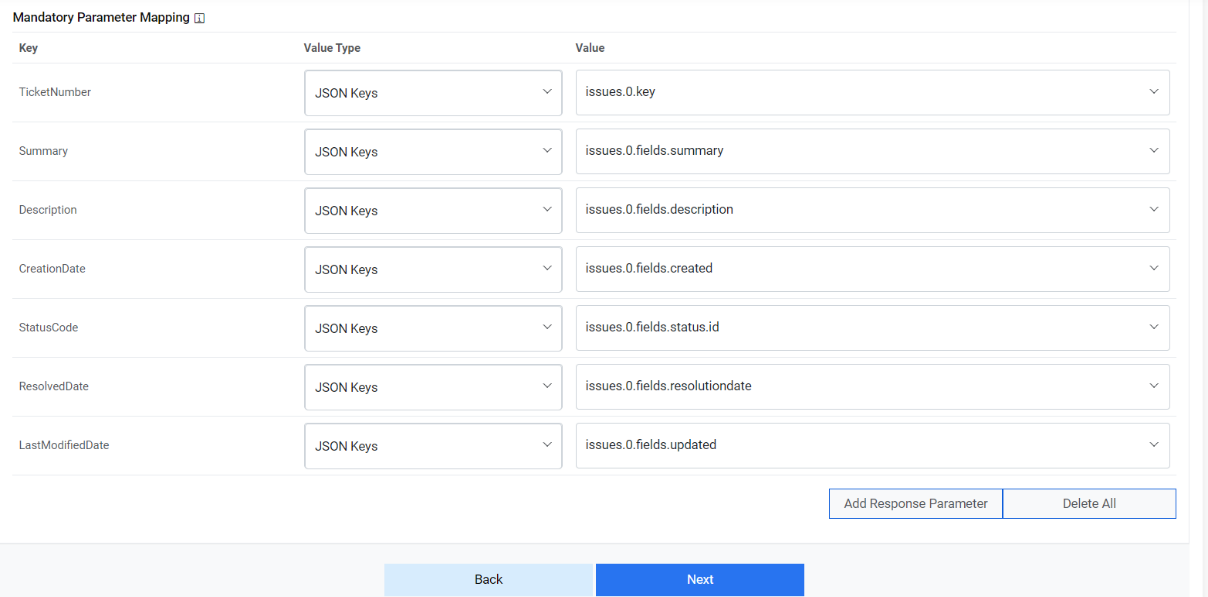
- Optional:
Figure 3. Optional 
- Release Rule:
For release, Jira has 3 different APIs to change the assignee, to add a comment and to add worklog. So, we are using iAutomate Custom Script API to update all 3 operations with one single API.
Note:To create Custom API, go to Manage Custom Script Section.URL: https://url.servicenow.com/api/now/v1/table/sc_request?sysparm_fields=#Columns
- Authentication Type: Basic
- UserId: myuser@hcl.com
- Password: ********
- Request Method: POST
- Authentication Type: Basic
- Request Body:
{ "key": "#ticketId#", "URL": "http://<ipaddress>:<port>/rest/api/2/issue/", "assignee_name": "#assignee_name#", "release_comment":"Ticket_released_from_iAutomate " } - Response
Body:
{"result":"#success#"}Figure 4. Response Body 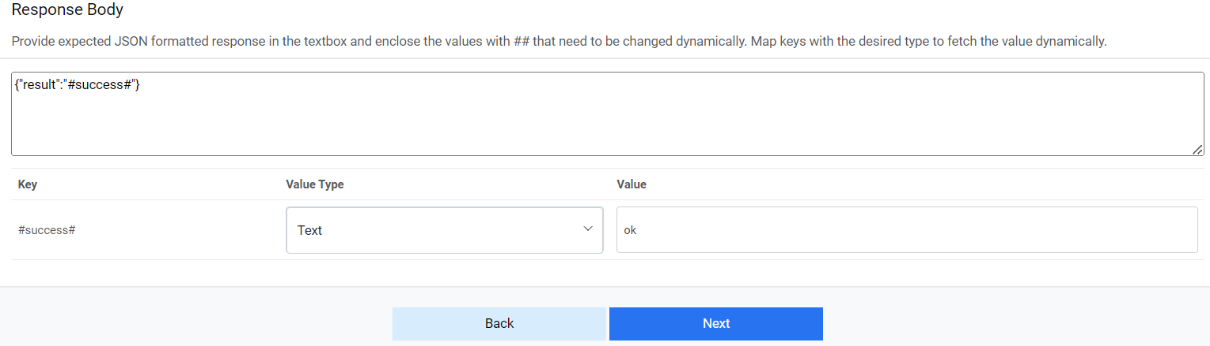
- Close Rules:
- URL: http://<ipaddress>:<port>/rest/api/2/issue/#key#/transitions
- Authentication Type: Basic
- Request Method: POST
URL Path Parameters:
Key Value Type Value #key# Table.Columns Col1 - Request Body:
{ "update": { "comment": [ { "add": { "body": "#worknote#" } } ] }, "transition": { "id": "#statuscode#" } } - Response
Body
{“result" : "ok" } - InProgress Rules:
- URL: https://url.servicenow.com/api/now/v1/table/sc_request?sysparm_fields=#Columns
- Authentication Type: Basic
- Request Method: POST
URL Path Parameters:
Key Value Type Value #key# Table.Columns Col1
- Request Body:
{ "update": { "comment": [ { "add": { "body": "#worknote#" } } ] }, "transition": { "id": "#statuscode#" } } - Response
Body:
{ "result" : "ok" }
JsResponseConverter: After successful creation of data source, follow these steps -
- Go to CollectIncident job under menu Configuration 🡪 Manage Jobs.
- Click on
 icon. A popup will be
opened.
icon. A popup will be
opened. - Go to parameter tab and search for ‘JsResponseConverter’ in the end. Replace its
value with below
string:
if(json.issues){for(var result=[],i=0;i<json.issues.length;i++)result.push(json.issues[i]);customJobject.dataCollectorNode.data.issues=result}
Manage Rules:
For each of the release, close, and in-progress rules are defined as follows:
- Release Rules:
Parameter Value Type Value #assignee_name# Text Assignee_user #ticketId# Table.Columns Col1 - Close Rules:
Parameter Value Type Value #worknote# Text Tickets closed from iAutomate #ticketId# Text 91 - In Progress Rules:
Parameter Value Type Value #worknote# Text Ticket marked to in progress #ticketId# Text 31
Manage Custom Script:
To use multiple Jira APIs that are being used while releasing an incident, you need a python script that contains the calling of all required APIs.
- For that go to page Advance Configuration 🡪 Script🡪 Manage Custom ScriptRBA.
- Select Input Mode as Manual, Script Language as Python, enter the name of script in the Script Name textbox.
- Enter Tags (if needed) and paste the content below in the Script Text
textbox.
import json
import requests
import sys
try:
##url = "http://<ipaddress>:<port>/rest/api/2/issue/IT-90/assignee" //update assignee
## Mandory
resp = json.loads(sys.argv[2])
url = resp["URL"] + resp["key"] + "/assignee"
payload = json.dumps({
"name": resp["assignee_name"]
})
headers = {
'Authorization': 'Basic QXNoaXNoTWlzaHJhOkluZGlhQDEyMw==',
'Content-Type': 'application/json'
}
response = requests.request("PUT", url, headers=headers, data=payload)
print(response.text)
import requests
import json
import sys
##url = "http://<ipadress>:<port>/rest/api/2/issue/IT-90" //add comment
resp = json.loads(sys.argv[2])
url = resp["URL"] + resp["key"]
payload = json.dumps({
"update": {
"comment": [
{
"add": {
"body": resp["release_comment"]
}
}
]
}
})
response = requests.request("PUT", url, headers=headers, data=payload)
print(response.text)
import requests
import json
import sys
##url = "http://<ipaddress>:<port>/rest/api/2/issue/IT-90/worklog" //add worklog
## Mandory
resp = json.loads(sys.argv[2])
url = resp["URL"] + resp["key"]+"/worklog"
payload = json.dumps({
"comment": resp["release_comment"],
"timeSpentSeconds": 6000
})
response = requests.request("POST", url, headers=headers, data=payload)
print(response.text)
except Exception as e:
message = {"Error": "Error in running Script, Error=>" + str(e)}
message = json.dumps(message)
code = 400
print(str(message))