
Integration with BigFix_SA
To manage / onboard BigFix_SA as the RBA tool, perform the following steps:
- On the main menu bar, click Runbooks, and then click Manage Runbook Tool. The Manage Runbook Tool appears.
- Click Add New to add a new tool or click to edit existing runbook automation tool.
- Select an organization for which you need to create a runbook tool in the Organization Name field.
- Type the runbook tool name in the Runbook Tool Name field.
- Select BigFix_SA from the Runbook tool type drop-down.
- Select REST API as integration method for BigFix_SA for the integration method field.
Figure 1. Manage Runbook Tool 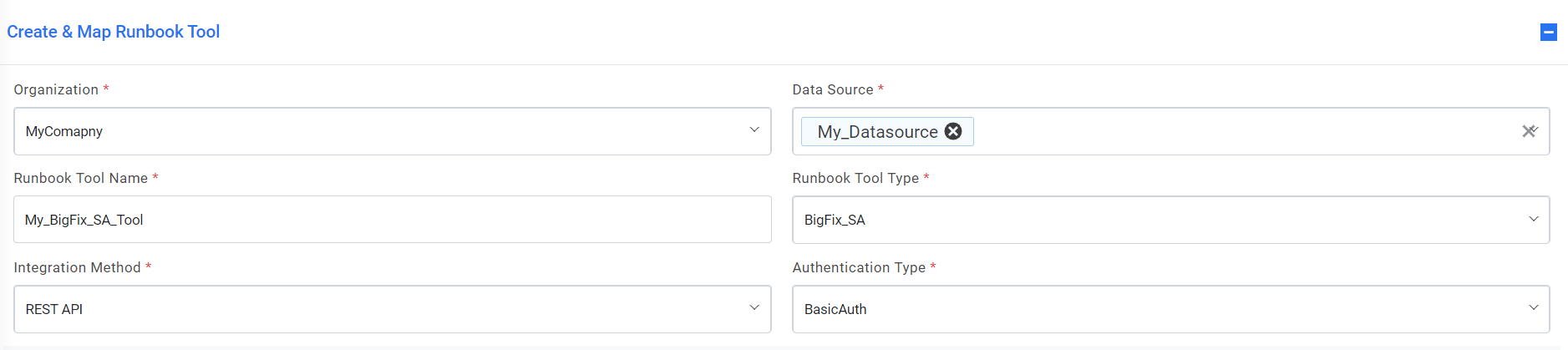
- Select one of the Authentication Type from BasicAuth,
- Selection of BasicAuth requires you to enter-
- User Id
- Password
- Type the URL in the API URL field, sample: http://<ippaddress>:<port>
- Type the Platform API URL of BigFix in the Platform API URL field, sample: http://<ippaddress>:<port>
- Select the integration method type as POST.
- Type the username and password in the User Id and Password field to get access to API web
service.Note:API URL, User ID, and Password are dependent on the selected integration method
- Specify the path to get consolidate script for the execution of runbook in the master
Runbook path field. This will be provided by respective runbook tool teams if they have a
master runbook.Note:This is not a mandatory field. Users can change and run these scripts any time.
- Select Proxy required, if the environment needs access to contact from the server outside a firewall.
- Type the return code in the return code Key field to identify the success or failure of runbook execution. E.g. status
- Type the return message key in the return message key field to display the success or failure of runbook execution. E.g. result
- Type the Toil Value (for manual execution) which implies the manual execution time of runbook under this tool (in minute)
- Type the Toil Value (for auto execution) which implies the manual execution time of runbook under this tool (in minute) if available else it’s a non- mandatory field.
- Type the Connection Retry Count which implies the no. of time connection would be made
with RBA tool server in case of connection failure.
Figure 2. Manage Runbook Tool (Cont.) 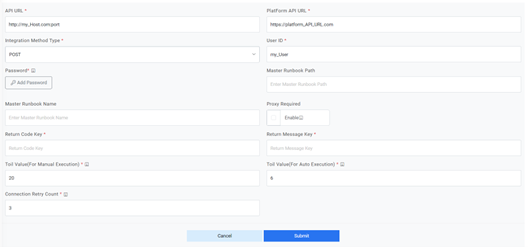
- Click Submit/Update for adding a new tool or making changes in an existing tool. An appropriate success message will be displayed.