
Integration with BigFix
To manage / onboard BigFix as the RBA tool, perform the following steps:
- On the main menu bar, click Runbooks, and then click Manage Runbook Tool. The Manage Runbook Tool appears.
- Click Add New to add a new tool or click
 to edit an existing runbook automation tool.
 - Select an organization for which you need to create runbook tools in the Organization Name field.
- Type the runbook tool name in the Runbook Tool Name field.
- Select BigFix from the Runbook Tool Type drop-down.
- Select REST as the integration method for BigFix for the Integration Method
field.
Figure 1. Manage Runbook Tool (Cont.) 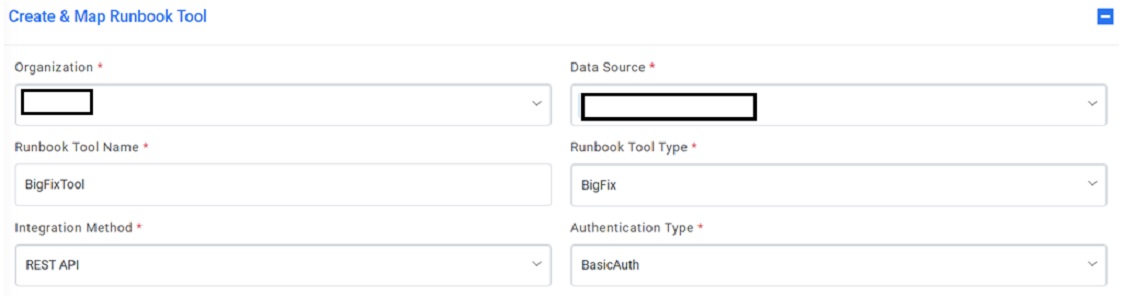
- Select one of the Authentication Type from BasicAuth
- Selection of BasicAuth requires you to enter:
- User Id
- Password
- Selection of BasicAuth requires you to enter:
- Type the URL in the API URL. field.
- Sample URL - https://hclo365-my.sharepoint.com/personal/sweta_gupta_hcl_com/Documents/Documents/Work/iAutomate/iAutomate%206.2/DOCs/%20https:/%3cip%3e:%3cport%3ehttps://url.servicenow.com/api/now/v1/table/sc_request?sysparm_fields=#Columnshttps://hclo365-my.sharepoint.com/personal/sweta_gupta_hcl_com/Documents/Documents/Work/iAutomate/iAutomate%206.2/DOCs/%20https:/%3cip%3e:%3cport%3e
- Select the Integration Method Type as POST
- Type the username and password in the User ID and Password
field to get access
to API web services.Note:API URL, User ID, and Password are dependent on the selected integration method
- Specify the path to get the consolidated scripts for the execution of runbooks in the
Master Runbook Path field. This will be provided by
respective Runbook Tool teams if they have a master runbook.Note:This is not a mandatory field. Users can change and run these scripts any time.
- Select Proxy Required, if the environment needs access to content from servers outside a firewall.
- Type the return code key in the Return Code Key field to identify the success or failure of runbook execution. E.g. status
- Type the return message key in the Return Message Key field to display the success or failure of runbook execution. E.g. result.
- Type the Toil Value (For Manual Execution) which implies the manual execution time of runbook under this tool (in minutes).
- Type the Toil Value (For Auto Execution) which implies the auto execution time of
runbook under this tool (in minutes), if available else it’s a non-mandatory field.
Figure 2. Manage Runbook Tool (Cont.) .png)
- Click Submit / Update for adding a new tool or making changes to an existing tool. An appropriate success message will be displayed.