Installing Apache Airflow
This section provides a step-by-step guide to installing Apache Airflow.
About this task
Apache Airflow (or simply Airflow) is a platform to programmatically author, schedule, and monitor workflows. In Airflow, workflows are defined as code, and they are more maintainable, versionable, testable, and collaborative.
You can use Airflow to author workflows as directed acyclic graphs (DAGs) of tasks. The Airflow scheduler executes tasks on an array of workers while following the specified dependencies. Availability of a rich set of command line utilities help performing complex surgeries on DAGs. The user interface makes it easy to visualize pipelines running in production, monitor progress, and troubleshoot issues when needed.
Procedure
-
Add Apache Airflow repositories to helm configuration.
helm repo add apache-airflow https://airflow.apache.org helm repo update -
Download the Helm charts to local.
mkdir -p /home/user/airflow-chart-download cd /home/user/airflow-chart-download # Download the chart locally, # it should download a tarball in the same directory helm pull apache-airflow/airflow # untar the downloaded tarball tar -zxvf airflow-1.14.0.tgz -
Update the airflow image with the HCL provided airflow image details in the
helm chart inside the values.yaml as below.
vi /home/user/airflow-chart-download/airflow/values.yamlEdit below properties
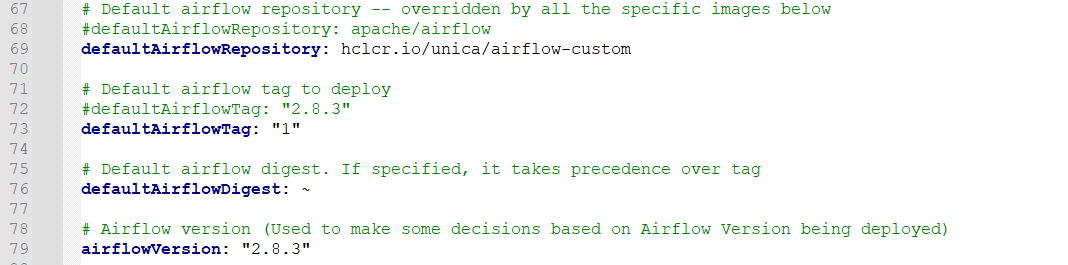
defaultAirflowRepository: hclcr.io/unica/airflow-custom
defaultAirflowTag: "1"
airflowVersion: "2.8.3"
The properties will look like below:
-
Update the security context in PostgreSQL values.yaml as below to disable
seccompProfile.
vi /home/user/airflow-chart-download/airflow/charts/postgresql/values.yaml -
Update the OpenShift SCC and grant necessary permissions to all the below
listed service accounts to deploy the pods.
<your airflow deployment namespace>-create-user-job if your namespace is airflow, the below all service accounts will be created when you deploy the helm chart. so grant the necessary permission in the SCC for all the service accounts. airflow-create-user-job airflow-migrate-database-job airflow-redis airflow-scheduler airflow-statsd airflow-triggerer airflow-webserver airflow-worker default -
Deploy the Apache Airflow using Helm.
helm upgrade --install airflow /home/user/airflow-chart-download/airflow --namespace airflow --create-namespace --debug --timeout 15m -
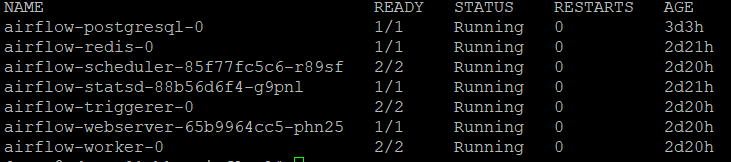
After deploying Apache Airflow, verify the deployed pods.
kubectl get pods --namespace airflowAs a result, the output will be as shown below:
-
Configure Apache Airflow. Expose the Airflow web server service, which will
create the route to access the Airflow UI.
oc expose svc airflow-webserver -n airflow
oc get routes -n airflow
Access the airflow UI application using the HOST/PORT URL.