
Enabling federated login with OIDC for Notes
Enable Notes federated login with OIDC to allow Notes clients users to start Notes and perform secure operations without being prompted for a Notes ID password.
About this task
Note:
- Federated login with OIDC for the Notes client is supported only when Domino is the OIDC Provider.
- Notes client authentication with OIDC uses an external browser.
- Only Notes Standard client is supported.
Procedure
- Make sure that you have enabled Bearer token (JWT) authentication to the Notes ID vault by following the steps in Configuring users for federated login with OIDC.
- In the Domino® Directory, open the existing Security Settings policy for users of your organization’s ID vault.
- Select the tab.
- Select No in the Enable Notes Federated login with SAML IdP field. (Although SAML is supported, you can enable either OIDC or SAML in the Security policy, not both.)
-
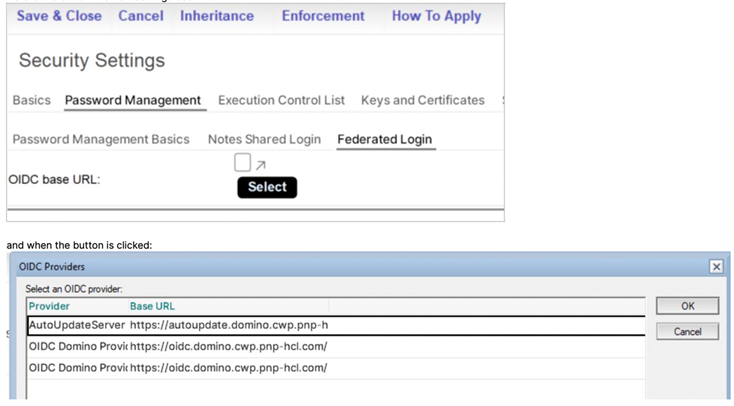
Click the Select button. The OIDC providers dialog box
opens.
-
In the Select an OIDC provider field, select the Domino
OIDC provider for the Notes clients.
Your selection populates the OIDC base URL field.