
Configuring users for federated login with OIDC
Web federated login with OIDC uses Bearer token (JWT) authentication to access the Notes ID vault. Enable Bearer token (JWT) authentication to the Notes ID vault in a Security Policy Settings document and apply that policy to the desired users.
Procedure
- In the Domino directory, open the existing Security Settings policy for users of your organization’s ID vault.
-
On the ID Vault tab, make sure there is an assigned
vault.
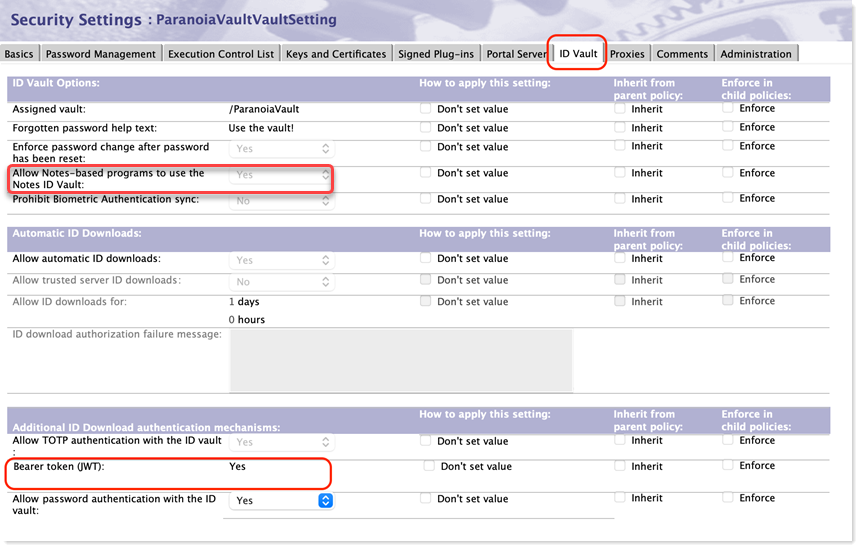
- Under the "Additional ID Download authentication mechanisms" section select Yes for Bearer Token (JWT).
-
For client deployments that have been upgraded to the current release, when the
policy is initially being deployed, select .
Note: After a user has been verified to be working with federated login, a recommended security improvement is to change Allow password authentication with the ID vault to No. When password authentication with the ID vault is not allowed, users are required to authenticate to the vault with federated login in order to download the user's ID for either Notes or Web use. Change "Allow password authentication wih the ID vault" to "No" only if it is the case that no client deployment should allow password authentication to the ID vault.
- Save and close the security policy.
Results
For any user that the policy applies to, the settings for Web federated login will be activated on the user's next login.