
Configuring the Domino HTTP server for Web federated login with OIDC
Add the Web federated login with OIDC references to an existing configuration for Web login with OIDC.
Procedure
- From the Domino Administrator, open the IdP Catalog application (idpcat.nsf).
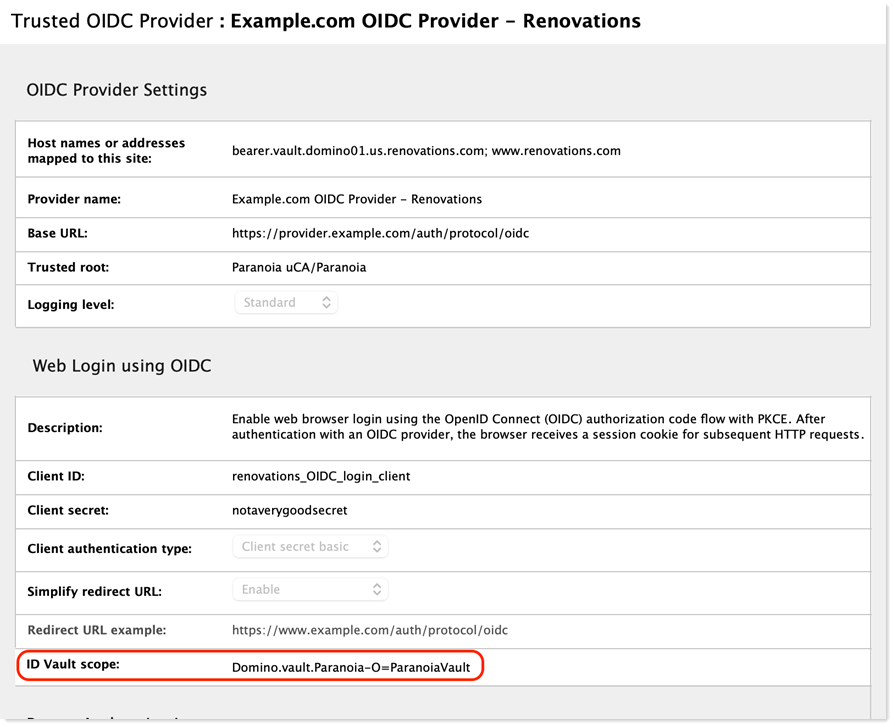
- From the Trusted Identity Providers / OIDC view, open the Trusted OIDC Provider document that was previously configured for federated login with OIDC.
-
Edit the ID vault scope field and add a four-part
string: "Domino.vault." + the "O" portion of the vault server's host name +
"-O=" + the vault name found in step 3 of "Configuring the
ID vault for federated login with OIDC." For example, a Domino vault
name of "ParanoiaVault" hosted on a Domino server named "ultraviolet/Paranoia"
would have an ID vault scope of "Domino.vault.Paranoia-O=ParanoiaVault" .
Starting in 14.5.1, vault scopes that include spaces and slashes are supported.
Any space characters in the vault scope should be replaced with the underscore
('_') character when configured in idpcat Trusted OIDC Provider and Registered
OAuth Client documents. This enhancement only requires upgrading the ID vault
server.
- Save and close the Trusted OIDC Provider document.