Configuring the OIDC provider for Web federated login with OIDC
Add the Web federated login with OIDC references to your OIDC provider's existing configuration for Web login with OIDC.
Procedure
- Open your OIDC provider's configuration page for the previously configured partnership for Web login with OIDC.
- Add the ID vault scope value from step 3 of Configuring the Domino HTTP server for Web federated login with OIDC to the list of allowed scopes for this partnership. Starting in 14.5.1, vault scopes that include spaces and slashes are supported. Any space characters in the vault scope should be replaced with the underscore ('_') character when configured in idpcat Trusted OIDC Provider and Registered OAuth Client documents. This enhancement only requires upgrading the ID vault server.
-
Add the ID vault scope value minus the leading
"Domino.vault." as the default audience value for this partnership.
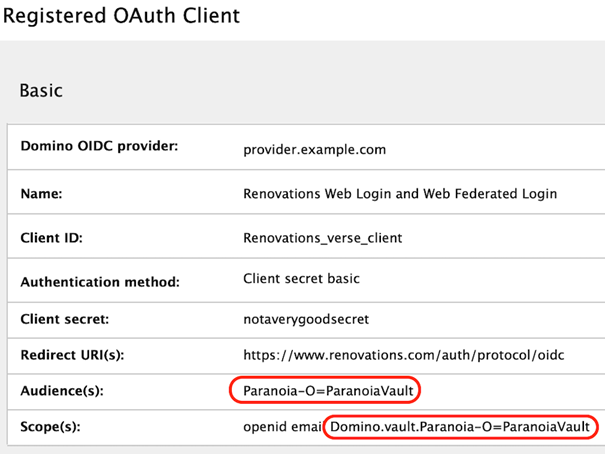
A Domino Vault name of "ParanoiaVault" hosted on a Domino server named "ultraviolet/Paranoia" would have a scope of "Domino.vault.Paranoia-O=ParanoiaVault" and an audience of "Paranoia-O=ParanoiaVault".
Note that when configuring the Domino OIDC provider for multiple audiences, this ID vault audience must be the first audience to make it the default audience.
These steps will vary based on provider - the following screenshot shows the example configuration with a 14.5 Domino OIDC provider. See Configuring Domino as an OIDC provider for more details.