
Configuring the ID vault for federated login with OIDC
The ID vault administrator must approve the use of an OIDC provider (OP) that will provide OIDC credentials. The ID vault administrator decides which OP is trustworthy. Only credentials from a trusted OP can be used for downloading an ID file stored in this ID vault. The administrator supplies host names for OIDC partnerships to the ID vault in a vault document. The vault server uses the host names to look up information about trusted OPs from the IdP Catalog application (idpcat.nsf).
Procedure
- From the Domino® Administrator, open the ID vault application (idvault.nsf), which by default is stored in the IBM_ID_VAULT directory.
-
From the Configuration view, open the vault document for the vault that will be
configured for OIDC authentication.
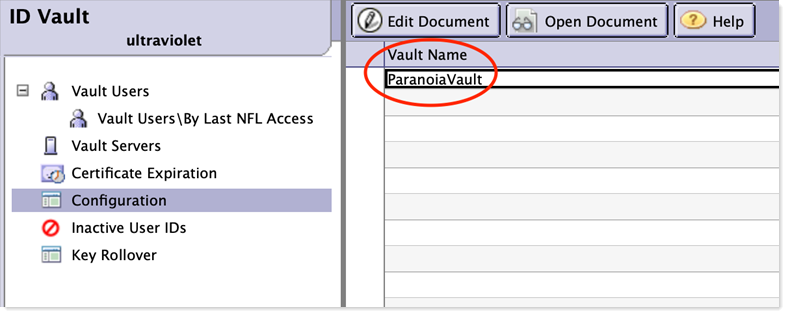
- Write down the name of this vault, found in the Vault Name field. This will be needed for a later step.
-
Populate the Bearer token (JWT) approved OIDC provider
configurations field with the DNS host name of the ID vault
server preceded with the string "bearer.vault.". For example, for an ID vault
server with a host name of "domino1.us.renovations.com" enter a value of
"bearer.vault.domino1.us.renovations.com". Note that only a single value may be
present in this field.
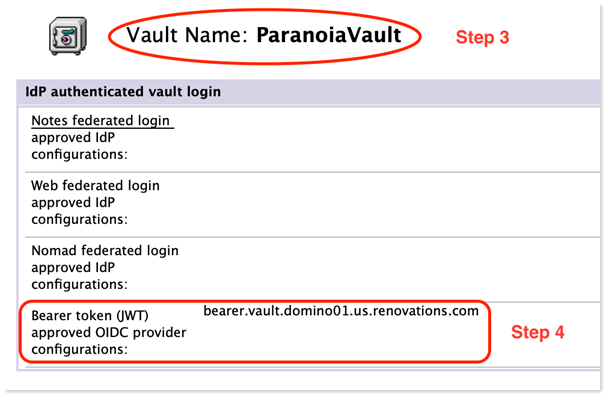
- Save and close the vault document.
- From the Domino Administrator, open the IdP Catalog application (idpcat.nsf).
- From the Trusted Identity Providers / OIDC view, open the Trusted OIDC Provider document that was previously configured for Web login with OIDC.
-
Manually edit the Host names or addresses mapped to this
site field and add the value from step 4 (example of
"bearer.vault.domino1.us.renovations.com") to the list. Note that using the
Internet Site picker button next to this field might overwrite any manually
added host names. Starting in 14.5.1, this value may be added to multiple
Trusted OIDC Provider documents in order to configure the ID vault to trust
multiple OIDC providers.
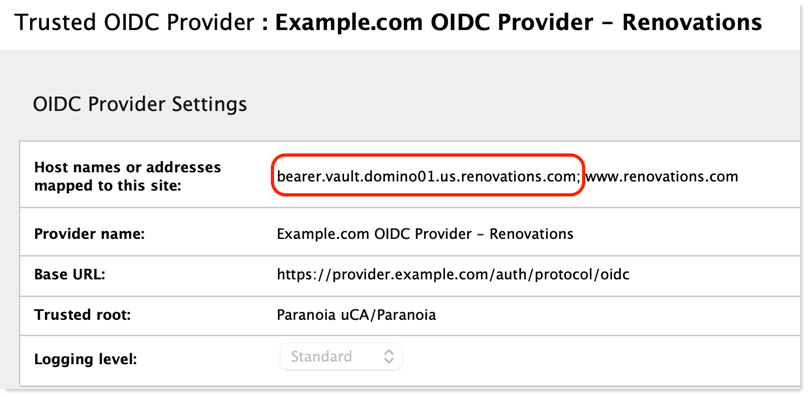
- Save and close the Trusted OIDC Provider document.