
Adding a Domino IQ Configuration for Remote mode
In Remote mode, every Domino IQ server needs its own Configuration document that associates the Domino server name with an LLM (model) used by the AI inferencing engine running on a the remote server, outside of the HCL Domino IQ server instance.
Procedure
- Using the Domino Administrator client, open the Domino IQ database , dominoiq.nsf, on the Domino IQ Administration server.
- Select the Configurations view and click the Add Configuration button.
- On the Basics tab, in the AI endpoint field, select Remote.
- Select the name of a Domino IQ server from the list.
- Specify the name of the download model from the LLM Model document. Use the model naming convention that the remote AI server typically specifies for launching its inferencing engine. The model name is sent as part of the /v1/chat/completions request payload.
- Set the Status field to Enabled, so that the Domino IQ task gets loaded on the server.
- Provide the AI endpoint URL. The endpoint supported is HTTPS only. For example:
https://endpoint-serv.example.com/v1/chat/completions
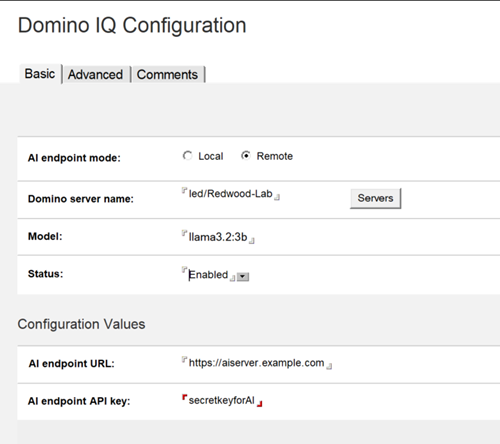
Provide an API Key to use for the remote AI endpoint. This is the only form of authentication supported by HCL to the remote AI endpoint/server, as it secures the requests sent over TLS to the remote AI endpoint/server.
-
Add the Trusted roots for the remote AI server to Domino's Certstore database. See Adding trusted root certificates for more information.
Note: For remote AI endpoints, the Advanced tab in the Configuration document doesn't contain any settings that apply to this configuration. - Save the document.
What to do next: