
Adding a Domino IQ Configuration for Local mode
In Local mode, every Domino IQ server needs its own Configuration document that associates the Domino server name with an LLM (model) used by the AI inferencing engine running on the server. The Configuration document also specifies the port number and use of TLS (as localhost), along with several runtime and tuning parameters used for running the AI inferencing server.
Procedure
- Using the Domino Administrator client, open the Domino IQ database , dominoiq.nsf, on the Domino IQ Administration server.
- Select the Configurations view and click the Add Configuration button.
- In the AI endpoint field, select Local.
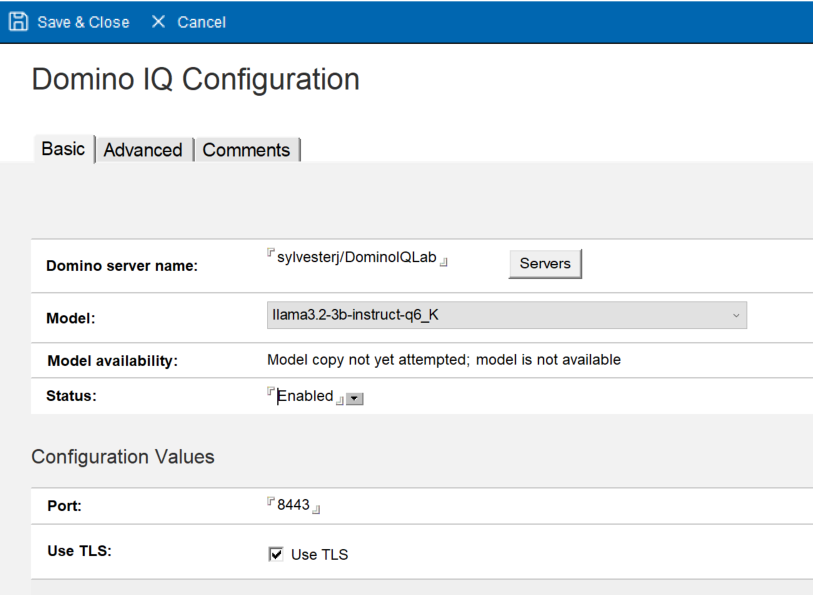
- Select the name of a Domino IQ server from the list.
- On the Basics tab, specify the name of the download model from the LLM Model document.
- Set the Status field to Enabled, so that the Domino IQ task gets loaded on the server.
- Select the port number for the AI Inference server started as "localhost" to run on the Domino IQ server. The default port for non-TLS is 8080 and for TLS is 8443. TLS can be optionally enabled by checking the Use TLS option.
- Configure TLS Credentials using Certstore. Complete this step only if you use
TLS for https communication between the Domino server process and the AI Inference
server running as localhost.
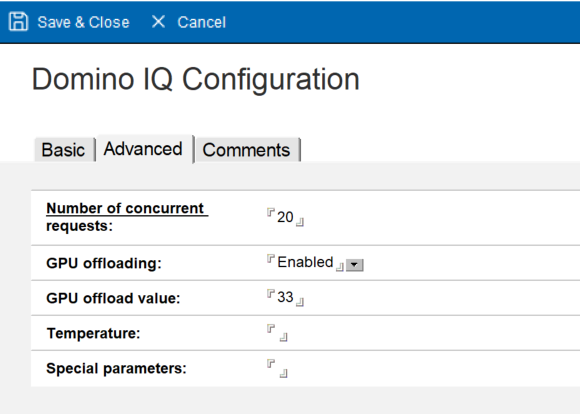
- On the Advanced tab, you can specify the number of concurrent CPUs and GPU
offloading enablement, and number of layers to offload to GPU, to automatically
build the Domino IQ server launch parameters.
- Save the document.
What to do next: