
Enabling Domino IQ servers
Use the Domino Directory to set up one or more Domino IQ servers.
- Upgrade the design of Domino Directory to latest 14.5 Domino Directory (pubnames.ntf) on the Domino Administration server in the Domain.
- Open the Domino Directory and from the Actions menu, run the Edit Directory Profile action.
-
On the Domino IQ tab, in the Domino IQ
servers(s) list or group field, complete the action that applies
in your environment.
- When Server(s) is selected in the
Configure Domino IQ using field, type the name of
the server you want to configure for IQ, or click the
Servers button to select the servers to
configure.
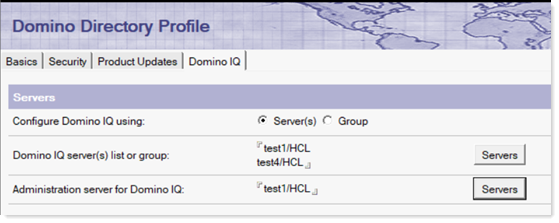
- When Group is selected in the Configure Domino IQ using field, type the name of the group or click the Group button to select the groups.
- When Server(s) is selected in the
Configure Domino IQ using field, type the name of
the server you want to configure for IQ, or click the
Servers button to select the servers to
configure.
- In the Administration server for Domino IQ field, select one of the servers as the primary administration server. This will be the primary server where you should make all configuration-related changes for all Domino IQ servers, to avoid replication conflicts.
- Replicate the Domino Directory from Domino administration server to the Domino servers added in step 3.
- Restart the Domino server on the Domino IQ servers, starting with the
Administration server for Domino IQ chosen in step 4.
On startup, the Domino IQ servers create the Domino IQ configuration database, dominoiq.nsf. The server specified as the Administration server for Domino IQ in step 4 will be the primary replica, and the other Domino IQ servers will replicate from this server. Also, on each Domino IQ server, under the data directory a subdirectory called llm_models is created to deploy the LLM models used by the AI inference engine.
Important to know
The Notes client refreshes the needed fields from the Directory Profile document in the local names.nsf , when it connects to the Home Mail server for the user. This is done in the background by a Notes client process. In most cases, features like Domino IQ reply/summarization in the Notes mail application will require a restart of the client to pick up the Domino IQ server listed in the local Directory Profile document for the user. Any changes to the Domino IQ server list on the Domino Directory Administration server will also need a restart of the Notes client to reflect the changes.
Notes users who might switch Notes IDs or change their Location with Notes ID switches will fail to see Domino IQ integration on the switched user ID's mail file. Restarting Notes should fix this issue as well.
The Notes client also caches the available commands on the Domino IQ server for the users' Domain. In 14.5, this is a limitation and a Notes client restart is required if newer commands for Domino IQ usage are added by the administrator.
What to do next: Configuring the Domino IQ database