Searching for hyphenated keywords
The Query service can identify and search for hyphenated keywords. By default, hyphenated keywords are split into separate tokens while indexing and searching, but there is an option to enable searching for hyphenated keywords with the hyphen intact.
Managing hyphenated keywords
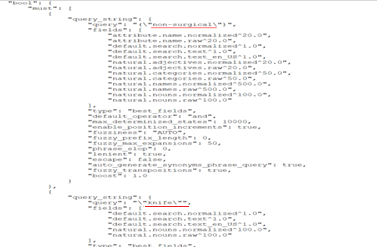
The Query service can generate an Elastic query with the hyphen as shown below. There is a separate definition block for hyphenated keyword and those keywords will be searched against all the natural fields and query fields from the search profile.
The default behavior is to split the keyword. Hyphenated keywords will be broken into
separate tokens during indexing and searching. You can control this behavior for the
Query service in the wc-component.json configuration file. In
this file, the configuration parameter is
nlp.split.hyphenated.word : true. In NiFi,
there are two places where the property is used to handle the splitting of
hyphenated words. Here as well splitting is enabled by default.
- Locate the panels in the NiFi canvas. Open the Processor Details window and select the Properties tab. Set the value of Split Hyphenated Word to true.
- Open the NLP Service Configuration interface. Select
the Controller Services tab and double-click on the
CoreNLP Controller Service row of the table. The
Controller Service Details window opens. Select
the Properties tab and set the Split
Hyphenated Word value to
true.
- Perform the following configuration changes in the NiFi canvas.
- Follow the same process used to enable the two properties in
Find Naturals From Cache Properties and
CoreNLP Controller Service, but set each
property to
false. - Change the tokenizer value from
standardtowhitespacein the product schema for each of the analyzers listed below.---Path--- Nifi Flow >> auth.reindex – Product Schema >> set up elastic search index schema >>populate product index schema Nifi Flow >> live.reindex – Product Schema >> set up elastic search index schema >>populate product index schema - custom_analyzer - custom_en_US_analyzer - custom_fr_FR_analyzer - custom_it_IT_analyzer - custom_ja_JP_analyzer - custom_ko_KR_analyzer - custom_ko_KR_analyzer - custom_pt_BR_analyzer - custom_ro_RO_analyzer - custom_de_DE_analyzer - custom_ru_RU_analyzer - custom_ar_EG_analyzer - custom_es_ES_analyzer
- Follow the same process used to enable the two properties in
Find Naturals From Cache Properties and
CoreNLP Controller Service, but set each
property to
- Delete any existing NLP Index data.
- Restart the NiFi service.
- In the Query service, update the Config parameter property
nlp.split.hyphenated.word :
falseusing a POST or PATCH query against the following endpoint.POST/PATCH http://dataQueryHost:dataQueryPort/search/resources/api/v2/configuration?nodeName=component&envType=auth Request Body { "extendedconfiguration": { "configgrouping": [ { "name": "SearchConfiguration", "property": [ { "name": "nlp.split.hyphenated.word", "value": "false" } ] } ] } } - Trigger a full reindexing operation.
- Restart the Query service.