
di-preprocess utility
The di-preprocess utility extracts and flattens WebSphere Commerce data and then outputs the data into a set of temporary tables inside the HCL Commerce database. The data in the temporary tables is then used by the index building utility to populate the data into search indexes with the Data Import Handler (DIH).
The preprocess utility picks the wc-dataimport-preprocess-fullbuild.xml file or wc-dataimport-preprocess-deltabuild.xml file first, and then transforms the results of the SQL statements defined in those files into temporary tables. Next, the utility handles each configuration XML file in a random order.
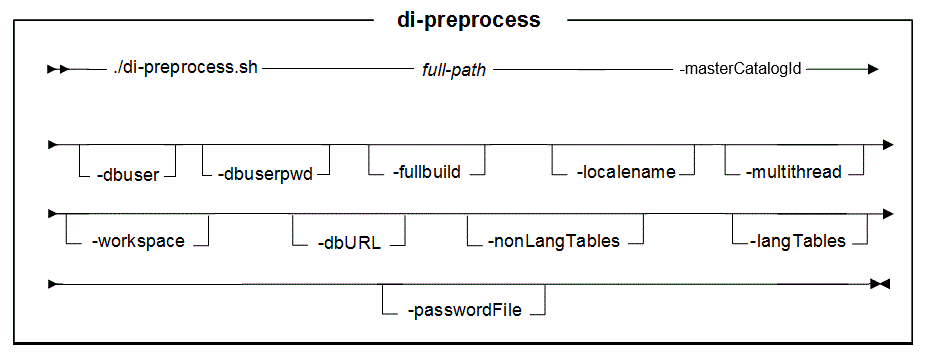
Parameter values
- full-path
- The names of these files start with
wc-dataimport-preprocess,
for example, wc-dataimport-preprocess-fullbuild.xml.
The search index setup utility installs this set of files when you deploy
HCL Commerce Search. Tip: To preprocess both the catalog entry index and the category index at the same time, specify the full path for the catalog entry index only. It then processes the configuration files for both the catalog entry index and the category index by default. This is because the directory which contains the configuration files for the category index (called CatalogGroup) is located one level below the directory for the catalog entry index (called CatalogEntry).For the catalog entry index: by default, the configuration files install at the following path:
 /opt/WebSphere/AppServer/profiles/default/installedApps/localhost/ts.ear/xml/search/dataImport/v3/databaseType
For the category index: by default, the configuration files install in a directory called CatalogGroup, one level below the catalog entry index configuration files, for example:- /opt/WebSphere/AppServer/profiles/default/installedApps/localhost/ts.ear/xml/search/dataImport/v3/databaseType/CatalogEntry
- /opt/WebSphere/AppServer/profiles/default/installedApps/localhost/ts.ear/xml/search/dataImport/v3/databaseType/CatalogGroup
For the inventory index: by default, the configuration files install in a directory called Inventory, one level below the catalog entry index configuration files, for example:- /opt/WebSphere/AppServer/profiles/default/installedApps/localhost/ts.ear/xml/search/dataImport/v3/databaseType/SubTypes/Inventory
- instance
- The name of the HCL Commerce instance with which you are working (for example, demo).
- dbuser (Optional)
-
The name of the user who is connecting to the database.
The user ID connecting to the database. If you are using workspaces, the database user must be granted cross-schema privileges to create and drop tables. Otherwise, you cannot preview changes made in workspaces.
- dbuserpwd (Optional)
- The password for the user who is connecting to the database.
- fullbuild
- Optional: A flag that indicates whether it is a full index build. The accepted values are either true or false. The default value is true.
- localename
- Optional: The locale that should be indexed. The accepted values are
either:
- All
de_DEen_USes_ESfr_FRit_ITja_JPko_KRpl_PLpt_BRro_ROru_RUzh_CNzh_TW
- multithread
- Optional: Preprocesses data by using multiple threads.
- workspace
- The workspace index to preprocess. This value is case-sensitive. If
specified, the specified workspace index is preprocessed. If not specified,
the base schema index is preprocessed. The default value is to preprocess
the base schema index. To get the workspace ID, either:
- Open the workspace in the Workspace Management tool in the
Management Center. The workspace
codeis the workspace ID; or - If the workspace has an active task group, run the following SQL
query:
select * from cmwsschema, where the workspace ID is listed under theworkspacecolumn.
- Open the workspace in the Workspace Management tool in the
Management Center. The workspace
- dbURL
- The database URL the utility uses to connect to the database. If not provided, the utility constructs a database URL based on the default database value.
- passwordFile
- Optional: The full path to the password.properties file that contains the password for the user who is connecting to the database. For example, C:\password.properties.
- nonLangTables
- Optional: Preprocesses only language-insensitive tables.
- langTables
- Optional: Preprocesses only language-sensitive tables.
Example
-
WC_installdir/bin
di-preprocess.sh full-path
                            -masterCatalogId masterCatalogId  -dbuser
                                dbuser -dbuserpwd dbuserpwd
[-fullbuild true | false] [-localename localename] [-multithread true | false] [-workspace workspaceId] [-dbURL dbURL] [-passwordFile passwordFile] [-nonLangTables nonLangTables] [-langTables langTables]
"Program exiting with exit code: 0.
Data import preprocessing completed successfully with no errors."
Also, inspect the following file for errors:
- WC_installdir\logs\wc-dataimport-preprocess.log
INFO to FINEST in the following file:
- $WAS_HOME/profiles/default/installedApps/localhost/ts.ear/xml/config/dataimport/logging.properties
- Sample: /opt/WebSphere/AppServer/profiles/default/installedApps/localhost/ts.ear/xml/config/dataimport/logging.properties
# Default global logging level, INFO
com.ibm.commerce.level=FINEST