- Merchant feature
Map a store to a merchant to facilitate payment operations and manage configuration properties.
- Adding a new payment or refund method
If you are adding a new payment method or refund method, you must update the HCL Commerce database tables that contain information about the payment methods or refund methods that your store will use. The business policy tables do not contain information about the type of payment or refund actions or rules the Payments subsystem will use. They identify the payment and refund methods. The payment and refund actions are defined by configuring XML files.
- Customizing the business flow for payment processing
If the business flow provided by payment rules does not meet your business needs, you can customize the business flow used for payment processing.
- Using other payment protocol data to find orders
As provided, HCL Commerce enables you to perform an advanced search for orders using the payment account information as the search criteria. For example, on the Find Orders page in the HCL Commerce Accelerator, you can search orders and include the cardholder account number as part of the search criteria. To search on other types of payment protocol data, or to include other payment protocol data with the account number as part of the search criteria, you must modify the order search JSP file used to perform order searches. The following examples describe how to substitute some other field for account, and how to add a second field to be used in addition to the account field.
- Bypassing the Payments subsystem in HCL Commerce
If you want to bypass or disable the Payment subsystem for HCL Commerce, replace the Payment Rules task commands with void implementations.
- Creating a payment plug-in
- Payment financial transaction state
When the Payment plug-in controller calls a payment plug-in to perform a financial transaction, the plug-in can return one of the three possible transaction states: Success, Failure, Pending. A pending state indicates that a particular transaction has not yet finished for a payment or credit transaction. It could mean that a plug-in uses an offline protocol to handle transactions, thereby some external intervention or action by a human must take place to move the payment or credit into another state. Offline processing typically requires human interaction to process transactions over the phone or by using a swipe machine. A payment or credit can also be in pending state for other reasons, such as when timeouts occur on the network or processing over the network is extremely slow. The pending state applies to both the payment and the payment transaction. If a pending approval transaction exists, then another payment approval cannot be issued until the prior pending approval transaction is successful.
- Plug-in exception handling and transaction roll-back
If a payment transaction fails, and that failure results in an HCL Commerce transaction roll back, then the payment transaction data is not in the HCL Commerce database.
- Payments subsystem
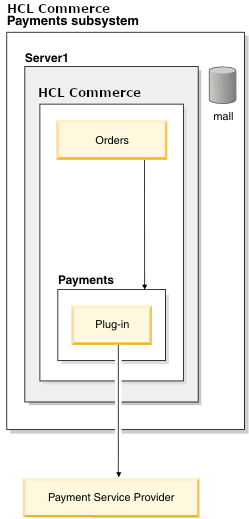
In HCL Commerce, payment processing uses the Payments subsystem.
- Extended data in payments or credits
Some payment plug-ins require extra protocol data or keywords to communicate with a back-end system. This extra protocol data called extended data is in addition to the standard attributes defined in the PaymentInstruction definition. Extended data is any data other than the currency, amount of the payment instruction, and the payment method name. For example, credit card number, expiration, and billing address are extended data.
- Payment rules provided in HCL Commerce
Payment rules specify the payment actions that should occur for the payment methods a store accepts for its goods or services. Payment actions and credit actions are determined in terms of current-to-target state movements. payment rules define what target state a payment should be in by defining the actions needed to move a payment from its current state to the target state.
- Payment configuration files
Use these files when configuring the Payments subsystem and payment plug-ins.
- Payment plug-in specification
Review the following overview of the payment plug-in specification to better understand how you can use payment plug-ins.
- Third-party payment integration in Ruby storefronts (B2C and B2B)
This document describes the high-level UI customizations for integrating third-party payment providers, such as PayPal, Braintree, or First Data, using punchout payment logic in the Ruby storefronts.
- Payments subsystem architecture
The Payments subsystem contains three main parts: Payment rules engine, Payment plug-in controller, and payment plug-ins.
- Payment life cycle
There are three stages to payment processing: validation, reservation, and finalization. The payment life cycle is related to the order life cycle stages: order capture, release to fulfillment, and shipping.
- Payment plug-ins
A payment plug-in is a self-contained software component that serves as a proxy for a payment back-end system.