
di-buildindex utility
The di-buildindex utility is a wrapping utility that updates the
information in the Master Index with the Data Import Handler (DIH) service to build the
index. The information is updated either partially through delta index updates or
completely through full index builds. The DIH uses URLs to call commands for
example,
http://host:port/solr/MasterCatalog_CatalogEntry_en_US/dataimport?command=full-import
. The index building utility uses DIH to connect to the HCL Commerce
database through a JDBC connection. It crawls the temporary tables that are populated by the
preprocess utility, and then populates the Solr index. The
wc-data-config.xml configuration file defines the JDBC
configuration and SQL crawling statements. The utility reports the status of the indexing
progress based on the statusInterval parameter. By default, every 10
seconds the utility prints how many documents are indexed in each index, how long the
utility is running, and the current indexing status. After the utility completes, it reports
how many documents were successfully indexed in each index, and which index build
failed.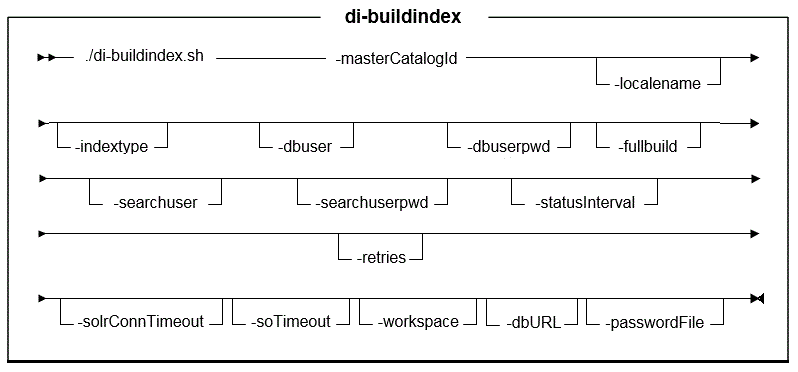
Parameter values
- masterCatalogId
- Required: The ID of the master catalog (for example, 10101).If you do not know the master catalog ID, run the following SQL:
SQL: select * from catalog where IDENTIFIER='STORE_IDENTIFIER'To find the master catalog ID for an Extended Site store:- Find the store
ID:
select * from storeent where IDENTIFIER='STORE_IDENTIFIER' - Use the storeent_id as
the store_id in the following SQL to find the catalog asset
store ID of this Extended Site
store:
Where XXXXXX is the storeent_id from the SQL in above step 1 when building the search index.select * from storerel where store_id=XXXXXX and streltyp_id=-4 and relatedstore_id not in (XXXXXX) - Get the master catalog
ID:
Where YYYYYY is the relatedstore_id from the above step 2 when building the search index.select * from storecat where storeent_id=YYYYYY and mastercatalog='1'
- Find the store
ID:
- localename
- Optional: The locale to index.
- All
de_DEen_USes_ESfr_FRit_ITja_JPko_KRpl_PLpt_BRro_ROru_RUzh_CNzh_TW
- indextype
- Optional: Indicates the search engine index to set up for a more granular
level of indexing. Valid values:
- CatalogEntry: Sets up the index for catalog entries in the master catalog.
- CatalogGroup: Sets up the index for categories in the master
catalog.
If you do not use the indextype parameter, both the CatalogEntry and CatalogGroup indexes are built by default.
- dbuser (Optional)
- Required for DB2 and Oracle databases:
The name of the user who is connecting to the database.
The user ID connecting to the database.
Optional for Derby databases.
- dbuserpwd (Optional)
- Required for DB2 and Oracle databases: The password for the user who is
connecting to the database.
Alternatively, you can use the passwordFile parameter to specify the encrypted password from a file.
Optional for Derby databases.
- fullbuild
- Optional: A flag that indicates whether it is a full index build. The accepted values are either true or false. The default value is true.
- statusInterval
- Optional: The interval in milliseconds that the utility uses to check the
index building status. The default value is 10,000 milliseconds.Note: If it takes too long to index many languages, reduce the status interval to a lower value.
- searchuser
- Optional: The user name of the search server. This parameter is required if WebSphere Application Security is enabled for HCL Commerce Search.
- searchuserpwd
- Optional: The password of the search server user. This parameter is required if WebSphere Application Security is enabled for HCL Commerce Search. Alternatively, you can use the passwordFile parameter to specify the encrypted password from a file.
- solrConnTimeout
- Optional: The time in milliseconds that the Solr connection stays open before it times out. The default value is 100 milliseconds. Use this parameter if you encounter timeout issues when you run the di-buildindex utility.
- soTimeout
- Optional: The time in milliseconds that the socket read stays open before it times out. Use this parameter if you encounter timeout issues when you run the di-buildindex utility.
- workspace
- Optional: The workspace index to build. This value is case-sensitive. If
specified, the specified workspace index is built. If not specified, the
base schema index is built. The default value is to build the base schema
index. To get the workspace ID, either:
- Open the workspace in the Workspace Management tool in the
Management Center. The workspace
codeis the workspace ID; or - If the workspace has an active task group, run the following SQL
query:
select * from cmwsschema, where the workspace ID is listed under theworkspacecolumn.
- Open the workspace in the Workspace Management tool in the
Management Center. The workspace
- dbURL
- The database URL the utility uses to connect to the database. If not provided, the utility constructs a database URL based on the default database value.
- retries
- Optional: Indicates the number of times the utility retries sending a status command check to the Solr server before indicating that the di-buildindex utility has failed. Retries might help resolve minor issues during the index build. For example, to recover from temporary networking errors.
- passwordFile
- Optional: The full path to the password.properties file
that contains password values used by this utility. For instance,
C:\password.properties.The password.properties file can contains one of the two following parameters:
where encrypted_database_pwd is a password that is encrypted with the wcs_encrypt utility (without specifying the Merchant key).dbUserPassword=encrypted_database_pwd
where encrypted_search_user_pwd is the search server user password and is encrypted with the wcs_encrypt utility (without specifying the Merchant key).searchAdminPassword=encrypted_search_user_pwd
Example
From the following directory on your HCL Commerce machine:
- WC_installdir/bin

di-buildindex.sh-masterCatalogId masterCatalogId [-localename localename] [-indextype indextype] [-dbuser dbuser] [-dbuserpwd dbuserpwd] [-fullbuild true | false] [-statusInterval statusInterval] [-solrConnTimeout solrConnTimeout] [-soTimeout soTimeout] [-workspace workspaceId] [-retries retries] [-passwordFile passwordFile]
If the utility runs successfully, the following message
is displayed in the Command
window:
Data import process completed successfully with no errors.Also, inspect the following file for errors:
- WC_installdir\logs\wc-dataimport-buildindex.log
To get more logging information, update the logging
level from
INFO to FINEST in the following file:
- $WAS_HOME/profiles/default/installedApps/localhost/ts.ear/xml/config/dataimport/logging.properties
- Sample: /opt/WebSphere/AppServer/profiles/default/installedApps/localhost/ts.ear/xml/config/dataimport/logging.properties
# Default global logging level, INFO
com.ibm.commerce.level=FINEST