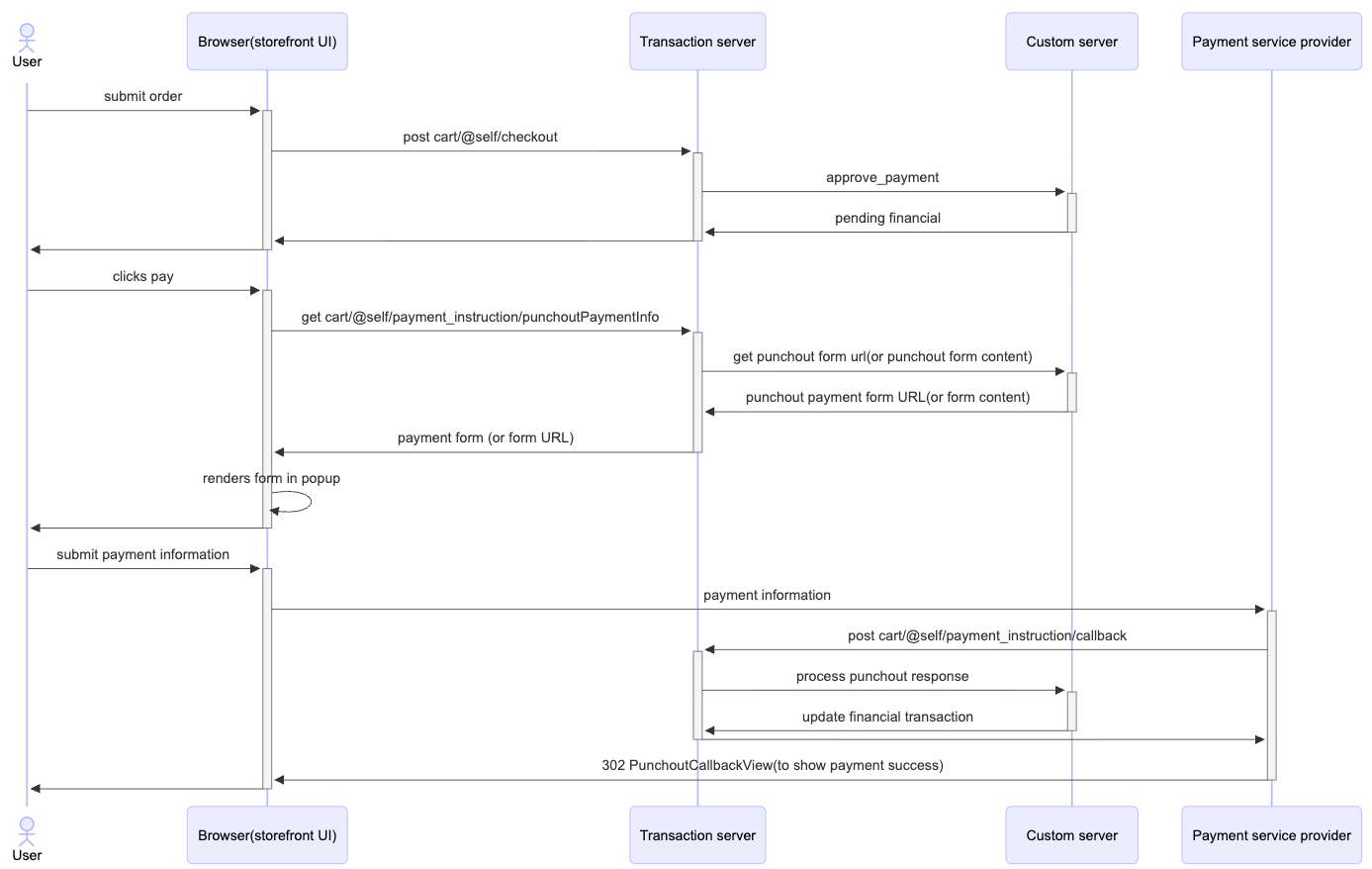
Third-party payment integration in Ruby storefronts (B2C and B2B)
This document describes the high-level UI customizations for integrating third-party payment providers, such as PayPal, Braintree, or First Data, using punchout payment logic in the Ruby storefronts.
About this task
Note: A complete payment solution requires integration with the
backend transaction server to validate tokens, capture payments, and process orders.
Backend integration is a prerequisite and is outside the scope of this
document.
Procedure
To integrate a third-party payment provider, such as PayPal, Braintree, or
First Data, in the Ruby storefronts, customize the checkout payment
flow:
- Add a custom payment trigger by extending the payment section of the checkout UI to add a custom button, such as Pay with PayPal.
- Configure the button to start the third-party payment punchout flow when selected.
- Create a view that displays the payment form or punchout interface provided by the third-party payment provider.
- Submit the form securely from the browser to the payment provider endpoint.
- Implement a listener or callback handler to receive the response from the payment provider after transaction processing.
- Parse callback data to confirm payment success.
-
Proceed to the order confirmation flow in the storefront after successful
payment.
For more information, see the sequential diagram: