
Choosing an Office 365 update method
Before you configure Click-to-Run updates for Office 365, decide which update method fits each set of endpoints. The right choice depends on whether the endpoints have internet access and how many Office 365 languages they run.
BigFix Patches for Windows supports three methods for updating Office 365 Click-to-Run products: the Microsoft Content Delivery Network (CDN), the Local Client Cache (LCC), and a network share location. Use the following guidance to pick the method, or combination of methods, that fits your deployment before you move on to setup.
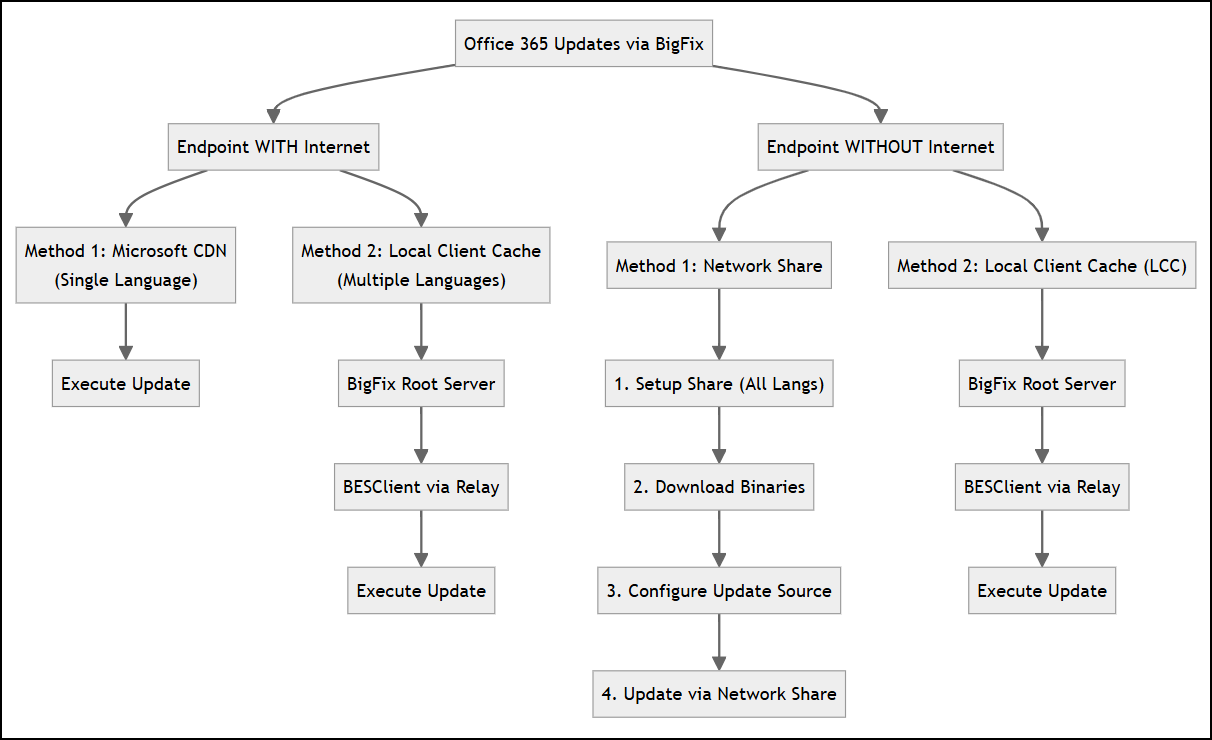
Scenario 1: Endpoints with internet access
- Microsoft CDN (single language)
- The endpoint pulls updates directly from the Microsoft CDN. This is the default update source and requires no additional BigFix setup. For example, Fixlet 304200290: Office 365 Version 16.0.20026.20182 Available - Current Channel - Office 365 (English (United States)). 36 language-specific variations of this Fixlet are available per version update, but each variation only updates one language.
- Local Client Cache (multiple languages)
- The BigFix Root Server downloads the required files and transfers them to the BESClient through the Relay, which then executes the update. LCC supports all 36 languages and both 32-bit and 64-bit architectures from a single Fixlet, so it is the better fit when an endpoint runs more than one Office 365 language. For example, Fixlet 304200272: Office 365 Version 16.0.20026.20182 Available - Current Channel - Office 365 (Update from Local Client Cache).
For background on both methods, see Understanding how BigFix works with Click-to-Run.
Scenario 2: Endpoints without internet access
- Network share
- Set up a shared location that all endpoints can reach, then point their update source at
it. This lets Office 365 update without any endpoint downloading binaries from the
internet.
- Set up the network share for all required languages. For example, Fixlet 365063: Set up Network Share for Office 365. See Setting up the network share.
- Download the current binaries into the share. For example, Fixlet 304200264: Office 365 Version 16.0.20026.20182 Available for Network Share for Office 365 - Current Channel - Office 365.
- Point the endpoints' update source at the share. Use Task 365076: Configure the Update Source of Office 365 - Office 365, Action 3. See Configuring the Update Path.
- Trigger the update from the share. For example, Fixlet 304200290: Office 365 Version 16.0.20026.20182 Available - Current Channel - Office 365 (English (United States)).
- Local Client Cache (LCC)
- LCC works the same way as in Scenario 1: the BigFix Root Server and Relay deliver the update to the BESClient without requiring internet access on the endpoint itself. This remains the preferred option when an isolated endpoint also runs multiple languages. For example, Fixlet 304200272: Office 365 Version 16.0.20026.20182 Available - Current Channel - Office 365 (Update from Local Client Cache).
Next steps
Once you have chosen a method, continue to Installing and updating Click-to-Run products for the full set of setup and maintenance topics, or go directly to the task that matches your method: Setting up the network share or Configuring the Update Path.